Smart Locks and Keyless Entry Door Locks: A Complete Guide
A smart door lock lets you open a door with a code, fingerprint, app or key, depending on the model. Choose by how you want to enter, whether you need remote access, your smart-home system and your door's fit.
On this page (11 sections)
- What does a smart door lock do?
- Which kind of keyless entry lock should you choose?
- Does a smart lock need Wi-Fi?
- What should you check before installing a smart lock?
- How do batteries and backup entry work?
- How should you think about smart lock security and privacy?
- Which smart door lock features matter most?
- Smart door locks to compare
- How do you choose between Wi-Fi, Bluetooth and Matter?
- Are fingerprint locks a good fit?
- What should you decide before buying?
A smart door lock lets you enter with a code, fingerprint, app or key, depending on the model. The right choice depends on your preferred entry method, whether you need remote access, your smart-home setup and the fit of your door.
Some locks replace the full deadbolt, while retrofit models attach to the inside thumb-turn. Either way, measure first and decide which features you will actually use.
For options that connect directly to a home network, start with our Wi-Fi smart locks guide. If you want to compare more entry methods, this guide covers keypad, fingerprint, app and key access.
What does a smart door lock do?
A smart door lock controls a door's bolt electronically and can add ways to manage entry. Depending on the model, you may use a keypad code, fingerprint, smartphone app, voice assistant or physical key.
Some models connect to Wi-Fi so you can check status or operate the lock remotely through an app. Others use Bluetooth or a hub, which can limit remote features unless another device relays the command.
A smart lock can also support temporary or recurring codes for guests and service providers. This can save you from sharing a physical key, but you should remove codes when access is no longer needed.
Which kind of keyless entry lock should you choose?
Choose an entry method that suits the people who use the door every day. A keypad is easy to share, a fingerprint reader reduces code entry, and app access helps when you need to manage a lock remotely.
| Entry method | Useful when | Check before choosing |
|---|---|---|
| Keypad code | Family or guests need separate access | Code limits and how you remove codes |
| Fingerprint | You want quick entry without a code | Who can enroll prints and how backup entry works |
| Smartphone app | You want status checks or remote control | Wi-Fi, Bluetooth, hub and account requirements |
| Physical key | You want a familiar backup | Whether keys are included and how they are stored |
| Voice assistant | You want hands-free commands | Supported services and app pairing requirements |
Many locks combine several methods. For example, a keypad lock may also include app control and a physical key, while some fingerprint locks add codes and voice control.
For locks centered on codes and other key-free access, see our keypad and keyless entry guide. If you prefer biometric entry, our fingerprint lock guide explains what to compare.
Does a smart lock need Wi-Fi?
A smart lock does not always need Wi-Fi for local entry, but Wi-Fi can enable remote app access. You may still be able to enter by code, fingerprint or key when the internet is down, depending on the lock.
Built-in Wi-Fi can avoid buying a separate bridge, but the lock still needs a suitable home network and reliable signal. Some locks use Bluetooth for nearby control or need a compatible hub for remote access.
Before buying, decide whether you need to operate the lock while away. If you only want keyless entry at the door, a keypad model without remote features may be enough.
Read whether smart locks work without Wi-Fi for a closer look at offline entry and remote access.
What should you check before installing a smart lock?
Check the door measurements and deadbolt operation before choosing a model. A lock that does not match your door thickness, backset or bore can be difficult or impossible to install correctly.
Measure the door thickness and backset, then check the lock maker's compatibility requirements. Also look at the deadbolt and strike plate: the bolt should move smoothly when the door is open and closed.
Consider whether the lock replaces a deadbolt or fits over an existing interior thumb-turn. A full replacement changes both sides of the lock, while a retrofit may leave the outside key cylinder in place.
Our smart lock compatibility and setup guide covers measurements, door prep and common setup checks. For a step-by-step overview, see how to install a smart lock.
How do batteries and backup entry work?
Most electronic locks use batteries, so check how the model warns you when power runs low. Look for a clear low-battery alert and a backup way to enter, such as a physical key or an emergency power option.
Battery life varies with the model, settings, network use and how often the lock operates. Keep the correct replacement batteries available and follow the maker's instructions for changing them.
A physical key can be useful if the keypad or electronics fail. If a model has no key cylinder, confirm what other backup method it supports before relying on it for your main entrance.
The battery guide for keypad door locks explains what to expect from battery-powered entry.
How should you think about smart lock security and privacy?
Use a smart lock's access controls carefully and secure the account tied to its app. Unique codes, a strong account password and prompt removal of old access help limit who can operate the lock.
Look for features that match your needs, such as access history, alerts or a built-in alarm. These can help you monitor activity, but they do not replace a sound door, secure frame and correctly installed deadbolt.
Keep your phone and app protected, and review who has access after guests or contractors no longer need it. If you share a home, agree on how codes are created and removed so old access does not linger.
See whether smart locks are safe for a fuller discussion of physical security, digital access and backup plans.
Which smart door lock features matter most?
Choose features based on the way you use the entrance. Remote control, multiple access methods and activity history can be useful, but every extra feature adds setup and account decisions.
Think through these questions before comparing models:
- Do you want remote access while away, or only keyless entry at the door?
- Will children, guests or service providers need their own codes?
- Do you prefer entering a code, touching a fingerprint reader or using an app?
- Does the lock work with your voice assistant or smart-home platform?
- Is a physical key important as a backup?
- Can you install the lock with your door measurements and tools?
For a broad comparison of Wi-Fi models, browse our best smart locks. If you are choosing between a traditional deadbolt and an electronic model, read smart lock vs regular deadbolt.
Smart door locks to compare
Choose Schlage Encode for a touchscreen and up to 100 codes, Philips Wi-Fi Keypad Deadbolt for an included handle set, or eufy C220 for fingerprint and Apple Watch entry. Ultraloq Bolt SE Wi-Fi adds Matter over Thread support with a compatible hub.
Schlage Encode: built-in Wi-Fi and keypad entry
The Schlage Encode combines a touchscreen keypad, app control, built-in Wi-Fi and a physical backup key. It supports up to 100 access codes and can send customizable notifications when paired with the Schlage Home app and a secure Wi-Fi network.
It has an encrypted connection and a customizable alarm for door movement and forced entry attempts. It also works with Alexa and Google Home when paired with the app and a voice-enabled device.
The lock uses 4 included AA batteries, and Schlage estimates up to 6 months of battery life with typical use. It fits standard doors from 1-3/8 in to 1-3/4 in thick, with a 2-3/8 in or 2-3/4 in backset.
Philips Wi-Fi Keypad Deadbolt: app access with a handle set
The Philips Wi-Fi Keypad Deadbolt includes a matching handle set, fingerprint access and a keypad. It connects directly to 2.4 GHz Wi-Fi, with no extra hub or bridge required.
The Philips Home Access app supports remote locking and opening, code and fingerprint management, lock status and access history. Its PIN options include permanent, one-time, periodic and recurring codes.
Philips estimates up to 6 months of battery life; batteries are not included. Use standard 1.5V alkaline batteries, and keep the lock within 33 ft of the router with as few obstacles as possible.
eufy C220: fingerprint access with built-in Wi-Fi
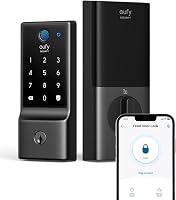
The eufy C220 combines fingerprint, keypad, app, voice, Apple Watch and physical-key entry. Its built-in Wi-Fi supports remote control through the eufy Security app without a separate bridge.
eufy says its fingerprint recognition becomes more precise with use. The lock uses 8 included AA batteries, with an estimated 8 months of battery life that may vary with use.
The C220 is designed to fit most standard deadbolts and supports bores under 54 mm when the spacer is removed. It also has an alarm for unusual attempts to open the lock, and eufy identifies it as BHMA Grade 3 certified.
Ultraloq Bolt SE Wi-Fi: access options with Matter over Thread
The Ultraloq Bolt SE Wi-Fi offers fingerprint, passcode, app, web portal, eKey sharing, voice control and 2 mechanical keys. Built-in Wi-Fi supports remote control without a hub, while Matter over Thread features require a compatible Thread Border Router.
It supports up to 50 fingerprints and 50 access codes, with permanent, scheduled or temporary sharing options. Ultraloq estimates up to 18 months of battery life using Thread; the lock uses 4 AA batteries that are not included.
Ultraloq gives the zinc-alloy lock an IP65 water-resistance rating, but that does not make it suitable for every exposure. Check your door fit and hub compatibility, and note that a door sensor is not included.
How do you choose between Wi-Fi, Bluetooth and Matter?
Choose the connection that provides the functions you need with the equipment you already own. Built-in Wi-Fi can provide remote access without a separate bridge, while Matter over Thread needs a compatible Thread Border Router.
Wi-Fi models depend on a compatible home network and signal near the lock. Bluetooth is generally for nearby phone control, while a hub or Thread Border Router can connect supported devices to a wider smart-home system.
Compatibility names can be specific. A lock may work with a voice assistant through its own app, but that does not mean every feature appears in every smart-home platform.
Check the requirements for your phone, router and smart-home hub before buying. Our Wi-Fi vs Bluetooth smart locks guide explains the trade-offs in more detail.
Are fingerprint locks a good fit?
A fingerprint lock can suit households that want entry without memorizing or sharing a code. It is most useful when the people who need access can enroll a fingerprint and still have a backup entry method.
Fingerprint models can also include a keypad, app or key, giving you options when a sensor does not recognize a print. Check how many prints can be stored and how the lock handles guest access.
For a focused look at this entry method, read are fingerprint door locks safe. If you want to compare models, see our best fingerprint door locks.
What should you decide before buying?
Start with the door and your preferred entry method, then decide whether remote control or smart-home integration matters. A suitable smart door lock fits your door, gives each user a practical way to enter and has a backup plan you can maintain.
Measure the door, confirm the connection requirements and check battery details. Then compare the lock's access methods, code management and alerts against the people who use the entrance.
Pick a keypad lock if sharing codes is your main goal, a fingerprint model if you prefer biometric entry, or a Wi-Fi model if you need remote access. For help narrowing your choices, use our guide to choosing a smart lock for your front door.
Frequently asked questions
What is a smart door lock?
A smart door lock is an electronic door lock that can offer entry through an app, keypad code, fingerprint, voice assistant or physical key. Some models connect to Wi-Fi for remote control, while others need a nearby phone or a separate hub for certain features.
Do smart locks work without Wi-Fi?
Many smart locks still allow local entry by keypad, fingerprint or physical key when Wi-Fi is unavailable, but remote app access may stop. The exact functions depend on the lock and its connection method, so check how each model handles internet, power and phone access.
Are smart locks safe?
A smart lock can provide useful access controls, but security depends on the lock's physical fit, security features, account settings and how you manage codes and phones. Keep a backup entry method, use strong account security and follow the lock maker's installation and update guidance.
Do keyless entry door locks need batteries?
Most electronic keyless locks use batteries to power the keypad, fingerprint reader, motor or wireless features. Check the battery type, low-power warning and backup entry method before buying, and replace batteries when prompted rather than waiting for the lock to stop responding.
How do I know if a smart lock fits my door?
Check door thickness, backset, bore hole and whether you have a standard deadbolt or another lock style. Compare those measurements with the model's fit requirements, and make sure the door and frame let the bolt move freely before installation.