Smart Lock vs Regular Deadbolt: Which Should You Buy? (October 2026)
Choose a regular deadbolt for simple keyed entry or a smart lock for codes, app control and other entry methods. Compare the physical lock, door fit and setup as well as convenience.
On this page (6 sections)
Choose a regular deadbolt for straightforward keyed entry or a smart lock for codes, fingerprint access or remote control. The smart lock vs deadbolt choice depends on the entry methods you need, the physical lock and your door's fit.
A smart lock can still use a deadbolt to secure the door. Electronics add ways to control the bolt, such as a keypad, app or fingerprint reader.
The eufy C220 and Philips Wi-Fi Smart Deadbolt add built-in Wi-Fi and several entry methods. The Schlage B60 deadbolt offers keyed entry and an inside turn unit, with Grade 1/AAA BHMA certification reported by Schlage.
Our scores weigh specs, features and fit for the intended use.

Smart lock vs deadbolt: what is the main difference?
A regular keyed deadbolt uses a key outside, while a smart deadbolt adds electronic controls or other entry methods. Both rely on a bolt that moves into a strike in the door frame.
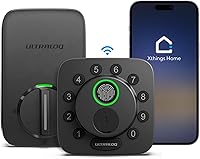
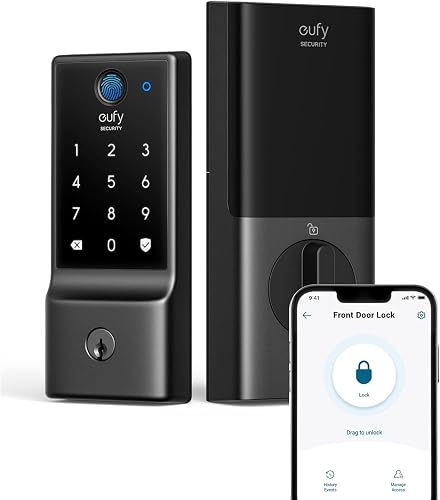
The eufy C220 and Philips Wi-Fi Smart Deadbolt offer app control, keypad entry, fingerprint access and physical key access. Their built-in Wi-Fi supports remote control without a separate bridge or hub.
The Schlage B60 deadbolt represents the traditional approach in this comparison. It uses a key from outside and an inside turn unit, and includes 2 keys.
If you want a plain-language explanation of the hardware, read what a smart deadbolt is. The term describes the locking hardware and electronic controls, so check each model's entry methods before choosing.
Which lock offers the entry methods you want?
Choose a smart lock for more entry options or a regular deadbolt when a key is enough. Consider who needs access and how you prefer to enter the house.
The eufy C220 offers fingerprint, keypad, app, physical key, Apple Watch and voice access. eufy says fingerprint recognition improves with use, and built-in Wi-Fi supports remote app control without a bridge.
The Philips Wi-Fi Smart Deadbolt offers app, passcode, fingerprint, physical key and voice access through Alexa or Google Assistant. It supports up to 100 custom passcodes, plus one-time or scheduled codes for guests and service people.
The Schlage B60 deadbolt keeps entry simple: use a key from outside or the turn unit from inside. Choose it if you prefer that routine over managing fingerprints or access codes.
Smart lock vs deadbolt: when do codes or fingerprints help?
A keypad or fingerprint reader can help when you want to enter without finding a key. Codes also let you provide access to other people without handing over a physical key.
The eufy C220 offers keypad and fingerprint access alongside its physical key. The Philips Wi-Fi Smart Deadbolt supports custom codes, access history and activity alerts.
Convenience depends on your routine. If you already carry a key and rarely share access, those extra methods may add little value.
Is remote access worth choosing Wi-Fi?
Remote app control can help if you want to operate the lock while away from home. Both smart locks in this comparison have built-in Wi-Fi.
Remote features depend on a working network and app setup. The Philips Wi-Fi Smart Deadbolt supports 2.4 GHz Wi-Fi, and Philips recommends keeping the router within 65 ft for better remote control.
Our guide to Wi-Fi vs Bluetooth smart locks explains what connectivity changes. If remote control isn't useful to you, focus on the entry methods you'll use at the door.
Is a smart lock safer than a deadbolt?
Neither type is automatically safer in every home. The exact lock, installation, door frame and how you manage access all matter.
eufy reports BHMA Grade 3 certification for the eufy C220. For the Philips Wi-Fi Smart Deadbolt, confirm its physical security certification if that is central to your choice.
Schlage reports Grade 1/AAA BHMA certification for the Schlage B60 deadbolt. Its physical features include a 1 in deadbolt, hardened steel spinning pin, anti-drill plates and anti-pick pins, which are intended to help resist attacks.
A connected lock adds account and network considerations. Use a unique account password, limit access to people who need it, and follow the instructions for setting up codes and alerts.
The smart lock safety guide covers ways to assess fit, access and account security. An app connection alone doesn't establish how well a lock resists physical attacks.
What happens if the power or Wi-Fi goes out?
A Wi-Fi outage can affect remote features, while depleted batteries can affect electronic entry. Check the exact lock's offline access and backup instructions before choosing it.
Both smart locks here offer physical key access. The eufy C220 uses 8 AA batteries, and eufy estimates around 8 months of battery life depending on use.
The Philips Wi-Fi Smart Deadbolt requires AA alkaline batteries, which aren't included. Use the specified battery type and follow its replacement instructions.
The Schlage B60 deadbolt doesn't depend on batteries for keyed operation. That simplicity may appeal if you don't want to monitor an electronic lock's power.
For a smart lock, plan for battery changes and keep the backup key in a secure, accessible place. Read our guide to smart locks that work without Wi-Fi for the offline functions to check.
Which lock is easier to install and fit?
Door measurements and the existing setup determine which lock fits. Check thickness, backset and bore before choosing smart or traditional hardware.
eufy describes the eufy C220 as compatible with most standard deadbolts. For bores under 54 mm, its instructions call for removing the spacer.
Philips gives a door thickness range of 1-3/8 to 2 in for the Philips Wi-Fi Smart Deadbolt. Its instructions call for routing the cable beneath the latch and placing the tailpiece into the latch slot.
The Schlage B60 deadbolt fits doors 1-3/8 to 1-7/8 in thick, with a 2-3/8 or 2-3/4 in backset. It supports right- and left-handed doors and installs with a screwdriver.
Check all required measurements rather than relying on thickness alone. Our smart lock installation guide walks through the main checks and installation steps.
Which smart lock or deadbolt should you buy?
Choose the eufy C220 for several entry methods, the Philips Wi-Fi Smart Deadbolt for flexible passcodes, or the Schlage B60 deadbolt for keyed simplicity. For smart lock vs deadbolt, start with the access you need each day.
The eufy C220 is our highest-scoring option here at 8.7, combining 6 entry methods with built-in Wi-Fi. The Philips Wi-Fi Smart Deadbolt follows at 8.6, with up to 100 custom codes and scheduled or one-time access.
The Schlage B60 deadbolt scores 7.9 and suits a simpler keyed routine. Schlage reports Grade 1/AAA BHMA certification, but the lower overall score here isn't a ranking of physical security alone.
For more options, see our Wi-Fi smart lock guide. If you're still unsure about the tradeoffs, how to choose a smart lock for your front door can help you narrow down the features that matter.
Frequently asked questions
Is a smart lock safer than a regular deadbolt?
Neither type is automatically safer. A traditional deadbolt avoids app accounts and batteries, while a smart lock can add access controls such as passcodes and alerts.
Compare the exact lock's physical security, fit and setup, and keep the door, strike and frame in good condition.
Can a smart lock work without Wi-Fi?
Some smart locks allow local entry without Wi-Fi, but available methods depend on the model and remote app features may stop working. Confirm which methods work offline and plan a backup.
Our guide to smart locks without Wi-Fi explains what to check before buying.
Does a smart lock replace the deadbolt?
Some smart locks replace the deadbolt, while others attach to existing hardware. A smart deadbolt still uses a bolt to secure the door; its electronics change how you control it.
Check the design, door measurements and installation requirements before choosing a replacement or an add-on.
What happens when a smart lock battery runs out?
Electronic entry may stop when the batteries run out, so check the model's backup instructions. The eufy C220 and Philips Wi-Fi Smart Deadbolt both offer physical key access and use AA batteries.
Replace batteries as instructed and keep a backup key in a secure place you can reach.
Should I choose a keypad lock or a keyed deadbolt?
Choose a keypad lock if you want to enter without carrying a key or share codes with other people. Choose a keyed deadbolt if you prefer simple operation and don't need codes or app access.
For a keypad option, compare our keyless entry door lock guide.