6 Best Smart Deadbolts (October 2026)
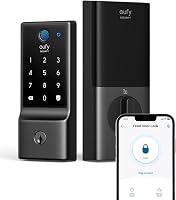
The best smart deadbolts for home entry include the Philips Wi-Fi Smart Deadbolt for mixed family routines, the Ultraloq Bolt SE Wi-Fi for Matter smart homes, and the Tapo DL110 for rechargeable households.
On this page (8 sections)
- The best smart deadbolts for different homes
- How to choose the best smart deadbolt for your routine
- What should you measure before ordering?
- How should you set up a new smart deadbolt?
- How should you manage guest codes and access logs?
- What care does a smart deadbolt need?
- Which buying mistakes are easiest to avoid?
- Which best smart deadbolt pick should you buy?
The best smart deadbolt for most households is the Philips Wi-Fi Smart Deadbolt, because it combines several everyday entry methods with remote control that needs no separate hub. Choose a different pick when rechargeable power, Apple Home Key, Matter or physical buttons matter more to your routine.
Start with the person least comfortable using a phone at the door. A lock that gives everyone a practical way inside is more useful than one chosen mainly for smart home features.
For a broader overview, read our guide to Wi-Fi smart locks. Our guide to smart locks and keyless entry explains how replacement deadbolts fit into the wider category.
Our picks at a glance
-
1

-
2
-
3

The best smart deadbolts for different homes
Philips leads for mixed family routines, while the other picks address specific needs that can outweigh its broader appeal. CalmerHallway compared entry methods, connection requirements, guest controls, battery arrangements and door fit.
The order reflects overall fit for this search, but your must-have feature should drive the final choice. An Apple household may get more daily value from the Aqara than a higher-scoring lock without Home Key.
Philips Wi-Fi Smart Deadbolt
- Built-in 2.4 GHz Wi-Fi
- Fingerprint, passcode, app, key and voice access
- Up to 100 custom passcodes
- No hub needed for remote access
Choose Philips when family members want different ways to enter and you want remote control without extra equipment. Scheduled and one-time codes also suit regular helpers and occasional visitors.
Pros
- Several entry methods for different family members
- Remote control without a hub
- Scheduled and one-time guest codes
Cons
- Supports 2.4 GHz Wi-Fi only
- AA alkaline batteries not included
- No door sensor
Philips suits a family where one person prefers a fingerprint, another remembers a code and someone else wants a physical key. App and Alexa or Google Assistant access give you additional ways to manage the door.
Its built-in 2.4 GHz Wi-Fi provides remote control without a hub, with Philips advising a router distance within 65 ft. Treat that distance as placement guidance, since walls and the door's location can still affect the connection.
The lock supports 100 custom passcodes plus one-time and scheduled guest codes. Give a recurring helper a scheduled code rather than sharing the family's permanent access.
Its adjustable auto-lock runs after 10 to 180 seconds, but there is no door sensor. A timer can extend the bolt while the door is open, so it does not prove the entrance is closed.
Choose Philips for flexible daily access without building a hub-based system. Skip it if your main requirement is Apple Home Key or door-position feedback.
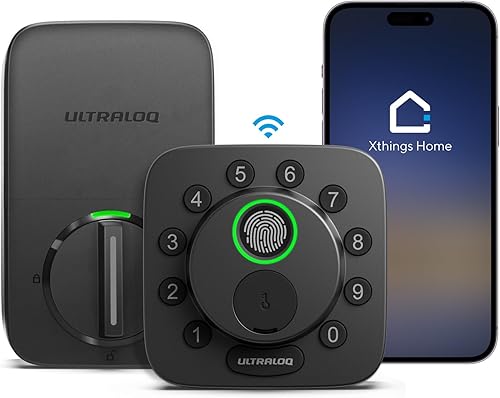
Ultraloq Bolt SE Wi-Fi
- Built-in Wi-Fi and Matter over Thread
- Up to 50 fingerprints and 50 access codes
- Mechanical backup keys
- Requires a Thread Border Router for Matter over Thread
Ultraloq suits buyers who want a Matter over Thread connection alongside direct Wi-Fi access. Choose the connection route before setup, since the Matter route needs a compatible Thread Border Router.
Pros
- Direct Wi-Fi and Matter over Thread options
- Fingerprint and code access for regular users
- Permanent, scheduled and temporary access sharing
Cons
- Matter over Thread needs a compatible Thread Border Router
- Supports 2.4 GHz Wi-Fi only
- Door sensor not included
Ultraloq suits buyers who want to bring a deadbolt into a Matter over Thread smart home. It also provides direct Wi-Fi remote control, so the purchase makes sense even if you plan to add the Thread connection later.
The Matter route requires a compatible Thread Border Router. Decide which app and connection you intend to use before installation, rather than assuming every supported platform needs the same setup.
For direct Wi-Fi, it uses 2.4 GHz and Ultraloq advises keeping the router within 70 ft. Access sharing includes permanent, scheduled and temporary options, with room for 50 fingerprints and 50 codes.
The supplied mechanical keys give you a backup route, while the app provides activity history and notifications. A door sensor is not included, so distinguish lock activity from confirmation that the door has closed.
Choose Ultraloq if ecosystem choice is central to your plans. Skip it if you only want a family keypad and would leave its Matter features unused.
Tapo DL110
- Fingerprint, passcode, Wi-Fi, Bluetooth, assistant and key access
- Removable rechargeable battery
- USB-C charging
- Supports up to 100 fingerprints
Tapo suits households that prefer charging a battery pack to replacing disposable cells. Its fingerprint capacity leaves room to enroll several fingers for each regular user.
Pros
- Removable rechargeable battery
- Wi-Fi and nearby Bluetooth app access
- Permanent, one-time and scheduled codes
Cons
- Charging needs a planned maintenance routine
- Battery life varies with settings and use
- Fingerprint response varies with conditions
Tapo DL110 suits households that prefer recharging a removable battery to keeping replacement cells on hand. Its USB-C charging arrangement is the main reason to choose it over another fingerprint deadbolt.
Tapo estimates up to 1 year between charges in Wi-Fi mode at 20 entries per day. Settings, use, router conditions and weather can change that interval, so base maintenance on the battery indicator.
There is room for 100 fingerprints, which lets several people enroll more than one finger. Permanent resident codes and one-time or scheduled visitor codes cover people who prefer the keypad.
Wi-Fi supports management away from home, while Bluetooth provides a nearby app connection. Backup keys offer another entry method when you do not want to rely on your phone.
Choose Tapo if charging fits your household routine. Skip it if removing and charging a pack sounds easier to postpone than replacing batteries, and read whether keypad door locks need batteries for the maintenance tradeoffs.
Aqara U100
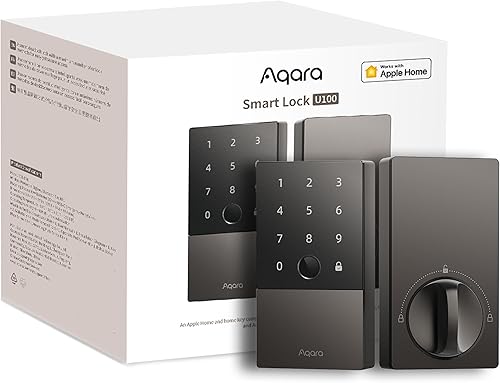
- Apple Home and Home Key support
- Fingerprint reader for up to 50 prints
- 4 AA batteries included
- Aqara Zigbee hub required for Aqara app remote passwords
Choose the U100 when tapping an iPhone or Apple Watch is your preferred way to enter. Check its separate Aqara and Apple hub requirements before planning remote access and Home Key sharing.
Pros
- Apple Home Key entry
- Locally generated one-time visitor passwords
- Mechanical keys and emergency USB-C power
Cons
- Aqara Zigbee hub required for remote password setup
- Apple Home Hub needed to share Home Keys
- NFC card sold separately
Aqara U100 is the strongest fit here for someone who wants to tap an iPhone or Apple Watch at the door. Home Key makes the Apple connection a daily entry feature, rather than simply another way to control the lock in an app.
It also provides fingerprint, password and mechanical-key entry. Locally generated one-time visitor passwords work without internet, giving occasional guests a route that does not require your phone to be nearby.
Check the hub requirements by task: remote password setup in Aqara Home and third-party integrations require an Aqara Zigbee 3.0 hub. Sharing Apple Home Keys requires an Apple Home Hub.
Aqara includes 4 AA batteries and provides USB-C emergency power. Its gyroscope-based auto-lock responds after the door closes, and a scheduled Do Not Disturb mode can mute lock sounds.
Choose the U100 if Home Key is worth arranging the required equipment. Skip it for a simple direct-Wi-Fi setup, and use our smart lock compatibility guide to plan the wider system.
Veise VE027-K Wi-Fi

- Built-in 2.4 GHz Wi-Fi
- 8 entry methods
- Up to 100 custom passcodes
- One-time, scheduled, expiring and permanent codes
Veise suits homes that regularly change access for guests and helpers. Its code options and included IC cards give visitors ways to enter without using a phone app.
Pros
- Permanent, scheduled, one-time and expiring codes
- Remote user management without a hub
- Includes 2 IC cards and 2 backup keys
Cons
- Uses 8 AA batteries, not included
- Stores up to 20 fingerprints
Veise VE027-K suits a home where access changes often, such as one with visiting relatives, cleaners and short-stay guests. Its permanent, scheduled, one-time and expiring codes let you match access to the visit.
Built-in 2.4 GHz Wi-Fi provides remote user management without a hub. You can review access logs, check battery status and revoke access through the app.
The set includes 2 IC cards and 2 backup keys, useful for people who prefer a physical item to a phone or remembered code. It holds 100 custom passcodes, but its 20-fingerprint limit deserves attention if several people will enroll multiple fingers.
The lock uses 8 AA batteries, supplied separately. Account for the full replacement set when deciding whether its guest controls suit your maintenance routine.
Choose Veise when managing different access periods is your priority. Skip it if you want a large fingerprint roster or would rather maintain a rechargeable pack.
Schlage Arrive

- Built-in Wi-Fi
- Up to 250 access codes
- Backlit physical buttons
- Works with Alexa and Google Home
Schlage Arrive suits buyers who prefer physical buttons and want to assign separate codes to many people. Codes and schedules remain active during a Wi-Fi outage, with nearby app access available through Bluetooth.
Pros
- Backlit silicone push buttons
- Up to 250 access codes
- Codes and schedules remain active without Wi-Fi
Cons
- Fits doors up to 1-3/4 in thick
- Remote app control requires Wi-Fi
- No fingerprint entry
Schlage Arrive suits buyers who want physical keypad buttons and little reason for residents to use a phone at the door. Its backlit silicone buttons provide a distinct alternative to the touchscreen-style controls elsewhere in this group.
The Schlage Home app manages up to 250 access codes, plus lock history and customizable notifications. That capacity is useful when you want separate codes for many people instead of one shared household number.
Built-in Wi-Fi supports remote control, with Alexa and Google Home connections for voice control and routines. During a Wi-Fi outage, codes and schedules stay active, and nearby app access remains available through Bluetooth.
Door fit is a firm limit: it supports 1-3/8 to 1-3/4 in thickness and either a 2-3/8 or 2-3/4 in backset. A thicker door needs another option.
Choose Arrive for button entry and a large code roster. Skip it if fingerprint entry is essential.
How to choose the best smart deadbolt for your routine
Choose door fit first, everyday entry second and remote features third. This order prevents you from buying a well-connected lock that fits poorly or makes daily entry harder for someone in the household.
Which smart deadbolt entry method will everyone use?
Pick a main entry method for each regular user before comparing extras. A phone app may suit the person managing the lock, while a code or card may suit someone who wants no app involvement.
Fingerprint entry is convenient when you arrive without keys in hand. Enroll an alternate finger where capacity allows, and keep another entry method ready for times when gloves, moisture or a cut make finger placement awkward.
A keypad is especially useful for visitors because you can share access without handing over hardware. Physical buttons deserve extra weight if someone has difficulty locating controls on a flat touch surface.
Do not judge fingerprint readers mainly by fractions of a second in advertised recognition claims. Capacity, fallback entry and how easily each person can reach the reader are more useful buying questions.
Is remote control worth adding?
Remote control is worth having when you regularly need to admit someone while away or manage access between visits. If every user lives at home and you rarely host visitors, local entry may solve most of your problem.
Check the signal at the actual door location with the door closed. A connection that works beside the router does not establish that the lock will stay reachable through an exterior wall.
A single app response is also not enough to confirm dependable placement. During setup, repeat remote commands from outside the home network and check that status changes appear as expected.
Our Wi-Fi vs Bluetooth smart lock guide explains why nearby phone control and control from elsewhere are different features.
Does your smart home need another hub?
Confirm the equipment required for the exact task you want, rather than buying from a compatibility logo alone. Voice control, remote administration, Home Key sharing and Matter integration can have different requirements.
Matter support does not establish Apple Home Key support. Ultraloq's Matter route and Aqara's tap-to-enter feature solve different needs, even though both can matter to an Apple household.
Write down your current hubs, preferred app and desired routines. If you cannot identify the equipment needed for a feature, resolve that before choosing the lock.
What should you measure before ordering?
Measure door thickness, backset, the existing opening and clearance around the lock before ordering. A replacement deadbolt also needs a door and frame that let its bolt move freely.
Backset is the distance from the door edge to the center of the deadbolt hole. Measure it directly rather than estimating from the handle or trim.
Check interior clearance near a handle, window trim or screen door. The outer keypad and inner battery housing need room, and you need access to the battery cover for future care.
Also measure the spacing between the deadbolt and any separate handle. A matching finish does not ensure that two pieces of hardware will fit beside each other.
Philips and Veise support doors from 1-3/8 to 2 in thick. For other models, confirm the complete installation dimensions before ordering, especially on unusually thick or modified doors.
With your current door closed, turn the existing deadbolt slowly. If it needs a push, lift or hard pull on the door, correct the alignment before fitting a motor-driven replacement.
A deadbolt secures the door but does not replace its handle or spring latch. Keep the handle arrangement in mind if you are planning a wider entry-door refresh.
How should you set up a new smart deadbolt?
Set up the mechanical operation before apps, guest codes or automations. Smooth bolt travel is the foundation for dependable daily use.
Fit the hardware with the door open
Keep the door open during assembly and the first operation checks. This gives you access to both sides if a cable, mounting screw or calibration step needs attention.
Follow the model's cable routing and bolt-orientation instructions exactly. For Philips, the cable routes underneath the latch, and the tailpiece must enter the latch slot correctly.
Tighten mounting screws evenly without forcing the parts together. Pinched wiring or hardware pulled out of alignment can create problems that app setup will not solve.
Check manual movement with the door open, then repeat with it closed. The bolt should enter the strike without needing you to pull the door into position.
Our smart lock installation guide covers the preparation in more detail.
Add residents before guests
Set your administrator account and add regular residents before sharing visitor access. Use a unique account password and enable an additional sign-in check if the service offers one.
Name each resident's credential clearly so you can remove the right one later. Keep administrator access limited to the people who need to change settings or manage users.
Try every intended entry method while another working route remains available. Then show each household member the fallback method, including where an accessible backup key will be kept.
Set auto-lock around real door use
Choose an auto-lock delay that gives people enough time to carry bags inside and close the door. A very short timer can extend the bolt against the frame or leave it protruding while someone holds the door open.
Check the behavior during ordinary arrivals, including several people entering together. Adjust the delay if the lock repeatedly acts before the door is shut.
Treat a timer-based lock event as evidence that the mechanism moved. Without door-position information, it does not confirm that the entrance is closed and secured.
How should you manage guest codes and access logs?
Give each guest the narrowest access period they need. Separate credentials make it easier to revoke access and understand the history than one permanent code shared with everyone.
Use scheduled access for a recurring cleaner and an expiring code for a visit with a clear end date, where supported. Reserve permanent codes for people who genuinely need continuing entry.
Send instructions before the guest arrives, including how to wake the keypad or finish code entry if needed. Avoid putting the door address and access code together in a public message.
Remember that a log records the credential used, which may not prove who entered. A shared or forwarded code reduces the value of that record.
Review users after a guest leaves or a service arrangement ends. Removing access promptly is more useful than accumulating old credentials until you reach the lock's capacity.
What care does a smart deadbolt need?
A smart deadbolt needs battery attention, clean controls and a freely moving door. Add these checks to your home maintenance routine instead of waiting for an entry problem.
Plan battery care before the first warning
Learn how your chosen lock reports low power and decide who will respond. For a rechargeable model, arrange charging while someone can maintain access and follow the removal instructions.
For replaceable cells, use the required battery type and replace the set together. Philips specifically requires AA alkaline LR6 batteries, so do not substitute another chemistry for convenience.
Emergency USB-C power and battery charging are different functions. An emergency port can provide temporary power without recharging the cells inside the lock.
Keep the backup key somewhere accessible from outside your locked home, rather than in the same drawer as the spare batteries. Avoid an obvious hiding place beside the entrance.
Clean gently and watch for door movement
Use a soft cloth and follow the lock's care instructions for the keypad and reader. Avoid spraying liquid into openings or using abrasive cleaners that could damage the finish.
Recheck bolt movement when a door starts sticking or the weather changes. A dragging door needs alignment attention rather than repeated app commands or a longer auto-lock delay.
Periodically review account access and install available firmware updates according to the brand's instructions. Our guide to whether smart locks are safe explains the role of account and physical-door security.
Which buying mistakes are easiest to avoid?
Avoid assuming that connection support, auto-lock and backup power mean the same thing across models. These differences affect everyday use more than another advertised entry method.
Buying for maximum code capacity is unnecessary if only a few residents need access. Consider how you will assign and remove codes before paying attention to the largest number.
Choosing by battery-life claims alone can also mislead. Entry frequency, network conditions, settings and resistance at the bolt can affect the maintenance interval.
Do not treat remote lock status as a substitute for checking door closure. Likewise, a household internet outage and an empty lock battery are separate problems that need separate backup plans.
Finally, do not add voice routines and several integrations on day one. Establish reliable entry and clear user access first, then add the features you will actually use.
Which best smart deadbolt pick should you buy?
Buy the Philips Wi-Fi Smart Deadbolt when your main need is flexible family entry with direct remote control. Choose Ultraloq when Matter integration drives the purchase, or Aqara when tapping an Apple device is the feature you will use every day.
Pick Tapo if you prefer a rechargeable battery routine. Choose Veise for frequent changes to guest access, or Schlage Arrive when physical buttons matter more than a fingerprint reader.
Before ordering, settle 3 things: the measured fit, each resident's entry method and your backup plan. Use our guide to choosing a smart lock to work through those decisions.
If your door needs a different style of hardware, our best smart locks guide and front door smart lock picks cover the next options to compare.
Our top 3 picks at a glance
-
1
-
2
-
3
Frequently asked questions
What should you look for in a smart deadbolt?
Choose a smart deadbolt that fits your door and supports the entry methods your household will use. Measure door thickness and backset, then check network and hub requirements.
Finally, decide how you will handle guest access, battery maintenance and backup entry before comparing extra features.
Do smart deadbolts work without Wi-Fi?
Some entry methods work without Wi-Fi, but remote control needs a working connection. Schlage Arrive keeps codes and schedules active and supports nearby Bluetooth app access during an outage.
Aqara U100 supports locally generated one-time passwords without internet.
Our guide to using smart locks without Wi-Fi explains the differences.
Do smart deadbolts need a hub?
A hub is required for some connections, rather than every smart deadbolt. Philips and Veise provide direct Wi-Fi remote control without one.
Ultraloq's Matter over Thread route needs a compatible Thread Border Router.
Aqara U100 requires an Aqara Zigbee hub for remote password setup and an Apple Home Hub for Home Key sharing.
Can you install a smart deadbolt yourself?
Many replacement smart deadbolts use a screwdriver, but a matching door opening and a freely moving bolt are essential. Measure before removing the old lock, follow the model's instructions and check operation with the door open first.
Our smart lock installation guide covers the preparation steps.