Are Fingerprint Door Locks Safe?
Fingerprint door locks can be safe with a sound door, correct installation, and protected backup access. Choose one with a battery recovery plan and entry methods everyone in your household can use.
On this page (11 sections)
- Are fingerprint door locks safe for a front door?
- What risks matter beyond the fingerprint reader?
- How dependable is fingerprint entry for everyday use?
- Who should choose the eufy C220?
- Who should choose the Veise VE017?
- Who should choose the Wyze Auto-Lock Bolt v2?
- What happens when batteries or internet service fail?
- How should you set up and care for a fingerprint lock?
- What access mistakes should you avoid?
- Which fingerprint door lock safety features should decide your choice?
- So, are fingerprint door locks safe for your household?
Fingerprint door locks can be safe with a sound door, correct installation, and protected backup access. The scanner makes daily entry easier, but the deadbolt, frame, backup credentials, and battery plan determine how dependable the whole setup is.
Choose one for convenient household access, rather than assuming biometrics make every door more secure. The right model also gives children, guests, and anyone with an unreliable fingerprint scan a practical way inside.
Are fingerprint door locks safe for a front door?
A fingerprint lock is a reasonable front-door choice when the bolt secures the door properly and access is well managed. It won't repair a loose strike plate, damaged frame, or door that needs lifting before it closes.
Check the existing door first. If the deadbolt already drags or catches, correct that problem before adding a motorized replacement.
A hardware certification can help you compare locks, but it doesn't answer every security question. Mechanical strength, fingerprint recognition, and app security are separate issues.
Our guide to fingerprint door locks explains the main entry options. For the wider risks of connected entry, read are smart locks safe?.
What risks matter beyond the fingerprint reader?
The main risks are weak door hardware, exposed backup credentials, and poorly managed access. A person with a working key, valid PIN, or authorized app account may not need the scanner at all.
Give each person a separate credential where possible. That lets you remove one person's access without changing how everyone else enters.
Fingerprint privacy needs a separate check because you can't change a fingerprint as easily as a password. Look for clear information about where biometric records stay, how they're protected, and how to delete them before transferring the lock.
Fast recognition isn't proof that a reader resists copied fingerprints. Avoid treating speed or accuracy claims as a complete security assessment.
How dependable is fingerprint entry for everyday use?
Fingerprint entry works best as your usual entry method with an accessible fallback. Wet skin, dirt, cuts, gloves, or changes in skin condition can make a scan less dependable.
During enrollment, follow the brand's prompts and use the finger position you'll naturally reach for at the door. Register another finger if supported, rather than relying on one thumb for every situation.
Try each person's saved fingerprint several times while another entry method is available. If someone regularly struggles, make a code or key their normal method instead of expecting repeated enrollment to solve every problem.
For a household that often wears gloves or needs frequent visitor access, the keypad may matter more than the scanner. Choose around those daily habits.
Who should choose the eufy C220?
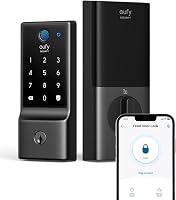
The eufy C220 suits households that want remote control without a separate bridge, especially those already using a eufy doorbell. Its built-in Wi-Fi supports app control, and compatible eufy devices can share routines.
It offers fingerprint, keypad, physical-key, app, Apple Watch, and Alexa or Google Assistant entry. Capacity for up to 50 fingerprints and 100 passcodes gives a larger household room for separate credentials.
Choose it if you want to manage guest codes alongside everyday fingerprint access. Skip it if you need a cylinder that can be rekeyed to match an existing household key, because this model cannot be rekeyed.
Eufy estimates about 8 months from 8 AA batteries, with use affecting battery life. Include replacements in your home maintenance routine rather than treating that estimate as a deadline.
Who should choose the Veise VE017?
The Veise VE017 suits households that want fob cards and flexible guest schedules. It supports one-time, duration, permanent, and recurring codes, which fit different visitors without giving everyone a lasting household PIN.
Veise says fingerprints, credentials, and entry records are stored locally with AES128 encryption. Local storage is useful to consider, but it doesn't remove the need to protect your phone and app account.
Choose it for a household where some people prefer a fob over a fingerprint or phone. Skip it if you want remote locking and opening without buying and setting up another device, since those functions require the separate Veise G1 gateway.
Veise estimates about 12 months from 4 AA alkaline batteries, which aren't included. Keep a fob under the same control as a key, and remove its access promptly if it goes missing.
Who should choose the Wyze Auto-Lock Bolt v2?
The Wyze Auto-Lock Bolt v2 suits buyers who want built-in Wi-Fi and emergency power, particularly those using a Wyze Video Doorbell. With that pairing, you can open the door from the live video feed after checking who's outside.
Fingerprint, app, code, and physical-key entry cover different household needs. The USB-C port provides temporary power from a power bank if the batteries run out.
Choose it if that doorbell connection fits how you handle visitors. Skip it if fob access is a priority, and favor the Veise option instead.
Wyze claims BHMA Grade 2 certification and IP53 weather resistance. Those details help with hardware comparison, but neither establishes the security of the fingerprint reader against deliberate imitation.
What happens when batteries or internet service fail?
Battery failure and internet failure need different plans. Lost internet can interrupt remote features, while depleted batteries can stop the lock's electronic entry methods.
Keep a physical backup key somewhere secure and reachable outside the locked home. A spare inside the house won't help when you're standing at the front door.
For emergency power, learn the exact procedure and keep the cable and power bank accessible. Supplying power does not grant entry by itself; you'll still need an authorized credential.
Replace batteries when the lock warns you, using the type its instructions require. Our guide to door lock batteries explains the upkeep to plan for.
Confirm which methods remain available during a lost connection. Read do smart locks work without Wi-Fi? for the difference between local entry and remote control.
How should you set up and care for a fingerprint lock?
Start with correct door measurements and a freely moving bolt, then set up credentials before relying on the lock. Compare door thickness, hole size, backset, and interior clearance with the installation requirements.
Check bolt movement with the door open first, then closed, while keeping another route inside available. If the bolt catches, fix the alignment instead of tightening the mounting screws further or expecting the motor to force it.
Set an auto-lock delay that gives everyone time to enter. Confirm that the door actually closes and latches, because a timer cannot pull an open door shut.
Follow the brand's cleaning instructions for the reader and keypad. Avoid abrasive cleaners, and investigate new rubbing or sticking before it becomes a failed entry.
Our smart lock installation guide walks through the fit checks. After setup, show every household member how to use the backup method.
What access mistakes should you avoid?
Avoid shared permanent codes and forgotten permissions. Use a separate, time-limited credential for a visitor when supported, then remove it when their access ends.
Don't choose a birthday, address, or obvious number sequence for a PIN. Extra digits around a valid code can make observation harder on supported locks, but they don't make sharing the actual code safe.
Protect the connected account with a unique password and any available extra sign-in security. Keep the app and lock software current when updates are offered.
Remote opening also needs a household rule: verify who is at the door before granting entry. If remote access drives your choice, review how Wi-Fi smart locks work and account for any required gateway.
Which fingerprint door lock safety features should decide your choice?
Prioritize usable backup entry, door compatibility, and clear access controls before scanner speed. A fast reader adds little value if your household can't recover from a failed scan or remove a former visitor's access.
Choose the eufy C220 for bridge-free remote control and its range of entry methods. Choose the Veise VE017 for fobs and varied guest schedules, or the Wyze Auto-Lock Bolt v2 for built-in Wi-Fi with USB-C emergency power.
If none matches your door or household, keep comparing rather than forcing the fit. Our smart lock selection guide helps you work through those requirements, and best fingerprint door locks offers more choices.
So, are fingerprint door locks safe for your household?
Fingerprint door locks can be safe when everyone can use them reliably and recover from a failed scan. Before making one your main entrance lock, confirm smooth bolt movement, working backup access, and a clear battery replacement plan.
Pick the model around your hardest everyday situation, such as a gloved arrival, visiting caregiver, or dead phone. For the remaining questions about connected access, read are smart locks safe?.
Frequently asked questions
Are fingerprint door locks safer than keypad locks?
Not automatically: a fingerprint reader reduces PIN sharing, but it doesn't strengthen the door or deadbolt. A keypad can be easier for visitors and people whose fingers scan poorly, so choose the entry method your household can use reliably while protecting codes, keys, and app accounts.
Can someone copy my fingerprint to open a fingerprint door lock?
A fingerprint reader should not be treated as impossible to fool, because resistance to copied fingerprints varies by system. Recognition speed and accuracy claims don't establish resistance to deliberate attacks, so check the brand's security guidance and weigh the door hardware, backup methods, and account protection together.
What happens if a fingerprint door lock battery dies?
Electronic entry may stop, so use the model's physical key or emergency power procedure if available. An emergency power port supplies temporary power rather than replacing your access credential, so keep the required cable and power source accessible outside, and replace the lock's batteries after entry.
Do fingerprint door locks work without Wi-Fi?
Local fingerprint entry can work without Wi-Fi, while remote app control and alerts may depend on a connection. Confirm the offline behavior of your chosen model before relying on it, and read our guide to smart locks without Wi-Fi to plan for an internet outage.