Do Keypad Door Locks Need Batteries?
Most electronic keypad door locks need batteries to read your code and operate the lock. Mechanical keypad locks are an exception, and a physical backup key can provide entry when an electronic lock loses power.
On this page (8 sections)
- Do keypad door locks need batteries to work?
- How long do keypad lock batteries last?
- Which keypad lock fits your door and battery routine?
- What happens if the batteries die?
- How should you set up and replace keypad lock batteries?
- What causes short battery life or missed warnings?
- Do Wi-Fi keypad locks use batteries too?
- Do keypad door locks need batteries: which should you choose?
Most electronic keypad door locks need batteries for code entry and lock operation. Mechanical keypad locks work without batteries, so check which kind you're buying rather than assuming every numbered keypad needs power.
For a battery-powered model, the main buying questions are how often you'll replace batteries and how you'll enter if they die. A physical backup key is useful only if you can reach it from outside.
Do keypad door locks need batteries to work?
Electronic keypad locks need electrical power, usually from replaceable batteries. Mechanical keypad locks use a physical code mechanism instead, so they don't need batteries or a household power connection.
“Keyless” describes how you enter, not the power source. It also doesn't mean a lock has Wi-Fi, an app, or remote control.
All 3 models below are battery-powered electronic deadbolts. For a broader explanation, see how smart locks work or explore our complete guide to smart locks and keyless entry.
Why do electronic keypad door locks need batteries?
Batteries power the code reader and electronic lock controls, plus features such as keypad lighting and wireless connections. The exact mechanism varies, but entering a correct PIN generally won't open an electronic lock after its batteries are depleted.
A physical key operates through a separate mechanical path. Don't assume a phone app provides backup entry after power loss, because the lock still needs power to receive and carry out commands.
How long do keypad lock batteries last?
Expect months of use rather than a fixed replacement interval. The estimates below help compare upkeep, but door traffic, temperature, battery condition, and motor strain can change the result.
| Lock | Batteries | Brand's battery-life estimate | Low-power warning |
|---|---|---|---|
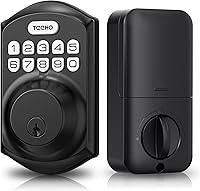
| TEEHO TE001 | 4 AA | Up to 365 days | Red light below 15% |
| Veise KS01B | 4 AA/LR6 alkaline | Over a year | Blinking red top button |
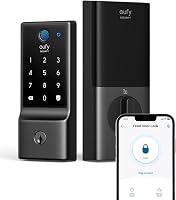
| eufy C30 | 4 AA | Up to 5 months | Indicator and notification |
Batteries are not included with these models. Buy the correct type before installation so you can finish setup and check operation in one sitting.
The estimates aren't directly comparable under identical conditions. Use them to judge the likely maintenance commitment, then let the lock's warning guide replacement.
Which keypad lock fits your door and battery routine?
Choose TEEHO for a deadbolt replacement, Veise for matching lever handles, or eufy for remote control. Door fit comes first, followed by the entry features you'll actually use.
Our guides to keyless entry door locks and keypad door locks cover more options if these 3 don't match your door.
TEEHO TE001: for keypad entry without an app
The TEEHO TE001 suits households keeping their existing door handle and replacing only the deadbolt. It offers 20 user codes and a single-use guest code, which is useful for a visitor who needs entry just once.
Its auto-lock timer can be set from 10–99 seconds and is off by default. Leave it off during setup, then choose a delay that gives everyone enough time to enter without rushing.
Skip it if you need remote control or have a 38 mm door hole. The TE001 requires a 2-1/8-inch (54 mm) door hole, so measure before removing your current hardware.
Reset it before first use as TEEHO directs. That step lets the lock detect the door direction for left- or right-handed operation.
Veise KS01B: for replacing a lock and handles together
The Veise KS01B suits a coordinated hardware replacement because it includes 2 lever handles. Choose it when you need both the deadbolt and handles, rather than buying extra hardware you won't use.
It provides 20 permanent user codes and one-time guest passwords. Its silent mode mutes keypad beeps while keeping low-battery and security alerts audible, useful when family members arrive late.
Skip this set if you want phone control or only need a deadbolt. Check the full hole layout and clearances, as well as its supported 1-3/8–2-inch door thickness.
Keep liquids away from the keyhole and interior assembly, and avoid prolonged direct sunlight as Veise advises. Weather resistance doesn't make every part suitable for direct water exposure.
eufy C30: for managing entry while away
The eufy C30 suits buyers who need remote control, with built-in Wi-Fi and no separate hub. It supports up to 100 passcodes, useful when several people need separate access.
Choose it if managing access through an app solves a regular need. Skip it if you only want a code at the door and prefer fewer battery changes.
It also isn't the choice for an Apple HomeKit, IFTTT, or Matter setup, since it doesn't support those services. Check installation requirements carefully: eufy says the C30 doesn't fit a rounded latch hole and directs buyers to use the supplied deadbolt.
What happens if the batteries die?
Electronic code entry can stop working, but a physical backup key can still provide entry. All 3 locks here support physical-key entry, and the TEEHO and Veise each include 2 backup keys.
A dead battery doesn't automatically make a secured door open. It can leave you outside with a keypad that won't respond, which is why backup access needs planning before installation.
Keep a key with a trusted nearby person or in another secure place you can reach from outside. A spare inside the locked house won't help you get in.
Don't assume the lock has emergency USB power or external battery contacts. Use those methods only when the model's manual confirms the correct procedure.
How should you set up and replace keypad lock batteries?
Start with a smoothly moving door and the correct fresh batteries. A motor shouldn't have to force the bolt past a misaligned strike plate every time it operates.
Before fitting the lock, check whether the existing deadbolt moves freely with the door closed. If it needs pushing, lifting, or pulling on the door, correct that fit first.
Follow this setup order:
- Confirm door measurements and read the model's installation instructions.
- Fit the lock without pinching wires or forcing parts together.
- Insert batteries with the marked polarity and complete any required door-direction setup.
- Change the default master code and add separate user codes.
- Check keypad entry, key entry, and the inside thumb turn with the door open.
- Close the door and check that the bolt travels freely before enabling auto-lock.
Use our smart lock installation guide for preparation, then follow your model's manual for programming.
For battery changes, replace the whole set at once. Don't mix old and new cells, battery brands, or battery types, and use rechargeable cells only if the manual permits them.
After replacement, check operation while the door is open. Don't perform a factory reset unless the instructions call for it, since resetting can erase access codes and settings.
What causes short battery life or missed warnings?
Frequent use and a binding bolt can shorten battery life, while ignored alerts raise the risk of losing keypad access. If batteries drain unusually fast, check door movement before simply installing another set.
Seasonal swelling or a shifted strike plate can make a previously smooth door harder to lock. Listen for strained operation and check whether the bolt moves easily by hand.
Avoid these common mistakes:
- Treating an estimate as a deadline. Replace batteries when warned, even if the advertised interval hasn't passed.
- Choosing a very short auto-lock delay. Pick a delay that fits school runs, deliveries, and bringing in groceries.
- Ignoring corrosion or leakage. Follow the manual's cleaning guidance and replace damaged batteries promptly.
- Assuming silent mode removes every alert. Learn which lights and sounds your model uses.
- Checking only the keypad. Make sure household members also know where the backup key is kept.
Wipe the keypad with a soft cloth using the care instructions for your lock. Don't spray cleaner into the keyhole, battery compartment, or interior electronics.
Do Wi-Fi keypad locks use batteries too?
Yes, Wi-Fi keypad locks can run entirely on batteries. Wireless access adds convenience, but it doesn't mean the lock plugs into household power or runs through a power cable.
The C30 offers remote control; the TEEHO and Veise operate without Wi-Fi. Decide whether you'll regularly manage entry while away before accepting the added connected features and battery upkeep.
Read how smart locks work without Wi-Fi if local keypad entry may cover your needs. For remote access options, compare Wi-Fi smart locks and check each model's battery requirements.
Do keypad door locks need batteries: which should you choose?
Most electronic keypad door locks need batteries, so choose the features you'll use and a replacement routine you'll maintain. Pick a mechanical keypad lock instead if avoiding batteries is your main goal.
Choose the TEEHO TE001 for code entry while keeping a separate handle, or the Veise KS01B when you also need matching lever handles. Choose the eufy C30 when remote control is worth more frequent battery attention.
Before ordering, confirm door fit and decide where the backup key will live. Then compare the best keypad door locks for the style and entry options that fit your household.
Frequently asked questions
Do keypad door locks work without batteries?
Electronic keypad locks generally need batteries for code entry, but mechanical keypad locks work without electrical power. On an electronic model with a physical backup key, the key can provide entry after battery failure.
Check the manual before relying on any other backup power or entry method.
How often do keypad door lock batteries need to be changed?
Change batteries when the lock gives a low-power warning, even if its expected replacement date is months away. TEEHO estimates up to 365 days for the TE001, while eufy estimates up to 5 months for the C30.
Door alignment, use, weather, and connected features can affect battery life.
What happens when a keypad lock battery gets low?
A low-battery light, sound, or app notification warns you to replace the batteries while the lock still has power. The warning method depends on the model, and it doesn't promise a fixed number of remaining entries.
Replace the full set promptly and keep your backup key accessible.
Do all keypad door locks use the same batteries?
No, battery size, quantity, and chemistry depend on the lock. The 3 models covered here each use 4 AA batteries, supplied separately, and Veise specifies AA/LR6 alkaline cells.
Follow your model's manual rather than assuming rechargeable batteries or a different battery type will work properly.