Smart Lock Wi-Fi vs Bluetooth: Which Is Better? (October 2026)
For smart lock Wi-Fi vs Bluetooth, choose Wi-Fi for control away from home or Bluetooth for nearby phone access. Philips includes direct Wi-Fi; this Yale needs an added module for remote control.
On this page (10 sections)
- Smart lock Wi-Fi vs Bluetooth: which fits your daily routine?
- Who should buy the Philips Wi-Fi Keypad Deadbolt?
- Who should buy the Yale Bluetooth Deadbolt?
- What should you check before ordering either lock?
- How should you set up Wi-Fi or Bluetooth access?
- What still works if the internet or phone fails?
- How much battery care and maintenance do these locks need?
- Is Wi-Fi or Bluetooth safer for a smart lock?
- Which buying mistakes should you avoid?
- Smart lock Wi-Fi vs Bluetooth: which should you choose?
Choose Wi-Fi for remote control and Bluetooth for nearby phone access. The practical answer to smart lock Wi-Fi vs Bluetooth is whether you need to manage your door from somewhere else or mainly want easier entry when you arrive.
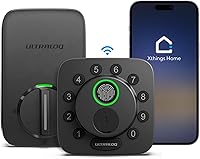
These 2 locks show that difference clearly. Philips includes a direct home-network connection, while the Yale Bluetooth Deadbolt starts with local phone access and offers a separate module upgrade.
For more connected options, see our guide to Wi-Fi smart locks. Read how smart locks work if you also want to compare phone, keypad and mechanical entry.

Smart lock Wi-Fi vs Bluetooth: which fits your daily routine?
Choose Wi-Fi if your door needs attention while you're away; choose Bluetooth if most actions happen beside it. Start with a real situation you expect to handle, such as admitting a visitor during your commute.
Remote control matters when you need to change access after leaving home. Nearby access is enough when everyone enters with their own code and you rarely need to intervene.
Neither connection makes a lock the right fit by itself. A household that dislikes using phones at the door may care more about a keypad than either wireless label.
When does Wi-Fi beat Bluetooth for a smart lock?
Wi-Fi wins when distance is part of the job. If a relative arrives early, you can manage a compatible connected lock without returning home or asking someone nearby to help.
It also suits people who want to check lock status after leaving. Decide whether you would act on that information, rather than choosing remote access simply because it sounds useful.
Remember that remote access is a chain: your phone, the app service, your home internet and the lock's network connection all need to cooperate. Strong phone reception cannot fix a weak connection at the door.
When is Bluetooth enough?
Bluetooth is enough when you use the app within range of the door and don't need distant control. It provides a local link between a compatible phone and lock rather than a direct connection to your router.
That suits a household with predictable arrivals and a keypad routine. You can leave home without needing to manage every visit through an app.
Don't choose Bluetooth solely to avoid every online service or account. A local radio connection does not, by itself, describe the app's account requirements or privacy practices.
Who should buy the Philips Wi-Fi Keypad Deadbolt?
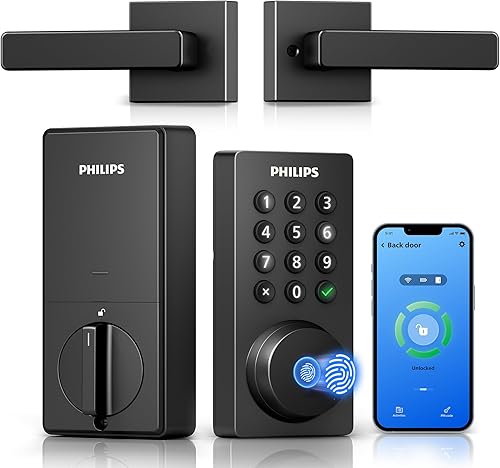
Buy the Philips if remote guest management is a regular need, especially when you're also replacing the door handle. Its included matching handle set makes it worth considering for a coordinated front door upgrade.
The Philips Home Access App lets you open or lock the door remotely, manage codes and fingerprints, check lock status and view access history. Those controls suit households where access changes from week to week.
Its permanent, one-time, periodic and recurring PIN options let you match access to the visit. Use a dedicated code for a regular helper instead of giving out the household's everyday code.
Fingerprint entry suits family members who prefer not to type a code or reach for a phone. For the tradeoffs of that entry method, read our guide to fingerprint door lock security.
Alexa and Google Assistant support locking and status checks. Treat voice control as an extra convenience, while keeping a familiar entry method available for each household member.
Skip this Philips if your door has poor Wi-Fi coverage and you cannot improve it. It needs a 2.4 GHz network, and Philips recommends keeping the lock within 33 ft of the router with fewer walls, metal objects and interference sources between them.
Also skip it if you only want nearby entry and have no use for the included handle hardware. In that case, its remote features may solve a problem you don't have.
Who should buy the Yale Bluetooth Deadbolt?
Buy the Yale if nearby phone access and custom entry codes cover your routine. Its Yale Access app works with a smartphone or Apple Watch, and optional automatic entry uses Bluetooth when you arrive.
That suits someone who wants to approach the door with their phone put away. Set up the automatic arrival feature carefully before making it part of your daily routine.
The Yale Assure Lock 2 includes DoorSense and automatic locking. These features address closing up after entry, which is a separate need from controlling the door across town.
Skip this Yale configuration if remote access is essential from day one. Wi-Fi is not built in, so the base Bluetooth setup does not meet that requirement by itself.
Yale offers separately sold Wi-Fi or Z-Wave modules for upgrades. Confirm the exact module, lock compatibility and any additional system requirements before buying, since those connection paths are not interchangeable.
This Yale also isn't the right choice if fingerprint entry is a must. Choose according to the way your household actually enters, rather than assuming every smart deadbolt offers the same methods.
What should you check before ordering either lock?
Check door fit first, connection second. A lock with the right wireless features still needs compatible mounting holes, adequate clearance and a bolt that moves freely into the frame.
Measure door thickness and existing hardware spacing. Check the backset, which is the distance from the door edge to the center of the main mounting hole, against the installation instructions for your exact lock.
If replacing both the deadbolt and handle, check each opening separately. An included handle does not guarantee that it covers old marks or matches every existing hole.
Read the instructions for door handing, meaning which way the door opens. On the Philips, the default setup is for a right-opening door; a left-opening door requires a reset for that direction.
For ecosystem plans, name the exact action you want. Opening the door from a watch, checking status by voice and controlling it remotely are different requirements.
Our smart lock setup and compatibility guide can help you work through the door, app and ecosystem details. For a wider range of entry methods, compare our best smart locks.
How should you set up Wi-Fi or Bluetooth access?
Start with smooth physical operation, then configure the app and access rules. Wireless setup cannot correct a bolt that catches on the strike plate or a door that needs lifting to close.
With the door open, check that the bolt moves freely. Repeat with the door closed, and correct rubbing or misalignment before relying on automatic locking.
Connect the phone and network
For Philips, confirm that your router offers the required network band and that you have the correct credentials. Check the signal with the door closed, since the installed position matters more than reception elsewhere in the hallway.
For Yale, begin with the phone near the lock and follow the app's Bluetooth permission prompts. Check any location or background permissions requested for optional automatic arrival features, and decide whether you're comfortable granting them.
Complete account setup using a strong, unique password. Enable an extra sign-in check if the app offers one, and keep recovery details somewhere you can reach without entering the house.
Add people before adding automation
Give each regular user a separate code where possible. This makes it easier to remove one person's access without changing everyone's routine.
Try each entry method with the door open before relying on it outside. Make sure a second household member can enter without borrowing the main account holder's phone.
Philips auto-lock is off by default and offers a delay from 0–180 seconds once enabled. Choose a delay that gives you time to carry bags through and close the door fully.
For installation steps beyond app setup, follow our smart lock installation guide. Keep the lock's own instructions beside you for wiring, screw tension and calibration.
What still works if the internet or phone fails?
An internet outage and a dead phone are different access problems. Plan for both instead of treating “works without Wi-Fi” as a complete backup strategy.
Remote commands need a working path to the lock. If home internet fails, being online somewhere else will not restore that missing connection.
Bluetooth can still provide nearby phone access without home Wi-Fi when the phone and lock are powered and correctly configured. Don't assume every app function remains available merely because a local connection exists.
The Philips includes keypad and fingerprint entry plus 2 mechanical keys. The Yale provides keypad entry, so household members don't need to depend on a phone for every arrival.
Keep a usable backup outside the locked home without hiding a key beside the door. A trusted person holding a spare can be more useful than a spare stored in the entryway.
Battery failure is separate again. Electronic entry needs lock power, so learn the exact battery replacement and backup-entry procedure before the first low-battery warning.
Our guide to smart locks that work without Wi-Fi explains which local and remote functions to separate in your plan.
How much battery care and maintenance do these locks need?
Plan for battery checks and a freely moving bolt with either connection type. Don't choose Bluetooth on the assumption that these 2 models have a proven battery-life advantage over one another.
Philips claims up to 6 months of battery life and provides a low-battery alert. It requires standard 1.5V alkaline batteries, sold separately, and warns against rechargeable or high-power lithium replacements.
Yale includes a battery indicator. Use the battery type specified in its instructions rather than assuming the Philips requirements apply to both locks.
Respond to a low-battery warning promptly. Replace batteries as instructed, then confirm that the keypad, app connection and automatic locking still behave as expected.
If the motor starts sounding strained or the bolt rubs, check door alignment. Seasonal movement, loose hinges or pressure from weather seals can change how a door closes.
Wipe touch surfaces with a soft cloth and follow the care instructions for cleaners. Keep moisture out of the battery compartment and avoid spraying cleaner directly into openings.
Is Wi-Fi or Bluetooth safer for a smart lock?
Neither radio type alone makes a lock the safer choice. Mechanical installation, account access, code sharing and software upkeep all affect the result.
Wi-Fi adds a remote connection path that you need to manage. Bluetooth limits direct phone communication to nearby range, but that does not remove the need to protect the app account and shared credentials.
Use separate guest codes and remove them when the visit ends. Avoid sending a permanent household code through a group message that may remain accessible long after the guest leaves.
For recurring visitors, review who still needs access. An old helper's code can matter more to your daily security than the wireless label on the box.
Keep the app current and follow available firmware update instructions. Yale describes enhanced app security features, but a broad security claim should not replace careful account management.
Read are smart locks safe? for a broader look at electronic access, physical security and household habits.
Which buying mistakes should you avoid?
Avoid buying for a connection label without mapping your routine. The expensive mistake is choosing local-only access when distant control is the feature you actually need.
Don't assume sharing a code is the same as controlling the lock remotely. A visitor can enter with a prepared code even when you have no live app connection to the door.
Don't assume an upgrade module is a simple afterthought. Check compatibility, installation and supporting equipment before choosing a Bluetooth model around a future remote-access plan.
Don't confuse lock status with a closed door. A bolt can extend while a door is open, so learn how your chosen lock reports door position and handles automatic locking.
Finally, don't give every visitor the same permanent code. Set access around the person and schedule, then remove it when the reason for access ends.
Smart lock Wi-Fi vs Bluetooth: which should you choose?
Choose the Philips for regular remote access and changing guest schedules. Choose the Yale for nearby phone access and a keypad routine, with a module upgrade only if you have confirmed what that upgrade requires.
If you're unsure, ask what you would need to do while standing miles from home. A real need to check status or change access favors Wi-Fi; routine entry beside the door can favor Bluetooth.
Before ordering, confirm door fit, the connection at the entrance and a backup method every household member understands. Use our guide to how to choose a smart lock to finish those checks.
If built-in remote control is your deciding factor, our Wi-Fi smart lock guide gives you other options to compare.
Frequently asked questions
Is Wi-Fi or Bluetooth better for a smart lock?
Wi-Fi is better for managing the door while away; Bluetooth suits phone access near the lock. Choose based on your routine rather than the connection name alone.
Compare guest access, backup entry and door fit too, since those details affect daily use just as much.
Can a Bluetooth smart lock work without Wi-Fi?
Yes, Bluetooth can connect a nearby phone to a compatible lock without home Wi-Fi. Keypad entry offers another local option on these models.
Remote control needs an added connection path, so read our guide to smart locks without Wi-Fi before deciding which features you need during an outage.
Does a Wi-Fi smart lock need a hub?
Some Wi-Fi smart locks need a bridge, but the Philips model here connects directly to a 2.4 GHz router without one. Philips recommends keeping it within 33 ft of the router with fewer obstacles between them.
Check signal quality at the actual door before choosing its permanent setup.
Can a smart lock use both Wi-Fi and Bluetooth?
Yes, a smart lock can support both connections, as this Philips does. That does not make their roles interchangeable: Wi-Fi provides its remote app connection, while Bluetooth is a nearby connection type.
Confirm which functions remain available locally before relying on any particular feature during an internet outage.