7 Best Wi-Fi Smart Locks (October 2026)
The best Wi-Fi smart locks include the Schlage Encode for most homes, the Philips Wi-Fi Keypad Deadbolt for replacing both locks, and the Philips Wi-Fi Smart Deadbolt for mixed entry preferences.
On this page (9 sections)
- How we chose these Wi-Fi smart locks
- Compare Wi-Fi smart locks by access and connectivity
- The best Wi-Fi smart locks for different needs
- What should you check before buying a Wi-Fi smart lock?
- How should you set up a Wi-Fi smart lock?
- How should you manage guest codes and household access?
- What care does a Wi-Fi smart lock need?
- Which Wi-Fi smart lock mistakes should you avoid?
- Which Wi-Fi smart lock should you choose?
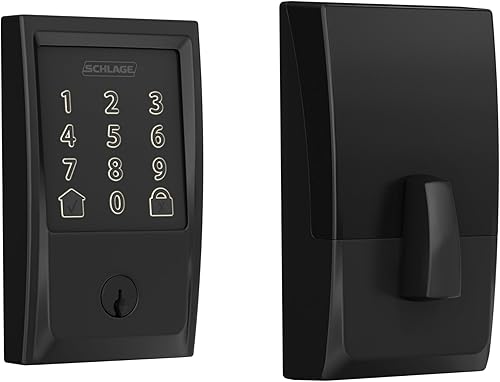
The Schlage Encode is the best Wi-Fi smart lock for most homes because it combines remote access, separate household codes and a customizable alarm without a separate bridge.
Choose the Philips handle set when replacing the deadbolt and handle together, or Tapo DL110 if you prefer recharging to replacing batteries. Ultraloq Bolt SE Wi-Fi makes more sense when Matter over Thread is part of your home setup.
Start with door fit and reliable entry, then choose the remote features you'll use. Our complete guide to smart locks and keyless entry explains the wider category if you're still deciding what kind of lock you need.
Our picks at a glance
-
1
-
2
-
3

How we chose these Wi-Fi smart locks
We compared remote connectivity, everyday entry, guest access and installation needs, with Schlage Encode offering the strongest overall fit for a typical household. The shortlist also covers buyers who need matching handles, fobs, rechargeable power or Matter integration.
A lock ranks well here when its features solve a clear access problem. More entry methods aren't automatically better if everyone in your home prefers a keypad, and a large code allowance matters mainly when you manage many separate users.
We also distinguish direct Wi-Fi from gateway-based access. That difference affects the equipment you need, the setup process and what must stay connected for remote control.
Compare Wi-Fi smart locks by access and connectivity
Compare how the lock connects and how people enter before choosing by appearance. The table separates direct Wi-Fi models from options that need extra hardware for particular functions.
| Product | Best for | Connectivity | Access | Codes | Our score |
|---|---|---|---|---|---|
| Schlage Encode | most homes | Built-in Wi-Fi | Touchscreen, app, voice, physical key | Up to 100 | 9.1 |
| Philips Wi-Fi Keypad Deadbolt | replacing both locks | Built-in 2.4 GHz Wi-Fi | Fingerprint, app, PIN, voice, physical key | 8.8 | |
| Philips Wi-Fi Smart Deadbolt | mixed entry preferences | Built-in 2.4 GHz Wi-Fi | Fingerprint, app, passcode, key, voice | 8.6 | |
| Ultraloq Bolt SE Wi-Fi | connected Apple homes | 2.4 GHz Wi-Fi; Matter over Thread requires a compatible hub | Fingerprint, app, passcode, voice, key | 8.4 | |
| Veise VE06-H Wi-Fi | fob-carrying households | Bluetooth; Wi-Fi requires Veise G2 gateway | App, code, fob, key, thumb turn | 8.0 | |
| Tapo DL110 | avoiding disposable batteries | Wi-Fi and Bluetooth | Fingerprint, passcode, app, Bluetooth, voice, key | 8.0 | |
| Kwikset Halo Wi-Fi | frequent guest turnover | Built-in Wi-Fi | Touchscreen, app, voice, physical key | Up to 250 | 7.3 |
The best Wi-Fi smart locks for different needs
Choose Schlage Encode for general household use, then move down this shortlist when another feature solves a more specific need. Each alternative has a clear reason to buy it and a reason to pass.
Schlage Encode
- Built-in Wi-Fi
- Up to 100 access codes
- Customizable movement and forced-entry alarm
- Four included AA batteries
Choose Encode for everyday family access and remote management without a separate bridge. Its customizable alarm adds a reason to choose it over a lock focused mainly on entry options.
Pros
- Remote control and access history
- Customizable alarm
- Physical backup key included
Cons
- No fingerprint entry
- Door thickness limited to 1-3/8 to 1-3/4 in
Schlage Encode suits a family that wants to manage the front door remotely while keeping everyday entry simple. The Schlage Home app handles door control, user codes, lock history and customizable notifications through built-in Wi-Fi.
Its 100-code capacity is enough to give residents and regular visitors separate credentials without sharing the household's main code. The customizable door-movement and forced-entry alarm is another reason to choose it over a model focused mainly on entry options.
Schlage certifies Encode to BHMA's highest residential security, durability and finish grades. That supports its place at the top, though a sound door frame and correctly fitted strike still matter.
It fits doors 1-3/8 to 1-3/4 in thick, with a 2-3/8 or 2-3/4 in backset. Four AA batteries and a backup key are included, and Schlage estimates up to 6 months of battery life with typical use.
Buy it for keypad-based family access with remote oversight. Skip it if fingerprint entry is essential or you want the same purchase to include a new handle.
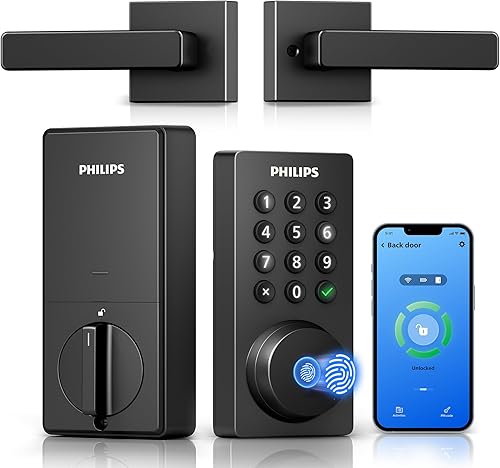
Philips Wi-Fi Keypad Deadbolt
- Built-in 2.4 GHz Wi-Fi
- Matching handle set included
- Fingerprint and PIN entry
- Recurring guest codes
This set suits a front-door refresh that includes both the deadbolt and handle. Fingerprint entry serves residents, while several PIN types help manage visitors.
Pros
- Matching handle set included
- Permanent, one-time, periodic and recurring codes
- Direct Wi-Fi connection
Cons
- Batteries are not included
- Philips recommends a router within 33 ft
The Philips Wi-Fi Keypad Deadbolt is the better fit when the front door needs both a new deadbolt and matching handle. It avoids choosing those pieces separately and adds fingerprint entry for residents who don't want to enter a code each time.
Its permanent, one-time, periodic and recurring PIN options suit different visitor patterns. A cleaner can have recurring access, while a single visit can use a one-time code.
The lock connects directly to 2.4 GHz Wi-Fi, and Philips recommends placing it within 33 ft of the router with as few obstacles as possible. Check reception at the door before choosing this set, especially if the router sits across the house.
Auto-lock is off by default and must be enabled in the app. Philips specifies standard 1.5V alkaline batteries, which aren't included, and warns against rechargeable or high-power lithium batteries.
Choose it for a complete hardware refresh on a compatible door. Skip it if you only need a deadbolt, or if you can't provide a suitable network connection near the entry.
Philips Wi-Fi Smart Deadbolt
- Built-in 2.4 GHz Wi-Fi
- Fingerprint, passcode and key entry
- Up to 100 custom passcodes
- Away Mode
Choose this deadbolt when family members want different entry methods and the existing handle can stay. Away Mode provides a separate access setting for trips.
Pros
- Fingerprint and keypad options
- One-time and scheduled guest codes
- Away Mode
Cons
- AA alkaline batteries required, not included
- No door sensor
The Philips Wi-Fi Smart Deadbolt suits a household with mixed entry preferences and an existing handle worth keeping. Residents can choose fingerprints, passcodes, the app, voice access or a physical key.
Its 100 custom passcodes, plus one-time and scheduled guest codes, cover family access and regular visitors. Alerts and access history help you review activity without asking everyone to report when they arrive.
Away Mode deserves a deliberate setup decision. Philips describes it as restricting entry to the master code, so check its instructions before enabling it while someone still needs normal household access.
The lock has no door sensor. Its 10-to-180-second auto-lock timer can extend the bolt after a delay, but that doesn't confirm that someone closed the door.
It needs AA alkaline batteries and a 2.4 GHz network; Philips recommends keeping the router within 65 ft. Buy it for entry flexibility without replacing the handle, and skip it if knowing whether the door is physically closed is a requirement.
Ultraloq Bolt SE Wi-Fi
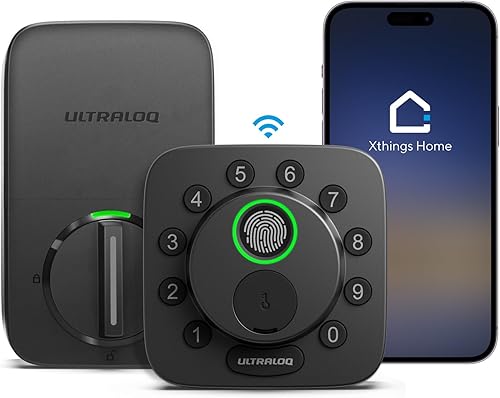
- Built-in Wi-Fi
- Matter over Thread support
- Up to 50 fingerprints and 50 codes
- Two mechanical keys
Choose Bolt SE for Apple Home access through Matter over Thread, with the required compatible hub. Its separate built-in Wi-Fi connection also supports remote app control.
Pros
- Matter over Thread integration
- Fingerprint and code entry
- Two mechanical keys included
Cons
- Matter over Thread needs a compatible hub
- Four AA batteries are not included
Ultraloq Bolt SE Wi-Fi suits a home that wants the lock in Apple Home or another Matter-compatible system. Its Matter over Thread connection requires a compatible Thread Border Router, while built-in Wi-Fi provides a separate path for remote app access.
That distinction matters before buying a hub. Choose the connection around the app and automations you intend to use, rather than assuming every advertised function comes from Wi-Fi alone.
The lock stores 50 fingerprints and 50 passcodes, and supports permanent, scheduled or temporary shared access. Two mechanical keys are included, giving you a backup that doesn't depend on phone access.
Ultraloq gives it an IP65 weather-resistance designation for exterior-door use. Its battery-life claim of up to 18 months relates to Thread's lower-energy connection, so don't use that figure as a fixed Wi-Fi replacement schedule.
Choose Bolt SE when Matter integration has a clear role in your home. Skip it if you want only remote keypad access and would gain little from configuring another smart-home connection.
Veise VE06-H Wi-Fi

- Handle set included
- App, code, fob and key entry
- Remote access requires G2 gateway
- 250+ user codes
The included fobs suit residents who prefer carrying a small credential to using a phone or code. Plan for the separate G2 gateway if remote control is part of the purchase.
Pros
- Handle set and two fobs included
- One-time, scheduled and recurring codes
- App and web user management
Cons
- Separate G2 gateway needed for remote Wi-Fi
- Requires three correctly spaced door holes
Veise VE06-H suits residents who prefer a fob to a phone or keypad and also need a handle set. The package includes two fobs and two backup keys, so those entry options are ready to assign to trusted users.
Its main buying caveat is connectivity. Nearby app access uses Bluetooth, while remote Wi-Fi functions and Alexa or Google Home integration require the separate Veise G2 gateway.
Remote code generation doesn't mean every management task works from anywhere without that gateway. Changing certain codes or their valid times requires being near the lock or connected through the G2.
The lock supports more than 250 user codes, including recurring and scheduled access. Before considering that capacity, check its installation layout: it requires three pre-drilled holes with the correct spacing.
Buy it when fob access and the bundled handle solve real household needs. Skip it if you want a direct-to-router lock or your door's existing holes don't match, since either issue changes the purchase substantially.
Tapo DL110

- Wi-Fi and Bluetooth
- Removable rechargeable battery
- USB-C charging
- Up to 100 fingerprints
Tapo suits households that prefer a charging routine to replacing disposable batteries. Fingerprint entry and guest-code options keep everyday access separate from phone control.
Pros
- Rechargeable battery and USB charger included
- Up to 100 fingerprints
- One-time and scheduled codes
Cons
- Battery requires periodic charging
- Runtime varies with use, settings and environment
Tapo DL110 is the choice for a household that prefers recharging a battery pack to stocking disposable cells. Its removable battery supports USB-C charging, and the battery pack and USB charger are included.
Tapo estimates up to 1 year of operation in Wi-Fi mode at 20 uses per day. Actual runtime depends on settings, router conditions, use and the environment, so build a charging routine around battery alerts rather than a calendar promise.
The lock stores up to 100 fingerprints, making it useful when several residents want to register more than one finger. Permanent resident codes and one-time or scheduled guest codes provide separate options for visitors.
Wi-Fi remote access and close-range Bluetooth serve different situations, while physical keys provide another entry route. Keep a key available while planning when and where to recharge the removable pack.
Choose DL110 if you'll keep up with charging and want fingerprint entry. Skip it if a charging task is likely to be forgotten and replacing standard batteries would fit your routine better.
Kwikset Halo Wi-Fi

- Built-in Wi-Fi
- Up to 250 access codes
- Temporary and scheduled access
- Optional geofencing
Halo suits homes that issue separate codes to many visitors or service providers. Choose it for code management and direct Wi-Fi rather than fingerprint entry.
Pros
- Up to 250 access codes
- Remote app control without a hub
- Temporary, scheduled and permanent codes
Cons
- No fingerprint entry
- Door thickness limited to 1-3/8 to 1-3/4 in
Kwikset Halo Wi-Fi suits a home that issues many individual guest codes and wants to manage them remotely. Its 250-code capacity and temporary, scheduled or permanent access options help keep visitor credentials separate.
The Kwikset app provides activity history and notifications for unusual activity, including invalid code attempts or tampering. Direct Wi-Fi access means you don't need a separate hub for remote door control.
Optional geofencing can allow automatic entry as you approach home. Start with manual app or keypad entry, then enable location-based access only if it suits how everyone uses the door.
This model includes batteries and physical keys, and fits doors 1-3/8 to 1-3/4 in thick. Measure the opening and follow the installation template rather than assuming an existing deadbolt guarantees a match.
Buy Halo for frequent guest turnover and code administration. Skip it if fingerprint entry matters more than code capacity, or if a simpler household access plan makes its larger allowance unnecessary.
What should you check before buying a Wi-Fi smart lock?
Check door fit, network coverage and backup entry first. A feature-rich lock is a poor match if it binds in the frame, can't stay connected or leaves someone without a usable entry method.
Will the Wi-Fi smart lock fit your door?
Measure door thickness, backset and the existing holes before choosing a model. Backset is the distance from the door edge to the center of the lock opening.
Check clearance around the inside assembly too. Nearby trim, a storm door or closely spaced hardware can affect whether the new lock sits and operates correctly.
A handle set adds another measurement task because its mounting points must match your door. Don't assume that replacing the deadbolt means the lower handle will fit the same holes.
For more setup help, see our smart lock installation guide and smart lock compatibility guide.
Does Wi-Fi mean every smart-home feature works without a hub?
No, the required hardware depends on the feature. Direct Wi-Fi can support a brand's remote app without also providing Matter over Thread integration.
Write down what you want to do: open the door remotely, use a voice assistant, manage visitor codes or add the lock to a home automation. Check each function against its required connection.
If your main goal is nearby phone access, compare the differences between Wi-Fi and Bluetooth smart locks before choosing. Remote access is useful, but it adds network setup and account management.
Will your network reach the door reliably?
Check signal strength at the closed door, not just in the room beside the router. Walls, metalwork and distance can make the entry a harder place to connect than the center of the house.
A brand's recommended router distance is a placement guide, not a promise through every wall. If reception is weak, improve coverage before relying on remote commands.
For models requiring 2.4 GHz, confirm that your router provides that band and follow the pairing instructions for your network. Avoid changing several router settings at once, since that makes connection problems harder to trace.
Which entry methods will people actually use?
Choose a primary method for each resident and a separate backup. A keypad can suit someone without a smartphone, while fingerprints may appeal to a resident who doesn't want to remember a code.
Gloves, wet fingers and the ability to reach the keypad should shape that choice. Keep an alternative available instead of making one electronic method the household's only practical route inside.
A fob is useful only if the person carries it, just as a backup key helps only if it isn't locked inside. Agree on where spare credentials will live before removing the old lock.
How should you set up a Wi-Fi smart lock?
Set up the lock with the door open, confirm smooth mechanical operation, then configure remote access. This order helps separate a door-alignment problem from an app or network problem.
Fix a sticking door before adding automation
The existing deadbolt should move freely without lifting, pushing or pulling the door. If it catches on the strike, correct the alignment before asking a motor to move it.
Follow the installation sequence and cable routing carefully. Pinched wires, a misplaced tailpiece or screws tightened too far can interfere with operation.
Keep the door open while checking keypad entry, the inside thumb turn and the backup key. Close it only after each works, with another entry route available during setup.
Pair the app before adding everyone
Create the administrator account and complete the lock's required calibration or setup steps first. Use a strong, unique account password and enable extra account protection if the app offers it.
For Veise VE06-H, pair the lock in the app before changing the master password on the keypad. Follow the model's sequence rather than borrowing instructions from a similar-looking lock.
Once paired, turn off your phone's Wi-Fi and check remote control over mobile data while standing safely inside. That confirms you're using the remote path rather than only a nearby connection.
Choose an auto-lock delay around your doorway
Start with a delay that lets people enter, carry bags through and close the door. A very short delay can extend the bolt while someone is still moving through the opening.
A timed bolt action is not proof of a closed door. On models without a door sensor, check that the door has shut and latched rather than relying on the timer alone.
After setup, show every resident how to secure the door manually. Automation should support the household routine, while each person still knows what to do if the app is unavailable.
How should you manage guest codes and household access?
Give separate credentials to separate people, then limit access to the time each person needs. That makes access history more useful and lets you remove one person's access without changing everyone's code.
Use a permanent code for a resident, a recurring schedule for a regular cleaner and a temporary or one-time code for a short visit. Choose from the code types your model actually supports.
Check the lock's time settings before sending scheduled access. A correct code with the wrong start time can leave a guest outside even when the hardware works normally.
Keep administrator credentials private. A visitor who only needs door access shouldn't receive the account password used to manage the whole lock.
Delete old credentials after a visit or service arrangement ends, and review the user list periodically. High code capacity helps with organization only if expired access doesn't accumulate.
Send guests brief entry instructions and a way to reach you. Tell them how to secure the door when leaving, especially if they might mistake an auto-lock timer for confirmation that the door is shut.
What care does a Wi-Fi smart lock need?
Keep the door aligned, power maintained and credentials current. These routine tasks matter more than adding every available automation.
Check battery alerts regularly and act before the lock runs low. Follow the specified battery chemistry, replace disposable cells as a set and avoid mixing old and new batteries.
For a rechargeable model, choose a time when you can manage access during charging. Keep the charging cable and backup key somewhere you can reach without depending on the powered lock.
Wipe touch surfaces with a soft cloth and follow the brand's cleaning instructions. Avoid spraying cleaner into the keypad, fingerprint reader, keyway or seams.
If the bolt starts moving slowly or sounds strained, check whether the door has shifted before assuming the batteries are the only cause. Weather changes and loose hinges can alter alignment over time.
Review app notifications so important battery or access alerts don't get buried. Install available lock and app updates through the official tools, then confirm normal entry still works.
Which Wi-Fi smart lock mistakes should you avoid?
Avoid confusing remote status with a complete picture of the doorway. A lock report, door position and a person's identity are different things.
An access event identifies the credential used, not necessarily the person holding it. Shared codes make that distinction harder to manage, which is another reason to assign individual access.
Don't assume an internet outage and a depleted battery have the same effect. Electronic local entry still needs power, while remote commands depend on the required network connection.
Read how smart locks work without Wi-Fi to plan for lost connectivity. Keep a physical backup accessible for situations where electronic entry isn't available.
Don't replace good hardware just to gain a feature you won't use. If you only need keypad entry, start by deciding whether a smart lock is worth it for your home.
Finally, don't buy a handle set before measuring its full mounting layout. A matching finish won't solve holes that don't line up.
Which Wi-Fi smart lock should you choose?
Choose your Wi-Fi smart lock around the job your current door can't do. Remote family access points to Schlage Encode; a full handle-and-deadbolt refresh points to the Philips Wi-Fi Keypad Deadbolt.
Pick the Philips Wi-Fi Smart Deadbolt when residents want different entry methods and you can keep the existing handle. Choose Ultraloq Bolt SE Wi-Fi when Matter over Thread belongs in your home setup.
Veise VE06-H makes sense for fob users who accept a separate gateway, while Tapo DL110 suits a household prepared to recharge its battery. Kwikset Halo is the pick when frequent guest turnover makes code management the priority.
Before ordering, measure the door, check the network at the entry and choose where the backup key will stay. For alternatives beyond these Wi-Fi models, use our best smart locks guide.
Our top 3 picks at a glance
-
1
-
2
-
3
Frequently asked questions
What is the best Wi-Fi smart lock for most homes?
The Schlage Encode is the best Wi-Fi smart lock for most homes because it combines direct Wi-Fi access, separate user codes, a customizable alarm and a backup key. Choose a different model if fingerprint entry, a matching handle or a rechargeable battery is a higher priority.
Do Wi-Fi smart locks need a hub?
Many Wi-Fi smart locks connect directly to a home router, including Schlage Encode and both Philips models here. Veise VE06-H needs its separate G2 gateway for remote Wi-Fi functions.
Ultraloq Bolt SE needs a compatible Thread Border Router for Matter over Thread, but not for its built-in Wi-Fi access.
Will a Wi-Fi smart lock work if the internet goes out?
A physical key provides entry without internet access, while electronic offline functions depend on the model and available battery power. Remote commands and notifications need a working connection.
Keep a backup key accessible and read our guide to smart locks without Wi-Fi before choosing your backup plan.
How do I choose between Wi-Fi and Bluetooth smart locks?
Choose Wi-Fi when you need to manage the door while away, and Bluetooth when nearby phone control covers your needs. Some models combine both, while others add remote functions through a gateway.
Our Wi-Fi vs Bluetooth smart lock guide explains the trade-offs for daily use.



