Schlage Encode Smart Wi-Fi Deadbolt Review: Worth It? (October 2026)
Choose the Schlage Encode for keypad entry and remote Wi-Fi control without a separate hub. Pick Encode Plus for Apple home key tap access, or Arrive if your household prefers physical buttons.
On this page (9 sections)
- What does the Schlage Encode offer?
- How does Encode compare with Encode Plus?
- Should you choose the touchscreen or a physical keypad?
- What are the main alternatives?
- What should you check before installation?
- How should you set up codes and remote access?
- What care does Schlage Encode need?
- Which mistakes should you avoid before buying?
- Is the Schlage Encode a good choice?
The Schlage Encode suits households that want keypad entry and remote app control without a separate hub. Choose it when you need to let someone in from elsewhere, manage individual codes or check lock activity.
Its strongest reason to buy is everyday access management. Apple home key users, people who prefer physical buttons and buyers who want fingerprint entry have clearer matches among the alternatives below.
What does the Schlage Encode offer?
The Schlage Encode combines a touchscreen deadbolt with direct Wi-Fi access through the Schlage Home app. When connected to secure home Wi-Fi, it lets you operate the lock remotely, manage up to 100 access codes, view lock history and receive customizable notifications.
Schlage Encode
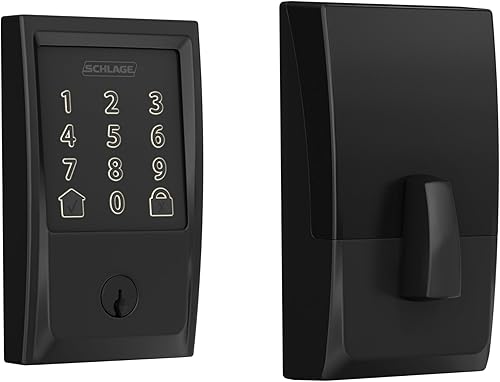
- Built-in Wi-Fi
- Up to 100 access codes
- Schlage Home app control
- Physical backup key
Choose Encode when you want to manage entry from away from home and give each person a separate code. Its direct Wi-Fi connection avoids a separate hub for remote app access.
Pros
- Remote app control without an extra hub
- Separate codes for household members and visitors
- Built-in customizable alarm
- Includes a physical backup key
Cons
- Requires AA battery replacement
- Remote features depend on home Wi-Fi
- Choose Encode Plus for Apple home keys
Separate codes are useful for family members, a dog walker or a regular cleaner. If one person no longer needs access, you can remove their code without asking everyone else to learn a new number.
Auto-lock can relock the door after a delay you choose, or you can turn it off. One-touch exterior locking also lets you secure the deadbolt when leaving without entering a code.
The touchscreen resists fingerprints, and the lock has a customizable alarm for door movement and forced-entry attempts. Schlage specifies an encrypted connection and BHMA's highest residential Security, Durability and Finish certification.
Those features support different parts of the job: app controls manage access, while the deadbolt secures the door. A sound door frame and a bolt that seats fully still matter.
Who should consider the Schlage Encode?
Choose Encode if remote access solves a regular household need and you're comfortable entering a code at the door. It suits a household where some people use the app while others simply need their own entry code.
Skip it if your main goal is fingerprint entry or Apple home key tap access. Also consider a simpler keypad lock if you'll rarely use remote control, notifications or access management.
Encode works with Alexa and Google Home when paired with the Schlage Home app and a voice-enabled device. Treat voice control as an optional convenience, rather than the main reason to replace a working deadbolt.
How does Encode compare with Encode Plus?
Choose Encode Plus for Apple home key tap access with an iPhone or Apple Watch. Both models share the core Wi-Fi app functions, so Plus makes the most sense when its Apple features change how you'll use the door.
Schlage Encode Plus

- Built-in Wi-Fi
- Up to 100 access codes
- Apple HomeKit
- Apple home keys
Choose Encode Plus if tapping an iPhone or Apple Watch would be your preferred way to enter. Its Apple HomeKit support also suits households building around Apple Home.
Pros
- Apple home key tap access
- Built-in Wi-Fi for remote app control
- Separate household and visitor codes
- Works with Alexa and Google Assistant
Cons
- Apple features offer little benefit to non-Apple households
- Remote features depend on home Wi-Fi
A watch tap can suit someone who doesn't want to reach for a phone or enter a code each time. Apple HomeKit support also gives households using Apple Home a reason to choose Plus.
Look at the whole household before deciding. If only one person wants Apple access, make sure everyone else is comfortable with keypad entry and knows their code.
Skip Plus if your household uses Android phones and has no plans for Apple Home. Its distinguishing features won't improve your daily entry routine in that situation.
Don't confuse a tap with automatic approach-based entry. With Encode Plus home keys, you bring your iPhone or Apple Watch to the lock to operate it.
For a closer comparison of the two models, read our Schlage Encode vs Encode Plus guide.
Should you choose the touchscreen or a physical keypad?
Choose Arrive for physical buttons and Encode for a flat touchscreen. The better choice is the one everyone who regularly uses your door can operate comfortably.
Schlage Arrive

- Built-in Wi-Fi
- Push-button keypad
- Up to 250 access codes
- Backlit silicone buttons
Choose Arrive when physical buttons make code entry more comfortable for the people using your door. Its larger code capacity also suits a long roster of authorized visitors.
Pros
- Backlit silicone buttons
- Higher code capacity than Encode
- Built-in Wi-Fi for remote app control
- Interactive digital installation instructions
Cons
- Doesn't suit buyers who prefer a flat touchscreen
- Remote features depend on home Wi-Fi
Arrive uses backlit, all-weather silicone buttons and supports up to 250 access codes. That larger capacity matters if you manage a long roster of authorized users, rather than a small household with a few visitors.
The buttons give each number a physical location and a press you can feel. If someone in your household dislikes touchscreens, that difference is more useful than choosing by appearance alone.
Skip Arrive if your main reason for changing locks is a touchscreen design or Apple home key entry. Choose it for its button interface and code capacity.
Arrive also has a clear outage provision: codes and schedules stay active during power or Wi-Fi outages. Within Bluetooth range, you can use the Schlage Home app without Wi-Fi.
A larger code limit still needs careful management. Keep the active user list short enough to review, and remove old permissions instead of leaving them in place because there is room.
What are the main alternatives?
Consider the Aqara U400 if you want fingerprint entry, rechargeable power or compatible approach-based entry. It suits buyers willing to plan their smart-home setup around those features.
Aqara U400
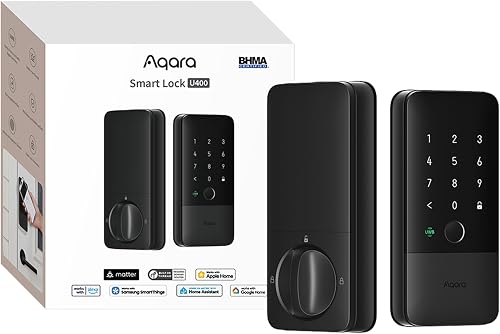
- Matter over Thread
- Fingerprint and passcode entry
- Apple home key tap access
- Rechargeable battery
Choose the U400 for fingerprint entry, rechargeable power or compatible Apple approach-based entry. Check its controller, phone and watch requirements before making those features the reason to buy.
Pros
- Several entry methods
- Rechargeable, removable battery
- Matter over Thread support
- Aqara specifies an IP65-rated exterior
Cons
- Each smart-home platform needs a compatible Thread-enabled Matter controller
- Approach-based entry requires compatible Apple hardware
- NFC card is sold separately
The U400 supports fingerprint, passcode, app, NFC card, physical key and Apple home key access. NFC cards are sold separately, so include that accessory in your plan if cards are your preferred entry method.
It uses Matter over Thread, with a compatible Thread-enabled Matter controller required for each smart-home platform you use. Apple home key tap access requires a supported Apple controller, such as HomePod mini, HomePod 2nd generation or Apple TV 4K 2021/2022.
Its UWB approach-based entry has further requirements: a Thread-enabled Apple Home hub and a supported iPhone or Apple Watch. Compatible phones start with iPhone 11 running iOS 18.5+, excluding iPhone SE and iPhone 16e.
Compatible watches start with Apple Watch Series 6 running watchOS 11.5+, excluding SE models. Check every household member's device before assuming this feature will serve everyone.
The removable battery can charge separately or through the lock's USB-C port. Aqara claims up to 6 months per charge and specifies a voice alert below 20% battery.
Skip the U400 if you want direct home Wi-Fi access without planning a controller setup. Encode is the more direct match for that requirement.
For another Wi-Fi deadbolt comparison, see Kwikset Halo vs Schlage Encode. If you're still choosing an entry style, our best smart locks guide compares more options.
What should you check before installation?
Confirm door fit and smooth bolt movement before ordering. Encode, Encode Plus and Arrive fit doors 1-3/8 to 1-3/4 in thick, with a 2-3/8 or 2-3/4 in backset.
Backset is the distance from the door edge to the center of the lock hole. Measure it directly instead of assuming that every exterior door uses the same layout.
Close the door and turn your current deadbolt by hand. If you must lift, push or pull the door for the bolt to move, correct the alignment before adding a motorized lock.
Also check clearance around nearby handles, trim and any storm door. Confirm that the interior lock body will have room and that you can reach its battery compartment.
Schlage specifies screwdriver installation without hardwiring. Encode and Encode Plus use Snap ’n Stay to help hold the lock on the door while you work; Arrive provides interactive digital instructions.
Keep the door open during initial assembly and setup checks. Confirm that the bolt extends and retracts freely before trying the lock with the door closed.
Follow our smart lock installation guide for preparation steps. For a broader look at how the connection affects daily use, read Wi-Fi vs Bluetooth smart locks.
How should you set up codes and remote access?
Set up individual codes and a reliable backup entry plan before relying on the lock. Getting access permissions right is more useful than turning on every app feature immediately.
Start with the app account and home network. Use a strong, unique account password, follow the setup instructions and check Wi-Fi reception at the door rather than beside the router.
Create a separate code for each regular user and give it a clear name. Avoid obvious numbers such as your street address, and don't send one permanent household code to every visitor.
For temporary access, decide when the person needs entry and remove permission afterward. Review the code list whenever a cleaner, caregiver or other regular visitor changes.
Choose notifications that prompt an action. Too many routine alerts can make it easier to ignore the one message you actually need.
Check remote control while someone with authorized access is at home. Confirm that the app reports the expected lock state and that the door is physically secured after the command.
Set auto-lock around how your household uses the entrance. A short delay may be inconvenient while carrying in groceries, and a timed relock does not pull an open door closed.
For the alarm, follow Schlage's instructions and choose settings suited to your door. Don't treat an alarm notification as a substitute for checking a bolt that fails to seat.
What care does Schlage Encode need?
Plan for battery replacement, clean controls and occasional alignment checks. These small tasks help keep the lock usable after the first setup.
Encode uses 4 included AA batteries, and Schlage claims up to 6 months of life with typical use. Low-battery warnings appear on the touchscreen and in the app, so replace batteries when prompted rather than treating that estimate as a deadline.
Follow the manual's battery guidance and replace the set together. Keep suitable spares available, especially if the lock serves your main entrance.
Store the physical backup key somewhere secure that you can reach from outside. A key in a drawer behind the same locked door won't help during a lockout.
Wipe the touchscreen with a soft cloth and follow Schlage's cleaning instructions. Fingerprint resistance doesn't remove the need to clean away dirt or moisture.
If the motor sounds strained or the bolt starts dragging, inspect door alignment. Don't assume a fresh battery will solve friction caused by a shifted strike plate or sagging door.
Which mistakes should you avoid before buying?
Avoid choosing by feature count alone. A lock fits your household when its entry methods, connection needs and maintenance routine match the people using it.
- Confusing fingerprint resistance with fingerprint entry. Encode's touchscreen resists marks; choose a model with a fingerprint reader if that is how you want to enter.
- Assuming remote access survives a network outage. Plan local entry separately and understand which functions depend on your connection.
- Buying Apple features for incompatible devices. Check the phone, watch and controller requirements for the exact access method you want.
- Sharing one code with everyone. Individual codes make it easier to remove one person's access.
- Ignoring a sticking deadbolt. Correct the door fit before expecting powered operation to work smoothly.
For a closer look at local access and internet-dependent functions, read whether smart locks work without Wi-Fi.
Is the Schlage Encode a good choice?
Choose Schlage Encode for straightforward Wi-Fi access management when codes and remote app control cover your needs. Before buying, confirm the door measurements, check Wi-Fi at the entrance and decide where the backup key will stay.
Pick Encode Plus if Apple home key taps will be part of your daily routine. Choose Arrive if physical buttons matter more, especially when you need to manage many authorized users.
Consider the Aqara U400 if fingerprint entry or compatible approach-based access solves a specific problem for your household. Its controller and device requirements should be part of that decision from the start.
Is Schlage Encode worth considering for your door?
Schlage Encode is worth considering when you'll regularly manage access from away from home. If everyone uses the same entrance routine and you don't need remote controls, a simpler lock may cover the job.
For a direct brand comparison before you settle on Encode, see Kwikset Halo vs Schlage Encode.
Frequently asked questions
Does the Schlage Encode need Wi-Fi?
Schlage Encode needs secure home Wi-Fi and the Schlage Home app for remote control and monitoring. Keypad entry and the included physical backup key provide other ways to enter.
Plan around those local entry methods if your internet service is unreliable, rather than relying only on remote app access.
Does the Schlage Encode work with Alexa?
Yes, Schlage Encode works with Alexa and Google Home when paired with the Schlage Home app and a voice-enabled device. Voice control is optional and doesn't replace the touchscreen or physical key.
Review the assistant's access settings during setup so everyone in your household understands which voice commands are available.
How many access codes can the Schlage Encode store?
Schlage Encode supports up to 100 access codes through the Schlage Home app. Give regular users separate codes so you can manage access without changing everyone's number.
Name each code clearly, remove access when it is no longer needed, and review lock history when you need to check code activity.
Is the Schlage Encode the same as Encode Plus?
No, Encode Plus adds Apple HomeKit and Apple home keys for tap access with an iPhone or Apple Watch. Both models offer built-in Wi-Fi, Schlage Home app control and up to 100 access codes.
Choose Plus when Apple entry is part of your daily routine, rather than for basic remote access alone.



