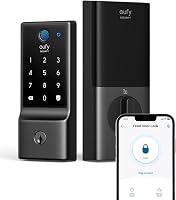
Eufy Smart Lock vs Philips Smart Lock: Which Is Better? (October 2026)
For eufy smart lock vs Philips smart lock, choose Philips for scheduled guest access and a matching handle set. Choose the eufy C220 for Apple Watch entry, eufy doorbell routines and longer stated battery life.
On this page (10 sections)
- Eufy smart lock vs Philips smart lock: which fits your household?
- Which lock suits a deadbolt replacement or a full handle upgrade?
- How should you manage fingerprints and guest codes?
- Which app and Wi-Fi setup makes more sense?
- How much battery care does each lock need?
- What should you do during installation and first setup?
- How should you set auto-lock and care for the hardware?
- When is the eufy C30 a better alternative?
- Which mistakes should you avoid before choosing?
- Eufy smart lock vs Philips smart lock: make the final choice
For eufy smart lock vs philips smart lock, choose Philips when you need scheduled guest access and a matching handle set. Choose the eufy C220 when Apple Watch entry or existing eufy doorbell routines will make daily entry easier.
Both main choices offer fingerprint entry, a keypad, physical keys and remote app control through built-in Wi-Fi. The better buy depends on who uses your door, which hardware you're replacing and how you'll manage access after installation.
The C30 is a separate option for households that prefer entering codes and don't need a fingerprint reader.
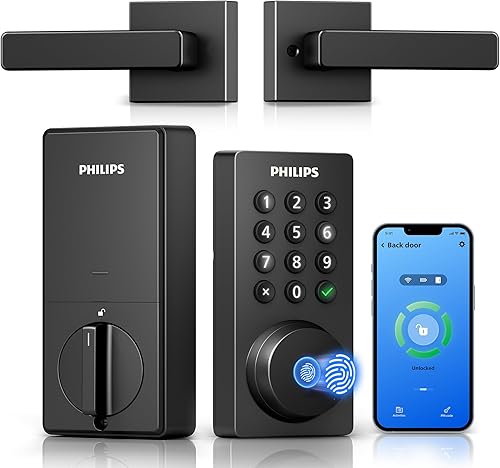
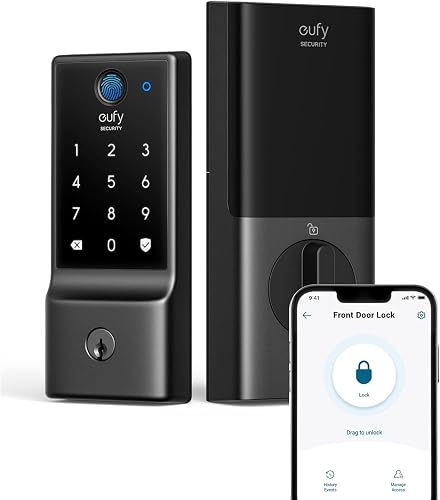
Eufy smart lock vs Philips smart lock: which fits your household?
Philips suits a household with changing visitors; the C220 suits a household already using eufy. Start with your normal week rather than choosing by the number of ways a lock can open.
A family coordinating relatives, cleaners and occasional guests benefits from access rules that match each person's visit. Philips offers permanent, one-time, periodic and recurring PIN codes, making those different arrangements a clear reason to choose it.
The C220 supports scheduled codes and user profiles too. Its stronger reason to buy is keeping compatible doorbell routines and lock control together in the eufy Security app.
Eufy vs Philips smart locks for everyday entry
Choose the entry method people will actually use. Someone who leaves their phone in a bag may value fingerprints, while a family member comfortable with a keypad may use a code every day.
Apple Watch access gives the C220 another useful option for a person who regularly wears one. Don't confuse that feature with a promise that every Apple smart-home service is supported.
For a wider view of entry methods and hardware types, our smart locks and keyless entry guide explains how the main choices fit different doors.
Which lock suits a deadbolt replacement or a full handle upgrade?
Choose Philips for a coordinated handle-and-deadbolt replacement; choose the C220 when your existing handle can stay. Buying extra hardware only helps if that hardware fits the work you need done.
Before removing anything, photograph both sides of the door and the latch edge. Measure door thickness, the face bore and the distance from the door edge to the center of the bore.
Also check the space around the interior lock assembly. Nearby trim, glass and other hardware can limit room even when the main hole appears suitable.
Philips gives conflicting inch and metric door-thickness ranges, so confirm the supported thickness with Philips before buying. Resolve that mismatch before taking apart your working lock.
Eufy describes the C220 as fitting most standard deadbolts and says removing its spacer allows fitting bores under 54 mm. That detail doesn't replace checking the rest of your door measurements.
Skip the C220 if keeping one existing house key is essential: it cannot be rekeyed. A household with several keyed doors should decide how it will handle separate keys before choosing it.
Our guide to installing a smart lock covers the preparation to complete before starting.
How should you manage fingerprints and guest codes?
Give each regular user separate access and limit temporary access to the visit. This makes it easier to remove one person's permission without changing everyone else's routine.
The C220 stores up to 50 fingerprints and 100 passcodes. Eufy describes its fingerprint recognition as self-learning, while Philips claims fingerprint entry in 0.3 seconds.
Those speed claims shouldn't decide the purchase. Access schedules, door fit and a backup method have more effect on whether the lock suits your household.
For Philips, a one-time code can suit a single visit, while recurring access can suit a regular cleaner. Check the selected dates and times before sharing any scheduled code.
With either model, avoid giving every visitor the family code. Separate codes make access history more useful and let you withdraw permission without asking the whole household to learn a new number.
Enroll fingerprints with clean, dry fingers and follow the app's placement prompts. Keep keypad access available for times when a cut, dirt or moisture makes a finger less convenient.
Review guest access after a project or stay ends. Deleting old permissions is part of using a smart lock, not a task to leave until someone loses a key.
The eufy C220 review covers that model in more detail, and our fingerprint door lock guide compares broader choices.
Which app and Wi-Fi setup makes more sense?
Choose the app that fits your existing devices, then check the connection at the door. Both main locks provide remote control without adding a separate bridge or hub.
Philips uses the Philips Home Access App for door control, user management, status checks and access history. Its connection requires 2.4 GHz Wi-Fi, with the lock within 33 ft of the router.
Treat that distance as a placement requirement, not a guarantee of a strong signal. Thick walls, metal objects and interference can still affect the connection.
Check your router's settings before installation, especially if one network name covers multiple bands. Have the network password ready so pairing doesn't become the last unfinished step.
After setup, check remote control while your phone uses cellular data. This helps confirm that remote access works beyond a nearby phone connection.
Both brands support Alexa and Google Assistant, but don't assume the same voice commands apply. Philips specifically describes voice commands for locking and checking status; review the available permissions during setup.
If remote access is your main reason for buying, read how Wi-Fi smart locks work before deciding where the router and lock will sit.
How much battery care does each lock need?
The C220 has the longer stated battery estimate, but both need a replacement routine. Eufy estimates around 8 months with 8 AA batteries, depending on use, while Philips states up to 6 months.
The C220 includes its batteries; Philips doesn't. Add the correct batteries to your installation supplies so the job doesn't stop after the hardware is mounted.
Philips calls for standard 1.5 V alkaline batteries and warns against rechargeable or high-power lithium batteries. Follow the battery instructions for the exact model rather than using whatever spare cells are nearby.
Frequent door use changes battery needs, and a bolt that rubs against the frame makes the motor work harder. Fix binding instead of treating repeated battery changes as the only solution.
Use a fresh, matching set when replacements are due, and respond promptly to low-battery warnings. Don't wait until the household is leaving for a trip to handle an alert.
Keep a physical backup key somewhere accessible outside the locked home, using a secure arrangement that suits your household. A key stored inside the house won't help someone standing outside.
Our guide explains why keypad door locks need batteries and how to plan for battery-powered entry.
What should you do during installation and first setup?
Make the door move freely before fitting the smart lock, then check operation with the door open. A motorized deadbolt shouldn't have to pull a poorly aligned door into place.
Start by checking the existing bolt by hand with the door both open and closed. If you need to lift, push or pull the door to turn it, address the hinges or strike alignment first.
Eufy describes the C220 as a no-drill installation on compatible standard deadbolts. Leave enough time for fitting, pairing and user setup instead of planning around the advertised installation time alone.
Philips warns against overtightening screws and pinching or misplacing wires. Tighten hardware as directed, then check that the manual mechanism moves freely before continuing.
Philips is configured for right-opening doors by default and requires a reset for a left-opening door. Follow its instructions for handing and calibration rather than forcing the bolt to move the wrong way.
Keep the door open while checking the keypad, fingerprint reader and manual key. Then close it and confirm that the bolt enters the strike without scraping or stopping short.
Finally, give each household member a short walkthrough. Everyone should know their normal entry method, their backup method and what to do when a battery warning appears.
How should you set auto-lock and care for the hardware?
Set auto-lock around how your household uses the doorway, and keep the bolt path clear. A short countdown may be inconvenient while carrying groceries or helping children through the door.
Philips provides an auto-lock delay of 0–180 seconds, and the feature is off by default. Enable it yourself if you want it, then check the behavior before relying on it.
The C220 also includes auto-lock. Review its settings during setup rather than assuming a default countdown matches your routine.
A timed bolt movement doesn't prove the door has closed. Don't read a locked-bolt status as confirmation that nobody left the door ajar.
Clean the reader and keypad gently using the care instructions, and avoid spraying cleaner directly into openings. Wipe away grime that could make fingerprint placement or keypad use less consistent.
Check screws and door alignment if operation changes with the season. Weather seals, hinges and the door frame can affect how easily the bolt reaches its resting position.
Before accepting a remote entry request, confirm who is at the door through a trusted channel. App control is useful, but it still requires a household rule about who may receive access.
When is the eufy C30 a better alternative?
Choose the C30 when physical keypad buttons meet your needs and fingerprint entry adds little value. Skip it if a fingerprint reader is a main reason you're replacing the lock.
It provides keypad, app, voice and physical-key entry, plus built-in Wi-Fi and a customizable auto-lock countdown. It can also pair with compatible eufy doorbells.
Eufy estimates up to 5 months from 4 AA batteries, depending on use; batteries aren't included. That makes battery supplies another item to arrange before installation.
The C30 supports up to 100 passcodes, so choosing it doesn't mean giving every person the same code. Its physical buttons suit a household that wants a clear, code-first entry routine.
Skip the C30 for an Apple HomeKit, IFTTT or Matter requirement: it isn't compatible with those services. It also doesn't fit a rounded latch hole, so check that part of your door before ordering.
Eufy identifies both the C30 and C220 as BHMA Grade 3 certified, with IP53 exterior protection. Those details don't remove the need for correct installation or establish that either lock makes a weak door frame secure.
Which mistakes should you avoid before choosing?
Avoid buying around one headline feature while overlooking door fit, shared access and backup entry. Write down your must-have requirements before comparing convenience features.
Don't assume a matching handle set will cover old marks or fit every existing hole. Compare the new hardware's placement with your current door before committing to a full replacement.
Don't treat Apple Watch entry as proof of broader Apple platform support. A named entry method and smart-home platform compatibility are separate requirements.
Avoid sharing the main app account simply because several people need entry. Use the lock's supported user and code controls, and keep account credentials private.
Don't choose by fingerprint speed alone. A small difference in a claimed response time matters less than a guest code that expires correctly or a bolt that moves without resistance.
If your priorities are still unclear, use our guide to choosing a smart lock for your front door to build a short requirements list.
Eufy smart lock vs Philips smart lock: make the final choice
Buy Philips for visitor schedules and a full hardware refresh; buy the C220 for an eufy-centered entry routine. Choose the C30 only when you prefer physical buttons and can do without fingerprints.
Skip Philips if you want to retain your current handle or can't meet its network placement requirements. Skip the C220 if the inability to rekey conflicts with your household's key plan.
Before ordering, settle three things: confirmed door fit, access for each regular user and a backup entry plan. Those checks turn this eufy smart lock vs Philips smart lock comparison into a choice you can use every day.
For another comparison focused on connected deadbolts, see Kwikset Halo vs Schlage Encode. If connectivity is still the deciding issue, read Wi-Fi vs Bluetooth smart locks next.
Ready to replace the lock?
Finish the measurements before removing your current hardware. Keep our smart lock installation guide nearby while you prepare the door, tools and setup details.
Frequently asked questions
Is eufy C220 or Philips Wi-Fi Keypad Deadbolt better?
Philips is the better fit for households managing different guest schedules or replacing a handle and deadbolt together. The eufy C220 suits existing eufy households and people who want Apple Watch entry.
Choose around those daily needs after confirming the lock fits your door.
Do both smart locks work without a hub?
Yes, both have built-in Wi-Fi for remote app control without a separate hub or bridge. Philips requires a 2.4 GHz network and placement within 33 ft of the router.
Walls, metal objects and other interference can weaken the connection, so review router placement before installation.
Which lock has longer battery life?
Eufy gives the C220 the longer estimate: around 8 months using 8 AA batteries, depending on use. Philips states up to 6 months.
Plan around low-battery alerts and your household's door activity rather than treating either estimate as a guaranteed date for changing batteries.
Does the Philips lock include a door handle?
Yes, the Philips Wi-Fi Keypad Deadbolt includes a matching handle set. That suits a full hardware replacement, but you still need to check door fit and opening direction.
Confirm the supported door thickness with Philips because its stated inch and metric ranges don't agree.
Can you use fingerprints with both locks?
Yes, both the eufy C220 and Philips Wi-Fi Keypad Deadbolt support fingerprint entry, along with keypad, app and physical-key access. Keep another entry method ready for anyone whose finger is wet, dirty or injured.
The eufy C30 alternative uses a keypad instead of a fingerprint reader.