eufy Smart Lock C220 Review: Worth It? (October 2026)
The eufy Smart Lock C220 suits households that want fingerprint entry and remote control on a deadbolt. Choose it if your door fits and you can keep a separate backup key; choose a keypad model if fingerprints won't change your daily routine.
On this page (9 sections)
- What does the eufy smart lock C220 offer?
- Who should buy the C220, and who should skip it?
- How does the C220 compare with the C210, C33 and C30?
- What should you measure before ordering the C220?
- How should you set up the C220?
- How should you manage fingerprints and guest codes?
- What battery care and weather limits matter?
- What mistakes should you avoid with a connected deadbolt?
- Should you choose the eufy Smart Lock C220?
The eufy Smart Lock C220 is a good fit for households that want fingerprint entry and remote access on a front-door deadbolt. Its strongest reason to buy is everyday convenience for several people who prefer different ways to enter.
Choose it for a compatible door where fingerprints will get regular use. Skip it if a keypad already meets everyone's needs, you need a handle replacement, or keeping your existing house key is essential.
What does the eufy smart lock C220 offer?
The C220 combines fingerprint access with remote door management, so it can serve both regular household members and occasional visitors. Its appeal is having those jobs handled by one deadbolt.
eufy C220
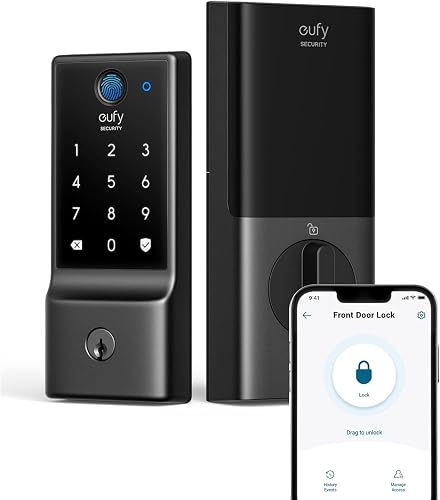
- Fingerprint and keypad entry
- Built-in Wi-Fi without a bridge
- Physical key backup
Choose this deadbolt for a household that will use fingerprints daily and wants remote access for visitors. Its cylinder cannot be rekeyed, so plan for a separate house key.
Pros
- Fingerprint entry plus individual passcodes
- Remote control without a separate bridge
- Physical key backup
- Works with eufy doorbell routines
Cons
- Requires 8 AA batteries
- Cannot be rekeyed
- Door measurements need checking
eufy Smart Lock C220 entry options for daily use
The C220 supports fingerprint, keypad, physical key, app, Apple Watch and voice access through Alexa or Google Assistant. Assign each person a practical everyday method rather than assuming everyone wants to use a phone.
Fingerprint entry suits someone arriving with a bag or coming back from a walk. A code is useful for visitors who shouldn't need an account or a household key.
Eufy says the fingerprint reader learns with repeated use and becomes more precise over time. Still, give each regular user a backup entry method so a poor finger placement doesn't delay them at the door.
Capacity is 50 fingerprints and 100 passcodes. You can create, manage and delete user profiles, with scheduled codes for trusted people who only need access at certain times.
Remote access that serves a clear purpose
Built-in Wi-Fi provides remote control through the eufy Security app without a separate bridge. The app includes access management, real-time notifications and event history.
That matters if you need to let someone in while you're away or remove a visitor's access after their visit. If everyone always enters with their own key or code, remote control may be a feature you rarely use.
Homes with a eufy doorbell can add the lock to routines and control the devices together in the app. Decide which routine you actually want before making ecosystem support a reason to buy.
Who should buy the C220, and who should skip it?
Buy the C220 if several people will use fingerprint entry on an existing deadbolt door. It is most useful when the household wants convenient daily access plus separate credentials for guests.
A family can give regular users their own fingerprints and reserve time-limited codes for a dog walker or other trusted visitor. This is easier to manage than passing around one spare key.
Skip the C220 if your main goal is simply to stop carrying keys. A keypad model can do that without making fingerprint recognition part of your routine.
Also skip it if you need a lock that can be rekeyed to match your current key. The C220 cannot be rekeyed, although a locksmith can copy its spare keys.
Renters should confirm permission to replace the deadbolt and check any building requirements for emergency access. Keep the original hardware if it must be restored when you leave.
For a wider view of biometric options, see our guide to the best fingerprint door locks. Our explanation of whether fingerprint door locks are safe covers the security questions behind the convenience.
How does the C220 compare with the C210, C33 and C30?
Choose among these models by entry preference and hardware shape. All 4 offer Wi-Fi access, so remote control alone doesn't make the C220 the right choice.
| Lock | Choose it when | Skip it when |
|---|---|---|
| eufy C220 | You want fingerprints on a separate deadbolt | You need a rekeyable cylinder |
| eufy C210 | You prefer shared access through individual codes | Fingerprint entry is essential |
| eufy C33 | You want to replace a compatible handle lock | You're only replacing a separate deadbolt |
| eufy C30 | You prefer physical buttons and a timed auto-lock setting | Your door has a rounded latch hole |
C210: choose codes over fingerprints
The C210 suits a household that wants keypad access, remote management and Apple Watch access without a fingerprint reader. Its touchscreen keypad stores up to 100 passcodes, and individual codes can be disabled.
It also provides event history and notifications, so you don't need the C220 just to manage visitors. Pick the C210 when people are comfortable entering codes and biometric access would go unused.
The C210 uses 4 AA batteries and supports emergency power from a portable charger. Learn that procedure during setup rather than trying to work it out from outside a closed door.
C33: choose the handle format first
The C33 suits a compatible side, garage or office door where you want fingerprint recognition in the handle grip. It supports left- and right-hand doors.
Its fit requirements include a 2 1/8-inch bore, a 2 3/8- or 2 3/4-inch backset, and door thickness from 1 3/8 to 2 1/6 inches. Measure the opening and check handle clearance against nearby trim.
Skip it if your aim is to retain a separate handle and replace only the deadbolt. It also doesn't support Apple HomeKit, IFTTT or Matter, so buyers who require those services should look elsewhere.
C30: choose physical buttons
The C30 suits people who prefer physical keypad buttons and want a customizable auto-lock countdown. It has no monthly fee and uses 4 AA batteries, with eufy estimating up to 5 months depending on use.
It doesn't fit a rounded latch hole, and eufy directs installation with its supplied deadbolt. Check that requirement before choosing it as the simpler alternative.
Skip it if fingerprints are central to your plan or you require HomeKit, IFTTT or Matter support. For a comparison outside this group, read our eufy C220 vs Philips Wi-Fi keypad deadbolt comparison.
What should you measure before ordering the C220?
Check door fit and free bolt movement before buying. A smart motor should move an aligned bolt, not compensate for a door that needs lifting or pushing shut.
Start with the current deadbolt while the door is closed. If turning the key or thumbturn takes force, correct the hinges, strike alignment or other source of binding before adding electronic hardware.
Record these measurements and compare them with the C220 instructions:
- Door thickness: measure the door itself, excluding trim.
- Backset: measure from the door edge to the center of the main bore.
- Bore size: measure the opening through the door.
- Clearance: allow room for both assemblies, the handle and nearby trim.
Eufy describes the C220 as compatible with most standard deadbolts and says bores under 54 mm can fit by removing the spacer. Don't use that single detail as a substitute for checking the full installation requirements.
Also check your Wi-Fi signal at the closed door and make sure the interior assembly will leave access to the battery compartment. Our complete guide to smart locks and keyless entry explains the hardware types if you're unsure what you're replacing.
How should you set up the C220?
Install and check the C220 with the door open first, then confirm that it works with the door closed. Keep the physical key with you throughout setup.
Eufy describes installation as a 15-minute job without drilling on a compatible door. Allow more time for removing old hardware, reading the instructions and setting up each person's access.
Follow this order:
- Photograph the old hardware and confirm the new parts match your door.
- Install the assemblies in the order shown in the C220 instructions.
- Check manual operation before completing app setup.
- Complete the required setup steps with the door open.
- Close the door and confirm the bolt moves freely into the strike.
- Add users, then check each person's entry method and backup.
If operation is smooth with the door open but strained when closed, investigate alignment. Repeated app commands won't correct a bolt that catches the strike.
Our smart lock installation guide covers the general process. Use the C220 instructions for its exact assembly, wiring and setup steps.
Choose an auto-lock delay around your routine
The C220 includes auto-lock, but enable it only after confirming reliable bolt movement. Choose a delay that gives people enough time to bring in groceries or help a child through the doorway.
Auto-lock is not a reason to stop checking the door. Unless a lock has a confirmed door-position feature, don't assume a locked bolt proves the door itself is shut.
How should you manage fingerprints and guest codes?
Give regular users their own credentials, and remove temporary access when it is no longer needed. A tidy access list is more useful than filling every available slot.
During enrollment, follow the prompts and use the finger position you naturally reach with at the door. Keep the reader and your finger clean and dry, and use a backup method if recognition is inconsistent.
Use separate passcodes for guests instead of sharing the main household code. Scheduled access makes sense for recurring visits; delete credentials after a one-time job or when an arrangement ends.
The C220 supports adding random digits around a PIN to obscure it from nearby eyes. Follow its instructions for the allowed entry format, and still shield the keypad when someone is standing close.
Review event history when you have a specific access question. An entry record can help you understand lock activity, but it doesn't explain everything happening around the entrance.
What battery care and weather limits matter?
Plan for battery changes and basic exterior care, even with the C220's long battery estimate. Keep the backup key accessible outside the home through a trusted arrangement.
The C220 uses 8 AA batteries, with eufy estimating around 8 months depending on use. Keep a complete spare set ready and replace batteries according to the instructions rather than waiting for a calendar date.
Don't mix old and new batteries, and use the type specified in the manual. If operation becomes strained, check for door binding as well as battery condition.
Eufy gives the C220 an IP53 weather-resistance rating and an operating range of -22°F to 158°F (-30°C to 70°C). Those limits don't make pressure washing or soaking the assembly sensible.
Wipe the exterior with a soft cloth and follow eufy's cleaning directions. Avoid spraying cleaner directly into the reader, keypad or keyway.
Eufy states that the C220 carries BHMA Grade 3 certification. That doesn't replace sound door hardware, a secure strike and careful control of keys and codes.
What mistakes should you avoid with a connected deadbolt?
Avoid depending on one entry method or one network connection. A phone-only plan can leave you searching for another way in when the phone is unavailable.
Keep a physical backup key somewhere you can reach without entering the house. A spare locked in an interior drawer won't help during a lockout.
Don't assume every advertised entry method works the same way during a network outage. Check the local entry procedures in the manual and read our guide to whether smart locks work without Wi-Fi.
Finally, distinguish Apple Watch access from broader smart-home compatibility. If a particular platform is essential, confirm support for that exact service before buying rather than inferring it from voice or watch features.
Should you choose the eufy Smart Lock C220?
Choose the eufy Smart Lock C220 for daily fingerprint entry on a compatible deadbolt door. Accept the separate backup key and battery upkeep as part of that choice.
Choose the C210 for a household built around codes, the C30 for physical buttons, or the C33 when replacing a compatible handle lock. Let the door format settle the shortlist before comparing extra entry methods.
Before ordering, use our smart lock compatibility and setup guide to check your door. If you're still deciding which features deserve priority, our guide to choosing a smart lock for your front door helps turn your household's routine into a clear buying decision.
Frequently asked questions
Does the eufy C220 need a Wi-Fi bridge?
No, the eufy C220 has built-in Wi-Fi and connects to the eufy Security app without a separate bridge. Remote control still needs a working network connection.
Before installation, check your Wi-Fi signal at the door with the door closed, then confirm app control after setup.
How many access methods does the eufy C220 support?
The eufy C220 supports 6 entry methods: fingerprint, keypad, physical key, the eufy Security app, Apple Watch and voice through Alexa or Google Assistant. It stores up to 50 fingerprints and 100 passcodes, allowing regular users to have their own credentials rather than sharing one household code.
How long do the eufy C220 batteries last?
Eufy estimates around 8 months from 8 AA batteries, depending on how often the lock operates. Use that figure to plan supplies rather than set a fixed replacement date.
Keep a complete spare set available, follow the battery instructions, and keep the physical backup key somewhere accessible.
Is the eufy C220 compatible with every deadbolt?
No, the eufy C220 fits most standard deadbolts, but that does not cover every door. Compare your door thickness, backset, bore and hardware clearance with its installation instructions before buying.
Also check that your current bolt moves freely when the door is closed, without lifting or pushing the door.