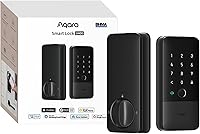
Kwikset Halo vs Schlage Encode: Which Wi-Fi Deadbolt Wins? (October 2026)
For Kwikset Halo vs Schlage Encode, choose Encode for its built-in alarm or Halo for larger guest lists and geofencing. Encode is our overall pick, but door fit and your access routine should settle the choice.
On this page (7 sections)
- Kwikset Halo vs Schlage Encode: which should you choose?
- How do the apps and remote controls compare?
- Which lock fits your door and installation plans?
- What upkeep will these Wi-Fi deadbolts need?
- Is Philips a better choice for fingerprint entry?
- Which everyday mistakes should you avoid?
- Final pick: Kwikset Halo or Schlage Encode?
For Kwikset Halo vs Schlage Encode, choose Encode for its built-in alarm or Halo for larger guest lists and geofencing. Encode is our overall pick, but Halo has the clearer fit if managing frequent visitors is your main reason for replacing a deadbolt.
Both provide remote app control and touchscreen entry through built-in Wi-Fi, without an extra hub. The useful differences are how you share access, which alerts you want and whether phone-based arrival automation belongs in your routine.
Philips is also worth considering if you want fingerprint entry. Neither touchscreen model at the center of this comparison provides that entry method.
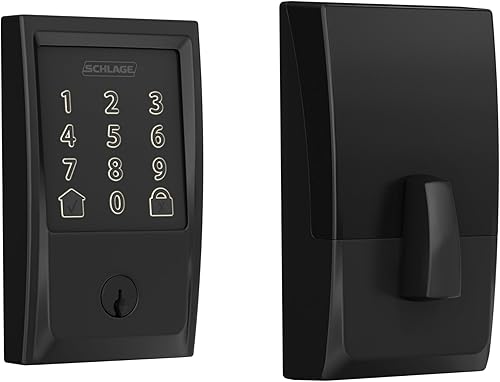

Kwikset Halo vs Schlage Encode: which should you choose?
Choose Schlage Encode for security alerts at the door and Kwikset Halo for guest access flexibility. Don't choose by code capacity alone if only your household and an occasional visitor need access.
Encode suits a front entrance where a built-in alarm is a priority. Schlage also supports managing multiple compatible locks in Schlage Home, which helps if you want one place to manage more than one entrance.
Halo suits a host who wants to separate access for relatives, cleaners and visitors. Its temporary, scheduled and permanent code options let you match access to the reason someone needs to enter.
Skip Encode if fingerprint entry is essential or its code capacity won't cover your needs. Skip Halo if you won't use guest schedules or geofencing and prefer Encode's alarm instead.
Our Wi-Fi smart locks guide covers the wider category. If you're still deciding between a connected deadbolt and other entry hardware, start with our smart locks and keyless entry guide.
Kwikset Halo vs Schlage Encode for shared access
Halo holds up to 250 access codes; Encode holds up to 100. Either can cover a household with a few regular guests, so count active users before treating the difference as decisive.
Separate codes help you manage access without changing everyone's code when one person's visit ends. A single shared guest code creates more work because you can't retire one person's access while leaving everyone else's unchanged.
For Halo, use a temporary or scheduled code when access has an end date. Save permanent access for people who should be able to return without another invitation.
A higher code limit doesn't replace good records. Give codes clear names in the app, keep a separate note of who should still have access, and review that list after guests or service providers leave.
Avoid codes based on your address, birthday or an obvious number pattern. Share access privately, and don't send a code to a group that includes people who don't need it.
Which lock has the more useful security features?
Encode's built-in customizable alarm is the main security feature separating these two locks. It responds to door movement and forced entry attempts, while Halo sends app notifications for invalid code attempts and tampering.
Encode also has a fingerprint-resistant touchscreen and an encrypted connection. Schlage says it carries BHMA's highest residential grades for security, durability and finish; Kwikset describes Halo as Grade AAA certified.
Those certifications don't make a weak door frame stronger. A deadbolt still needs a sound strike area, secure hardware and a bolt that seats fully without pushing or lifting the door.
An app alert also needs your attention to be useful. Choose notifications you can act on rather than turning on every available event and later ignoring them.
Our guide to whether smart locks are safe explains the role of account security, physical hardware and access habits.
How do the apps and remote controls compare?
Both let you manage the door remotely, using Kwikset's app for Halo and Schlage Home for Encode. Reliable Wi-Fi at the entrance matters more than how strong the signal feels elsewhere in the house.
Each app provides activity history, which is useful when you need to check a recent access event. Use separate codes if you want those records to help distinguish one guest from another.
Before letting someone in remotely, confirm who is waiting and why they need access. Don't treat a message from an unfamiliar number as enough reason to open the door.
Both locks support Alexa and Google Home. Finish setup in the lock's own app before adding voice control, then review which household accounts and devices can issue commands.
Keep the app account password unique and enable extra account protection where available. Remove account access from old phones or people who no longer help manage the home.
Our comparison of Wi-Fi and Bluetooth smart locks explains how connection choices affect remote access.
Should you use Halo's geofencing?
Use geofencing if you want phone-based arrival convenience, and keep keypad entry as another way inside. Halo can automatically open the lock as you approach home when that feature is enabled.
Location-based automation depends on phone settings and permissions. Review the app's guidance, keep your phone secured, and confirm the arrival behavior before making it part of a daily routine.
This feature suits someone who usually carries the same phone and wants fewer steps at the door. It is less useful if several people share a phone or you prefer to make an intentional entry action every time.
Set up basic keypad access first. Add geofencing afterward so you can spot whether a problem comes from the door hardware, account setup or phone permissions.
What happens if home Wi-Fi goes down?
Plan to use local entry during an internet outage, rather than remote app commands. Both locks have touchscreen code entry and physical keys, giving you ways inside that don't require a remote command to reach your home.
Encode includes 1 backup key, while Halo includes 2 Kwikset keys. Keep a key somewhere secure that you can reach from outside, rather than leaving every backup behind the locked door.
An internet outage and depleted lock batteries are different problems. Review the instructions for each situation, and make sure another household member knows the backup plan.
Read whether smart locks work without Wi-Fi if outage access is a major buying concern.
Which lock fits your door and installation plans?
Measure the door and fix any binding before choosing either lock. Both support installation with a screwdriver, but an existing deadbolt hole doesn't settle every fit question.
Encode fits doors 1-3/8 to 1-3/4 in thick, with a 2-3/8 or 2-3/4 in backset. Halo covers the same thickness range; Kwikset gives an adjustable backset range of 2-1/8 to 2-3/4 in.
Backset is the distance from the door edge to the center of the lock hole. Compare your measurement with the installation diagram for the exact model, especially if it falls outside common deadbolt dimensions.
Check clearance around existing trim, a nearby handle and any storm door. Leave enough room inside to reach the battery cover without removing other hardware.
Schlage's Snap ‘n Stay design helps hold the lock on the door while you work. Kwikset provides guided setup, and both include installation hardware and instructions.
What should you do during setup?
Confirm smooth manual movement before setting up remote features. With the door open, follow the supplied instructions and make sure the bolt moves freely.
Next, close the door and check that the bolt enters the strike without force. If you must pull the handle hard or lift the door, correct the alignment before relying on the motor.
Complete any required setup or calibration steps in the manufacturer's instructions. Keep the door open during initial configuration when directed, and keep a backup key accessible throughout the job.
Create the household's main access codes before adding guest access or voice control. Then check entry, locking and app status from both sides of the door so everyone understands the controls.
Our smart lock installation guide walks through measurements and door preparation in more detail.
What upkeep will these Wi-Fi deadbolts need?
Battery care and a freely moving bolt are the main ongoing jobs. Don't wait for a missed entry attempt to look at battery warnings or a door that has started sticking.
Encode uses 4 included AA batteries, and Schlage gives a battery-life estimate of up to 6 months with typical use. Low-battery notices appear on its touchscreen and in Schlage Home.
Halo also includes batteries, but don't assume the same replacement interval. Follow its battery instructions and keep suitable replacements somewhere easy to reach.
Replace batteries as a set using the type the manufacturer specifies. Don't mix old and new cells, and check that the battery compartment is dry and clean when replacing them.
Our guide to keypad lock batteries explains how power needs affect everyday use.
How should you care for the touchscreen and bolt?
Keep the touchscreen clean and address friction early. Use the cleaning method allowed in the lock's instructions, avoiding abrasive pads and sprays aimed directly at openings.
A fingerprint-resistant surface still needs care. Wipe away visible dirt and avoid pressing the screen with sharp objects.
Check alignment again if weather changes make the door harder to close. Don't use the motor to pull a poorly aligned door into place, and use only manufacturer-approved lubrication where directed.
Does the warranty change the decision?
Encode offers longer electronics coverage on qualifying purchases. Schlage provides a limited 3-year electronics warranty, while Kwikset provides 1 year; both brands also offer lifetime mechanical and finish coverage subject to their terms.
Schlage restricts its warranty to purchases shipped from and sold by Amazon or Buildcom. Check that condition and retain your receipt if the longer coverage helps decide your choice.
Warranty length doesn't tell you which lock will need service first. Treat it as support protection after door fit and daily usefulness are settled.
Is Philips a better choice for fingerprint entry?
Choose Philips if fingerprint entry would be your preferred daily method. It adds that option alongside app, passcode, physical-key and voice access, giving family members different ways to enter.
The Philips Wi-Fi Smart Deadbolt supports 100 custom passcodes, plus unlimited one-time or scheduled guest codes. That makes it worth considering for guest access as well as everyday family use.
Its network requirement is 2.4 GHz Wi-Fi, and Philips recommends keeping the router within 65 ft for better remote control. Check coverage at the actual door because walls and placement affect signal quality.
Philips fits doors 1-3/8 to 2 in thick. Confirm the full installation dimensions before choosing it for a thicker door, since thickness is only one part of fit.
Batteries aren't included, and Philips specifies AA alkaline LR6 batteries. Have them ready before removing the old deadbolt.
Its auto-lock delay ranges from 10 to 180 seconds, but it has no door sensor. A timer reaching its deadline doesn't confirm that someone has closed the door.
Choose Philips for the extra entry method, rather than assuming a fingerprint reader makes it more secure than either main contender. Our fingerprint lock guide helps frame that choice.
Which everyday mistakes should you avoid?
Avoid sharing one permanent code with everyone or treating auto-lock as a door-closed check. Those habits can weaken the value of the access controls you're buying.
Encode and Halo both offer auto-lock and one-touch locking. Choose a delay that allows your household to finish entering, then make closing the door fully part of the routine.
Don't assume that a lock command means the doorway is secure. Pay attention to error notices, and investigate if the bolt struggles or the reported state doesn't match what you see.
Avoid setting up every automation on installation day. Start with codes and basic app control, then add features one at a time so any problem is easier to trace.
Finally, don't give every guest account-level control when a code will do. Reserve lock management for trusted household members who need to change settings and access.
Final pick: Kwikset Halo or Schlage Encode?
The decision in Kwikset Halo vs Schlage Encode comes down to the job your current lock can't do. Buy Encode if you want a built-in alarm and convenient management of compatible locks at multiple entrances.
Buy Halo if you regularly grant time-limited access or specifically want geofencing. Its larger code capacity matters when you have enough separate users to need it.
Choose Philips instead if entering with a fingerprint is your main goal. Keep a second entry method ready regardless of which lock you choose.
Before ordering, write down your door measurements, check Wi-Fi at the entrance and count who needs access. Use how to choose a smart lock to turn those checks into a final shortlist.
For a closer look at the two main options, read our Schlage Encode review and Kwikset Halo review.
Frequently asked questions
Is Kwikset Halo or Schlage Encode better?
Schlage Encode is our overall pick for buyers who value a built-in customizable alarm and multiple-lock management. Kwikset Halo Wi-Fi is the better fit for larger guest lists or geofencing.
Choose around those differences after confirming door fit, rather than assuming one lock suits every household.
Do Kwikset Halo and Schlage Encode need a hub?
Neither needs an extra hub for remote app access because both connect directly to home Wi-Fi. Halo uses the Kwikset app, while Encode uses Schlage Home.
Check coverage at the door before installation, and remember that remote commands depend on a working home network and internet connection.
How many codes do Kwikset Halo and Schlage Encode support?
Kwikset Halo Wi-Fi supports up to 250 access codes, while Schlage Encode supports up to 100. Halo offers temporary, scheduled and permanent codes through the Kwikset app.
Count people who need separate access, give each person a distinct code, and remove guest access when it ends.
Does Schlage Encode have an alarm?
Yes, Schlage Encode has a built-in customizable alarm for door movement and forced entry attempts. Halo instead provides app alerts for unusual activity, including invalid code attempts and tampering.
Choose Encode if the alarm itself matters, while remembering that secure door hardware and proper installation still matter.
Can Kwikset Halo and Schlage Encode work with Alexa and Google Home?
Both work with Alexa and Google Home for voice control. Schlage specifies pairing through Schlage Home and using a voice-enabled device.
Complete the lock's own setup first, then follow your chosen voice platform's instructions and review account access before making voice commands part of your daily routine.