Schlage Encode vs Encode Plus: Which Should You Buy? (October 2026)
For Schlage Encode vs Encode Plus, choose Encode for keypad and app access or Encode Plus for Apple home keys. Plus makes sense when tapping a compatible iPhone or Apple Watch will be part of your daily entry routine.
On this page (11 sections)
- Schlage Encode vs Encode Plus: what actually changes?
- Who should buy Schlage Encode, and who should skip it?
- Who should buy Schlage Encode Plus, and who should skip it?
- How do entry methods and security compare?
- What should you check before installation?
- How should you set up codes, Wi-Fi and notifications?
- What battery care and daily habits matter?
- When is Schlage Arrive the better choice?
- Which buying mistakes should you avoid?
- What is this comparison based on?
- Schlage Encode vs Encode Plus: the final decision
For Schlage Encode vs Encode Plus, choose Encode for keypad and app access, or Encode Plus if you want to tap an iPhone or Apple Watch at the door. Apple home keys are the clearest reason to choose Plus.
Start with how everyone enters your home, including children, guests and anyone who doesn't carry an Apple device. The right lock should make those everyday visits simple without adding setup you won't use.
If your household prefers physical buttons, Schlage Arrive is also worth considering. It offers a different keypad and more room for individual access codes.

Schlage Encode vs Encode Plus: what actually changes?
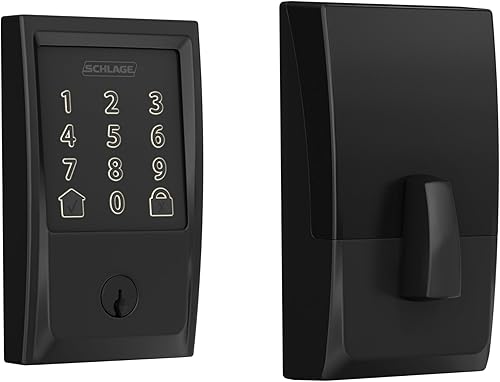
Encode Plus adds Apple HomeKit and Apple home keys, while both models cover the same core keypad and remote-access tasks. Choosing Plus is mainly a decision about your Apple devices and entry habits.
Both have built-in Wi-Fi and Bluetooth, a touchscreen keypad and support for up to 100 access codes. Through Schlage Home on a secure Wi-Fi connection, you can operate the lock remotely, manage codes, view lock history and receive customizable notifications.
Neither needs an extra Wi-Fi hub for that Schlage Home remote access. Both also support voice control through Alexa and Google's smart home system when paired with the app and a voice-enabled device.
Schlage Encode vs Encode Plus for Apple users
Choose Encode Plus if tap entry matters, even if you rarely open a smart-home app. Home keys let you tap a compatible iPhone or Apple Watch to lock or open the door.
Owning an iPhone alone doesn't settle the choice. Think about whether you already wear your watch when coming home or routinely have your phone ready at the door.
If entering a familiar code already suits you, standard Encode may cover your needs. Plus earns its place when its extra entry method solves a task you do often.
Who should buy Schlage Encode, and who should skip it?
Buy Schlage Encode for a code-first household that wants access management from away. It suits people who want visitors to enter without installing an app or learning a smart-home system.
For example, you can give a family member their own code and use remote control when someone needs unexpected access. Separate codes also make the lock history more useful than one shared household code.
Encode includes 1 physical backup key. Keep it somewhere you can reach when needed, rather than inside the home behind the door it serves.
Skip standard Encode if Apple home keys are a must-have. Buying it with the expectation that the Plus feature will appear later is a poor basis for choosing a lock.
Also skip both Encode models if your main preference is a keypad with physical buttons. Their touchscreens won't become a better fit simply because the app features suit you.
Our Schlage Encode review takes a closer look at the standard model if you've settled on code and app access.
Who should buy Schlage Encode Plus, and who should skip it?
Buy Encode Plus when Apple tap access will see regular use by at least one household member. It's especially useful when a watch is already part of that person's daily routine.
A mixed-phone household can still choose Plus. Apple users can use home keys while other household members enter with codes, so everyone doesn't need the same device.
Before buying, work out who will manage the lock and who only needs permission to enter. A visitor usually needs a simple entry method, not access to your household's smart-home controls.
Skip Plus if you're choosing it only because it sounds like the higher model. Its name doesn't give you more code storage or a different door fit than standard Encode.
If you're uncertain about using Apple HomeKit, separate that question from tap access. Write down the Apple features you actually want, then check device compatibility and setup requirements before ordering.
How do entry methods and security compare?
Choose the entry methods your household can use reliably, then build a backup plan around them. An app, keypad and wearable each depend on different things being available at the door.
A code is useful for someone who doesn't carry a phone. Remote app control helps when you're away, while a physical key can be part of a separate access plan.
Both Encode models have fingerprint-resistant touchscreens and customizable built-in alarms for door movement and forced entry attempts. Schlage says both use encrypted connections and carry BHMA's highest residential Security, Durability and Finish certification.
That shared certification doesn't give you a reason to choose Plus over Encode. The added Apple features concern how you operate the door, rather than establishing a stronger physical barrier.
A fingerprint-resistant touchscreen is also not a fingerprint reader. Choose these models for code entry, not because you expect them to recognize a finger.
Keep the rest of the doorway in mind. A secure lock still needs sound mounting, a properly aligned strike and a door frame in good condition.
If you're comparing entry methods beyond these models, our smart lock guide explains the broader choices.
What should you check before installation?
Check door fit and bolt movement before removing your current lock. Both Encode models fit doors 1-3/8 to 1-3/4 inches thick with a 2-3/8 or 2-3/4 inch backset.
Backset is the distance from the door edge to the center of the lock hole. Measure it directly rather than judging from a photo or assuming every exterior door is the same.
Both use screwdriver installation without hardwiring. Schlage's Snap 'n Stay design helps hold the lock on the door while you work, but follow the instructions in order.
Prepare the door before setting up the app
The deadbolt should move freely with the door closed, without lifting the handle or pushing hard against the door. Correct rubbing or strike misalignment before asking a motor to move the bolt.
Seasonal swelling, loose hinges and weatherstripping pressure can all affect door alignment. A new lock won't correct those door problems by itself.
Keep another way into the home available during installation. With the door open, check the lock's operation before closing it and relying on electronic entry.
Our smart lock installation guide walks through the preparation and fitting checks. Choose a time when you can finish both the hardware and access setup without rushing.
How should you set up codes, Wi-Fi and notifications?
Set up household access first, then add remote control and alerts. Everyone who needs routine entry should understand their method before you depend on the lock.
Give each person a separate code where practical. Avoid obvious choices such as an address or repeated digits, and don't use one permanent code for every visitor.
Remove codes when someone no longer needs access. A full code roster is harder to manage than a short, current list with clear names.
Check the connection at the door
Check your home Wi-Fi signal near the installed lock, rather than assuming coverage beside the router tells you enough. Complete pairing with the door in its normal closed position.
Remote app control depends on the lock's secure Wi-Fi connection. If managing entry while away is essential, include home network reliability in your buying decision.
Wi-Fi access and nearby Bluetooth access serve different needs. Our Wi-Fi vs Bluetooth smart lock guide explains that difference before you plan around either connection.
Make alerts useful
Start with notifications that match a real need, such as knowing when a particular person uses the door. Too many routine alerts can make the important ones easier to overlook.
Show household members how to confirm that the door is locked. A history entry records lock activity; it doesn't prove who physically walked through the doorway or whether another person followed.
Both models support voice assistants, but plan those controls around your household's needs. For one related connection, see whether Schlage Encode works with Ring.
What battery care and daily habits matter?
Respond to battery warnings and keep the bolt moving freely. Those habits matter more than treating a battery-life estimate as a fixed replacement date.
Schlage Encode uses 4 included AA batteries, with low-battery warnings on the touchscreen and in Schlage Home. Schlage claims up to 6 months of battery life with typical use.
Use that estimate for planning, then follow the actual warnings and the model's battery instructions. Don't transfer Encode's battery-life claim to Encode Plus.
Check for rubbing if the door becomes harder to lock as the weather changes. Correct the fit rather than repeatedly forcing the bolt or ignoring a new strain in its movement.
For cleaning, follow Schlage's finish-care instructions. Avoid spraying liquid into the keypad or openings, and keep abrasive cleaning tools away from the finish.
Standard Encode offers adjustable auto-lock delays, an option to turn auto-lock off and one-touch exterior locking. Choose a delay around your habits, especially if you often step outside briefly without your entry backup.
A lock command is not a substitute for closing the door. Build the habit of checking the latch and door position before walking away.
For outage planning, read how smart locks work without Wi-Fi. Separate the loss of remote internet access from the entry methods your chosen model supports locally.
When is Schlage Arrive the better choice?
Choose Schlage Arrive if you prefer physical buttons or need a larger code roster. Its backlit, all-weather silicone keypad gives you a different way to enter from either Encode touchscreen.
Arrive supports up to 250 codes through Schlage Home. That capacity helps when you need to keep separate credentials for a longer list of authorized people.
Extra capacity isn't a reason to keep unused codes active. Review access regularly, particularly after a guest visit or a change in household arrangements.
Arrive also offers remote app control, lock history, notifications and Alexa and Google Home support. Schlage says codes and schedules stay active during power or Wi-Fi outages, with nearby app access available over Bluetooth.
That stated outage behavior may help if local access continuity is high on your list. It doesn't preserve remote internet control when your home network is down.
Skip Arrive if your main goal is Apple home keys. Encode Plus is the choice for that feature among these 3 locks.
| Product | Best for | Access | Connectivity | Codes | Our score |
|---|---|---|---|---|---|
| Schlage Encode | code-first households | Touchscreen keypad, app, physical key | Wi-Fi, Bluetooth | Up to 100 | 9.1 |
| Schlage Encode Plus | Apple households | Touchscreen keypad, app, Apple home keys | Wi-Fi, Bluetooth | Up to 100 | 7.4 |
| Schlage Arrive | button-preferring households | Push-button keypad, app | Wi-Fi, Bluetooth | Up to 250 | 7.3 |
Which buying mistakes should you avoid?
Avoid choosing by model name before checking fit, entry habits and access needs. A feature you won't use shouldn't outweigh a daily task the lock must handle well.
- Assuming Plus means more codes: It adds Apple access features without increasing capacity over Encode.
- Treating every household member as the same user: A watch wearer, a child and a visiting relative may need different ways to enter.
- Leaving backup access until later: Decide how you'll enter if your usual device or method isn't available.
- Fitting the lock to a sticking door: Correct alignment before completing installation.
- Sharing a permanent visitor code: Separate credentials are easier to remove without disrupting everyone else.
- Confusing hub-free Wi-Fi with every Apple requirement: Check the requirements for your intended Apple setup separately.
If these choices still feel unsettled, use our guide to choosing a smart lock. Start with the doorway and household routine, then narrow the models.
What is this comparison based on?
The recommendations focus on access methods, door fit, code management and smart-home support. Encode fits code-first households, Plus adds a reason for Apple users to switch entry methods, and Arrive serves people who prefer buttons.
For manufacturer guidance, see Schlage's Encode Plus information and Schlage's Encode information. Use the instructions for your exact model during installation and setup.
Schlage Encode vs Encode Plus: the final decision
Pick Encode when codes are your household's main entry method; pick Encode Plus when Apple tap access has a clear daily role. Choose Arrive instead if physical buttons solve the bigger problem.
Before ordering, confirm your door measurements, each person's entry method and your backup access plan. Those checks turn Schlage Encode vs Encode Plus from a feature comparison into a decision you can use.
If neither feels settled and you're open to another brand, our Kwikset Halo vs Schlage Encode comparison is the next useful comparison.
Frequently asked questions
What is the main difference between Schlage Encode and Encode Plus?
Apple home keys are the main difference: Schlage Encode Plus lets you tap a compatible iPhone or Apple Watch to operate the lock. Both models offer touchscreen entry, remote Schlage Home app control and the same code capacity, so choose Plus when Apple tap access serves your household.
Does Schlage Encode Plus need a hub?
Schlage Encode Plus needs no separate Wi-Fi hub for remote control through the Schlage Home app. It connects directly to secure home Wi-Fi.
Treat that separately from Apple HomeKit setup: check Apple's current requirements for the specific home features and devices you plan to use.
Can Schlage Encode work with Apple home keys?
Choose Schlage Encode Plus for Apple home keys support. The standard Encode is the choice for keypad and Schlage Home app access in this comparison.
If tap entry is essential, check the model name carefully before ordering, since Encode and Encode Plus share much of their naming.
How many access codes can Schlage Encode and Encode Plus store?
Schlage Encode and Encode Plus each support up to 100 access codes managed through the Schlage Home app when connected to secure Wi-Fi. Schlage Arrive supports up to 250.
Give each authorized person a separate code where practical, and remove access when that person no longer needs it.
Is Schlage Encode Plus better than Schlage Encode?
Schlage Encode Plus is better for households that will use Apple home keys regularly. Standard Encode is the stronger fit when codes and remote app access cover your needs.
Plus does not increase code capacity, so choose by your entry routine rather than assuming its name means every feature improves.



