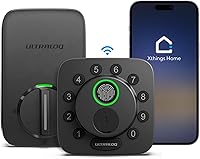
Does the Schlage Encode Work With Ring?
Yes, Schlage Encode works with Ring. Choose it for a Ring-compatible touchscreen lock, then confirm that Ring supports the exact control or routine you need.
On this page (8 sections)
- Does Schlage Encode work with Ring?
- What does Ring compatibility mean for daily use?
- Which Schlage lock should you consider for Ring?
- How do you set up Schlage Encode with Ring?
- What should you check before choosing a lock?
- How should you manage codes, batteries, and daily use?
- Which mistakes cause trouble with a Ring lock setup?
- Does Schlage Encode work with Ring: which should you choose?
Yes, Schlage Encode works with Ring, but check the exact Ring action you need before buying. Choose the lock around how your household enters the door, then confirm that your preferred camera workflow or routine is supported.
Built-in Wi-Fi gives Encode remote management through the Schlage Home app without an extra hub. Ring compatibility is a separate feature, so app access alone doesn't tell you what you'll be able to do inside Ring.
Does Schlage Encode work with Ring?
Schlage identifies Encode as Ring compatible. That makes it a suitable starting point for a Ring household that wants a touchscreen deadbolt.
Start with a clear goal: checking lock status, controlling the lock, or using it alongside a doorbell camera. Find instructions that name both your exact lock and the function you want.
A compatibility label shouldn't stand in for that check. Support for a connection doesn't establish every camera workflow, account requirement, or automated action.
Encode also supports Alexa and Google Home through the Schlage Home app and a voice-enabled device. Treat voice control as its own setup choice, with permissions you understand.
Our guide to Wi-Fi smart locks explains how a home network connection fits into remote lock management.
What does Ring compatibility mean for daily use?
Build your daily access plan around the lock's own controls, then add the Ring features that serve a clear purpose. You'll have fewer decisions to troubleshoot if each part of the setup has a defined job.
The Schlage Home app lets you manage entry codes, view lock history, receive customizable notifications, and lock or open Encode remotely. Remote management requires the lock to be paired with the app and connected to secure Wi-Fi.
For a household member, a personal entry code may be simpler than installing another app. For someone who manages visitors while away, app access and useful notifications may matter more.
If you want to open the door while viewing a Ring camera, verify that exact workflow before making it part of your routine. Keep visitor identification separate from the decision to grant entry.
Read how smart locks work if you need a clearer picture of the roles played by the keypad, app, wireless connection, and smart home service.
Which Schlage lock should you consider for Ring?
Choose Encode for touchscreen entry or Arrive for physical buttons. Consider Encode Plus when Apple home keys are a priority, after confirming any Ring support you need.
All 3 provide built-in Wi-Fi for remote management through the Schlage Home app. Their entry controls and access-code capacity are more useful buying distinctions than their similar names.
Schlage Encode: who should buy it for Ring?
Encode suits Ring households that prefer a touchscreen and need up to 100 access codes. It's a sensible choice for family members, regular visitors, and service access without moving to a larger code capacity.
Its included physical backup key gives you another entry method. Auto-lock offers adjustable delays or can be turned off, while one-touch exterior locking makes leaving simpler.
Skip Encode if physical buttons are a firm preference or Apple home keys are the main reason you're replacing the lock. Its fingerprint-resistant touchscreen is still a touchscreen, so choose the interface everyone at home can use comfortably.
The Schlage Encode review covers its features in more detail.
Schlage Encode Plus: who should choose Apple home keys?
Encode Plus suits households that want iPhone or Apple Watch entry. Apple HomeKit and Apple home keys are the main reasons to choose it over the standard Encode.
Home keys let you tap a compatible iPhone or Apple Watch to lock or open the door. Plus also supports up to 100 access codes, so household members don't all need to use the same entry method.
Skip Plus if nobody will use its Apple features and Ring is your only reason for buying. Ring support for this exact model needs confirmation, so don't assume the shared Encode name settles it.
Our Encode vs Encode Plus comparison helps you decide whether Apple access changes the choice for your household.
Schlage Arrive: who should choose physical buttons?
Arrive suits people who prefer pressing buttons and households that need room for more individual access codes. Its backlit, all-weather silicone keypad and capacity for up to 250 codes separate it from the Encode models.
Arrive also links with Alexa and Google Home for voice control and automated routines. During a power or Wi-Fi outage, its battery-powered codes and schedules stay active, with nearby Schlage Home app access available through Bluetooth.
Choose it for button entry or a large guest-access roster. Skip it if you're buying mainly for Apple home keys, or if a smaller household would get no benefit from the extra code capacity.
How do you set up Schlage Encode with Ring?
Install Encode and confirm Schlage Home app access first, then follow Ring's instructions for the supported connection. Separating those steps makes a setup problem easier to locate.
Use this order:
- Measure the door. These locks fit doors 1-3/8 to 1-3/4 inches thick, with a 2-3/8-inch or 2-3/4-inch backset.
- Check the existing deadbolt. It should move freely with the door open and closed, without lifting or pushing the door.
- Install the lock. Follow Schlage's instructions with a screwdriver; no hardwiring is required.
- Set up Schlage Home. Pair the lock, connect it to your secure home Wi-Fi, and create your household access codes.
- Check remote access. With another entry method available, confirm app control while your phone is away from the home Wi-Fi connection.
- Add the Ring connection. Follow the official steps for your exact model and confirm the action you intend to use.
Keep the door open while checking new codes for the first time. After that, check operation with the door closed while someone remains inside.
Our guide to installing a smart lock explains door fit and alignment checks.
Does Schlage Encode need a hub for Ring?
No extra hub is needed for Encode's Schlage Home remote access. That doesn't settle the equipment or account requirements of a particular Ring feature.
Check Ring's support instructions before buying accessories. Use instructions for the exact model rather than a guide for a different Schlage lock.
What should you check before choosing a lock?
Door fit, entry preference, and the required Ring action should decide the purchase. A lock that supports your smart home still needs to suit the people using the door.
Check Wi-Fi coverage near the closed front door before relying on remote management. If the signal is unreliable there, address the network rather than expecting the lock to solve it.
Ask each household member how they want to enter. Touchscreens, physical buttons, and phone-based access create different daily habits, especially for children, visitors, and people who leave phones behind.
Count the people who need their own codes, rather than choosing the largest capacity by default. A small household may benefit more from clear access rules than from space for many unused codes.
Encryption and security features also deserve attention apart from Ring. Schlage says all 3 locks carry BHMA's highest residential Security, Durability, and Finish rating, while Encode and Encode Plus include customizable alarms for door movement and forced-entry attempts.
For broader security questions, see are smart locks safe?. Our guide to choosing a smart lock can help you weigh entry methods against your door and household needs.
How should you manage codes, batteries, and daily use?
Give each regular user a separate code and keep a backup entry plan. Separate codes make it easier to remove one person's access without changing everyone else's.
Avoid using your street number or an easy repeated pattern. Remove visitor access when it's no longer needed, and review the code list after a move, staff change, or long visit.
Encode uses 4 AA batteries, with low-battery notices on its touchscreen and in the Schlage Home app. Schlage estimates up to 6 months with typical use, so treat the alerts as the replacement cue rather than relying on a calendar alone.
Keep its backup key somewhere you can reach without entering the locked house. Don't leave your only spare behind the door it opens.
For routine care, follow Schlage's cleaning instructions and keep the keypad free of buildup. If the bolt starts dragging, check door alignment instead of repeatedly running the motor against resistance.
Our guide to smart locks without Wi-Fi explains why local entry and remote control need separate plans.
Which mistakes cause trouble with a Ring lock setup?
The biggest mistakes are assuming compatibility transfers between models and skipping basic door checks. Both can leave you with a lock that misses the reason you bought it.
Don't choose Encode Plus solely because standard Encode supports Ring. Confirm model-specific support before placing the order.
Don't buy a hub until you've found a requirement for your intended connection. Direct Wi-Fi app management and smart home integrations can have different needs.
Avoid enabling several routines at once. Add one, check its behavior, and keep only the actions that improve your daily use.
Set Encode's auto-lock delay around how you use the doorway. A delay that's too short can interrupt unloading or repeated trips outside, so keep an entry method with you.
Does Schlage Encode work with Ring: which should you choose?
Choose Schlage Encode for a Ring-compatible touchscreen lock, or Arrive if physical buttons better suit your household. Choose Encode Plus for Apple home keys once any required Ring support is confirmed.
Make the final decision in this order: supported Ring action, door fit, then preferred entry method. If the lock style itself is still undecided, the smart lock and keyless entry guide is the next useful read.
Frequently asked questions
Does Schlage Encode work with Ring?
Yes, Schlage Encode is Ring compatible. Choose it if you want a touchscreen deadbolt that also connects directly to home Wi-Fi for Schlage Home app management.
Confirm that Ring supports your intended action before buying, especially if a specific camera workflow or automated routine is essential.
Does Schlage Encode need a Ring hub?
Schlage Encode needs no extra hub for remote management through the Schlage Home app because it connects directly to home Wi-Fi. Requirements for a Ring feature are a separate question.
Check Ring's instructions for the exact model and action before buying a hub or other accessory.
Can Ring control a Schlage Encode?
Check Ring's current instructions for the specific controls available with Schlage Encode. Ring compatibility doesn't establish every possible action or routine.
The Schlage Home app provides remote locking and opening when Encode is paired with the app and connected to a secure Wi-Fi network, giving you a separate management option.
Does Schlage Encode Plus work with Ring?
Confirm Ring support for Schlage Encode Plus before choosing it for that purpose. Its supported features include Apple HomeKit, Apple home keys, Alexa, and Google Assistant.
Pick Plus for its Apple access options only if those matter to your household; the Encode name alone doesn't establish Ring compatibility.