Aqara U400 Smart Lock Review: Worth It? (October 2026)
The Aqara U400 suits Apple households that want hands-free entry and have compatible devices and a Thread-enabled Apple Home hub. Choose it for UWB convenience; choose a Wi-Fi alternative if remote app control is your main goal.
On this page (11 sections)
- Aqara U400 at a glance
- Which U400 entry method should each person use?
- How does Matter over Thread affect setup?
- What should you check before fitting the U400?
- How should you manage charging and daily care?
- Is the Aqara U400 suitable for an exterior door?
- Aqara U400 vs U100: which Aqara lock fits better?
- Aqara U400 vs Schlage Encode: what changes?
- When is the Schlage Encode Plus a better fit?
- Which mistakes should U400 buyers avoid?
- Is the Aqara U400 the right choice for your home?
The Aqara U400 is worth choosing for hands-free entry in a compatible Apple household. Its UWB feature lets you approach the door without reaching for your phone, making it useful when you carry groceries, hold a child's hand or wear gloves.
Buy it for that daily convenience, rather than simply for a long feature list. If remote app access is your main goal, the Schlage Encode review covers a built-in Wi-Fi alternative that needs no separate hub.
Aqara U400 at a glance
The U400 combines approach-based entry and several backup methods, but its strongest feature depends on your Apple hardware. It makes the most sense when the required devices already fit your household.
Aqara U400
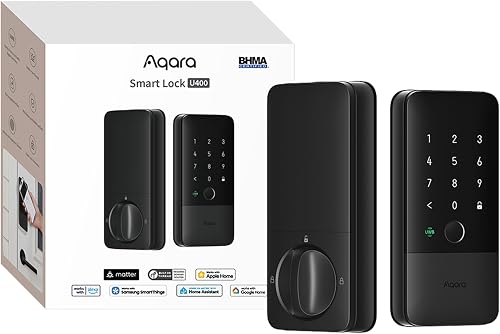
- Matter over Thread
- UWB hands-free entry
- Fingerprint and passcode
- Rechargeable battery
Choose the U400 if compatible Apple devices can handle your daily entry and you want fingerprint, code and key backups. Check your controllers before planning connections to several smart home platforms.
Pros
- UWB approach-based entry with supported Apple devices
- Fingerprint, passcode and physical key alternatives
- Can connect to multiple Matter platforms
- USB-C charging can keep the lock online
Cons
- UWB needs compatible Apple hardware and software
- Each platform requires its own Thread-enabled Matter controller
- NFC card is sold separately
Alongside UWB, it supports Apple Home Key, fingerprint, touchscreen passcode, voice assistant control, remote app access, an optional NFC card and a physical key. That range helps a household avoid forcing everyone to use the same method.
The main reason to skip it is simple: if you won't use UWB, compare alternatives around the entry method you actually prefer. Fingerprint access, tap entry and remote code management each lead to a different buying choice.
How does Aqara U400 UWB entry work?
UWB uses range and angle measurements to identify your approach. Aqara says the U400 distinguishes movement toward the entrance from someone walking past or standing nearby.
That suits repeated trips home with full hands. Choose it if removing the pause at the keypad matters more to you than tapping a device deliberately.
UWB requires a Thread-enabled Apple Home hub and one of these supported devices:
- iPhone: iPhone 11 or later, excluding iPhone SE and iPhone 16e, with iOS 18.5 or later.
- Apple Watch: Series 6 or later, excluding SE, with watchOS 11.5 or later.
Check every person's exact device, rather than assuming a recent Apple purchase qualifies. Someone with an excluded model can use another entry method, but won't get the feature that makes this lock stand out.
Which U400 entry method should each person use?
Give each household member a daily method and a backup. A parent carrying bags may prefer UWB, while someone who leaves their phone indoors may find a fingerprint or passcode more useful.
Apple Home Key provides deliberate tap entry. On the U400, it requires an Apple Thread-enabled Matter controller: HomePod 2nd Gen, HomePod mini or Apple TV 4K 2021/2022.
Don't confuse tapping with approaching. If you want to decide exactly when the door opens, Home Key may suit your routine better than automatic approach detection.
Passcodes help people who don't want to carry a phone or card. Give people separate codes where supported, avoid easy sequences, and remove access when it is no longer needed.
An NFC card is another option, but it is sold separately. Choose it only if carrying a dedicated card solves a real need.
Keep a physical key accessible outside the locked home through a trusted arrangement. Our guide to fingerprint door lock safety explains the wider security questions to consider when choosing biometric entry.
How does Matter over Thread affect setup?
The U400 can connect to multiple smart home platforms at once, but each platform requires its own Thread-enabled Matter controller. Matter support does not mean every hub you own will work.
Before buying, write down the platforms you use and the tasks you expect from each. Check remote control, household access and planned routines separately, since Aqara notes that features can vary by platform.
Don't buy several controllers just because the lock supports several ecosystems. Start with the platform you use daily, then add another connection only if it provides a useful control or routine.
The Aqara app adds Auto Lock, Night Latch Mode and Do Not Disturb Mode. Night Latch Mode restricts nighttime entry to admins and physical keys, so consider late arrivals before enabling it.
The U400 also works with Aqara G5 Pro cameras and G410 doorbells for viewing visitors and operating the lock through live video. That matters most if those devices are already part of your entry setup.
For another platform-specific example, read whether the Yale Assure Lock 2 has Matter. Our Wi-Fi and Bluetooth smart lock guide explains why connection type changes the equipment you need.
What should you check before fitting the U400?
Confirm door fit and free bolt movement before setting up apps. A smart motor cannot correct a sagging door or a strike opening that catches the bolt.
Check door thickness, backset, existing holes and clearance against Aqara's installation instructions. Don't use the lock's outer dimensions as a substitute for installation measurements.
With your current deadbolt, check whether the bolt moves freely when the door is both open and closed. If you must push, lift or pull the door to turn the key, resolve the alignment first.
Follow Aqara's installation and pairing instructions in order, keeping the door open during the first operating checks. Confirm manual operation before relying on automatic functions.
Then check entry from outside with another person inside or with a working backup available. Try each household member's chosen method and confirm the bolt fully retracts and extends.
Our smart lock installation guide covers the preparation in more detail. If you're still comparing door fit and household needs, use how to choose a smart lock before ordering.
How should you manage charging and daily care?
Charge the U400 when its low-battery alert sounds, rather than waiting for it to stop working. Aqara claims up to 6 months per charge, and the voice warning starts below 20%.
Its removable lithium battery can charge separately, or you can use the lock's USB-C port while it stays online. Choose a charging routine that leaves your household with a working entry method throughout.
If you remove the battery, plan to use the mechanical key during that time. Keep the charging cable ready, and arrange it so it cannot catch in the door.
For routine care, follow Aqara's cleaning guidance and keep dirt away from the keypad, reader and keyway. Don't spray cleaner directly into openings or use unapproved lubricants.
Check door alignment again if operation becomes stiff. Also review stored access and automatic settings when someone moves out, a guest leaves or your household schedule changes.
Is the Aqara U400 suitable for an exterior door?
The U400 has an IP65-rated exterior, and Aqara says it is BHMA-certified. Its aluminum body and rekeyable design support use as an exterior deadbolt, subject to the installation requirements.
The exterior protection does not make the entire assembly suitable for every exposure. Follow Aqara's guidance for placement and keep interior components protected as instructed.
Rekeying lets you change the physical key without replacing the entire cylinder. Consider that option if an old key is missing or someone who should no longer have access still has a copy.
Treat the whole doorway as part of the security decision. A loose strike plate, damaged frame or door that won't latch properly needs attention alongside the lock.
Aqara U400 vs U100: which Aqara lock fits better?
Choose the U400 for approach-based entry; choose the U100 when fingerprint and keypad access cover your needs. The U100 is also worth considering if you already use an Aqara Zigbee 3.0 hub.
The U100 stores up to 50 fingerprints and offers locally generated one-time visitor passwords that work without internet. Remote password setup and third-party integrations require that Aqara hub.
It also supports Apple Home Key, with an Apple Home Hub required for sharing home keys. Its auto-lock feature uses a built-in gyroscope to lock after the door closes, and Do Not Disturb can mute sounds during chosen hours.
Power comes from 4 AA batteries, with Aqara claiming up to 8 months of use and providing USB-C emergency power. Choose this approach if keeping spare cells suits you better than recharging a removable pack.
Skip the U100 if UWB is your reason for shopping. Don't choose it expecting the U400's Thread setup, either: its connection approach is Bluetooth and Zigbee.
Aqara U400 vs Schlage Encode: what changes?
Choose Schlage Encode for remote code management over home Wi-Fi. Choose the U400 when approach-based or fingerprint entry matters more than avoiding an extra controller.
Encode manages up to 100 access codes through the Schlage Home app and provides lock history and notifications. Its built-in Wi-Fi connects directly to your secure home network without a separate hub.
It includes a customizable alarm for door movement and forced entry attempts, plus a physical backup key. Schlage claims up to 6 months of typical use from its 4 AA batteries.
This is the clearer choice for someone who wants to manage access while away and expects everyone to use a keypad. Skip it if you specifically want Apple Home Key; Encode Plus is the Schlage option here for that feature.
Both Schlage models fit doors 1-3/8 to 1-3/4 inches thick with a 2-3/8- or 2-3/4-inch backset. Confirm those measurements before choosing either model.
When is the Schlage Encode Plus a better fit?
Choose Encode Plus for Apple tap entry with built-in Wi-Fi. It suits someone who wants to present an iPhone or Apple Watch at the door and manage remote access through the Schlage Home app.
It supports up to 100 access codes, lock history, notifications and a customizable alarm. Alexa and Google Assistant voice control require the Schlage Home app and a voice-enabled device.
Skip Encode Plus if approach-based UWB entry is the feature you want from the U400. A deliberate tap is a different daily routine, even though both products can suit Apple households.
Read Schlage Encode vs Encode Plus if the choice has narrowed to those two. The key decision is whether Apple Home Key adds something you will use every day.
Which mistakes should U400 buyers avoid?
Avoid choosing the U400 before checking compatibility and household routines. The most costly mistakes involve buying equipment for a feature someone cannot use.
- Assuming all Apple devices qualify: check the exact model and software version for every intended UWB user.
- Treating all hubs as interchangeable: confirm the controller required for each platform and feature.
- Skipping door alignment: correct rubbing or sticking before fitting a motorized deadbolt.
- Enabling automatic settings too soon: confirm normal entry and bolt movement first.
- Keeping every backup indoors: arrange access to a key if the door is locked and electronics are unavailable.
- Ignoring nighttime access: review Night Latch permissions before someone arrives late.
Start with a simple setup, then add routines one at a time. That makes it easier to identify which setting needs attention if the door behaves differently from what your household expects.
Is the Aqara U400 the right choice for your home?
Buy the Aqara U400 if compatible Apple devices and hands-free entry match your daily routine. Check door fit first, then confirm the hub and device requirements before committing to it.
Choose the U100 if fingerprints, codes and your existing Aqara setup cover the job. Pick Schlage Encode for remote code management without a separate hub, or Encode Plus when Apple tap entry is the deciding feature.
If none of those routines fits your household, compare the wider options in our smart lock guide. Your best choice is the lock everyone can use reliably, with a backup they can reach.
Frequently asked questions
Does the Aqara U400 need an Apple hub?
Yes, UWB entry needs a Thread-enabled Apple Home hub. Apple Home Key requires a compatible Apple Thread-enabled Matter controller, such as HomePod 2nd Gen, HomePod mini or Apple TV 4K 2021/2022.
Check your phone or watch compatibility separately, since owning a suitable hub does not make every Apple device eligible.
Can the Aqara U400 work with Google Home or Alexa?
Yes, the U400 supports Google Assistant and Amazon Alexa through Matter over Thread. Each ecosystem requires its own Thread-enabled Matter controller, and features can vary by platform.
Confirm the controls and routines you need before buying controllers, especially if you plan to connect the lock to several platforms.
Does the Aqara U400 have a physical key?
Yes, the U400 includes a physical key and has a rekeyable design. That gives you a mechanical backup alongside its electronic entry methods.
Keep the key somewhere accessible if you cannot enter the house, rather than in a drawer behind the locked door, and avoid obvious outdoor hiding places.
How is the Aqara U400 powered?
The U400 uses a removable, rechargeable lithium battery, with Aqara claiming up to 6 months per charge. You can charge through the lock's USB-C port while it stays online or remove the battery for separate charging.
A voice alert sounds below 20%, which is a prompt to charge soon.



