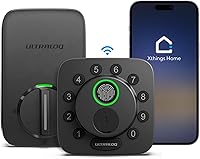
How Do Smart Locks Work?
Smart locks work by checking an approved code, fingerprint, or phone command, then using a battery-powered motor to move the bolt. Remote control needs a supported network connection; a physical key provides mechanical entry on models with a key cylinder.
On this page (9 sections)
- How do smart locks work when you open the door?
- What connects a smart lock to your phone?
- How do codes, fingerprints, and guest permissions work?
- Do smart locks need batteries, and what happens when they run out?
- What should you check before installing a smart lock?
- Which smart lock suits your household?
- How should you set up and care for a smart lock?
- Are smart locks safe to use?
- How do smart locks work best for your routine?
Smart locks work by checking an approved code, fingerprint, or phone command, then using a battery-powered motor to move the locking mechanism. The door still depends on a physical bolt and strike plate to stay secured.
The key buying choice is how you want to enter and manage access. Local keypad entry, remote phone control, and smart-home routines solve different needs, so start with your daily routine before comparing extra features.
How do smart locks work when you open the door?
A smart deadbolt checks your entry request and, if accepted, turns the bolt out of the door frame. It releases the lock; you still turn the handle or pull the door open yourself.
A keypad compares your code with saved codes. A fingerprint reader checks an enrolled print, while an app sends a command through a supported connection.
How does a smart lock work with a physical key?
A physical key turns the lock’s mechanical parts without electronic approval. On a model with a key cylinder, this provides a way in when electronic entry is unavailable.
That makes key storage part of your setup. A backup key left inside the locked house cannot help if you arrive home to dead batteries.
For the differences between deadbolts, handles, and other entry hardware, see our smart locks and keyless entry guide.
What connects a smart lock to your phone?
Bluetooth, Wi-Fi, and smart-home networks connect locks to phones in different ways. Choose the connection that supports where you need control, rather than assuming every app works from anywhere.
Bluetooth usually provides nearby phone control. Built-in Wi-Fi can connect a lock to your home network for remote commands, often through the brand’s online service.
Other locks communicate through compatible home equipment. Matter is a smart-home compatibility standard, while Thread is a wireless network that can carry those commands.
Check the exact lock, app, and hub requirements together. A familiar voice assistant logo does not mean every feature works without extra equipment.
How does a Wi-Fi smart lock work remotely?
A Wi-Fi smart lock receives commands through your internet connection and home network. Remote control depends on lock power, network access, and the service handling the command.
A failed remote command does not necessarily mean local entry has failed. Read whether smart locks work without Wi-Fi to plan for outages.
Our guide to Wi-Fi smart locks covers connected options. For nearby phone control versus away-from-home access, compare [Wi-Fi vs.
Bluetooth smart locks](/smart-lock-wifi-vs-bluetooth/).
How do codes, fingerprints, and guest permissions work?
Each entry method needs approval in advance, either through saved credentials or an authorized account. Set permissions around who needs access and when.
Give household members separate codes where supported. That lets you remove one person’s access without changing everyone’s code, and makes activity history more useful.
Scheduled codes suit a cleaner’s regular visit; temporary codes suit a short stay. Check the start time, end time, and app time zone before relying on a guest schedule.
Enroll fingerprints as the instructions direct, using the finger positions you naturally use at the door. Keep an alternate method available for a wet finger, a covered hand, or a missed read.
For remote entry, confirm the visitor and door before sending a command. Review voice-assistant settings too, including any confirmation requirements for opening the lock.
Do smart locks need batteries, and what happens when they run out?
Electronic entry needs power, even when it works without internet. Batteries supply the motor, keypad, reader, and wireless functions.
Battery-life estimates depend on use and connection conditions. Frequent motor operation, a binding bolt, and wireless activity can affect how often batteries need replacing.
Follow the brand’s battery instructions and replace batteries promptly after a warning. Avoid mixing old and new cells, and check the compartment for corrosion during changes.
Do not confuse a network outage with a dead battery. A saved keypad code may still work without internet, but it cannot power a dead motor.
Read whether keypad door locks need batteries for more on power and backup access.
What should you check before installing a smart lock?
Check door fit, bolt alignment, and interior clearance before buying. A motor cannot correct a door that needs lifting or pushing to make the deadbolt turn.
Measure door thickness, bore size, and backset, which is the distance from the door edge to the hole’s center. Compare those measurements with the chosen model’s instructions.
Check clearance around the interior assembly and battery cover, especially near trim or another handle. Renters should also confirm permission before replacing hardware.
Our smart lock installation guide explains the process. Use how to choose a smart lock for your front door to work through fit before ordering.
Which smart lock suits your household?
Pick by daily entry habits and existing home equipment. These 3 models illustrate different reasons to choose connected entry, rather than treating every extra feature as essential.
Philips Wi-Fi Smart Deadbolt: for managing visitors
The Philips suits households that need separate access for family and visitors. It supports up to 100 custom passcodes, plus one-time and scheduled guest codes.
Entry options include fingerprints, an app, a physical key, and Alexa or Google Assistant voice control. Built-in Wi-Fi needs no extra hub, but requires a 2.4 GHz network.
Its auto-lock timer runs from 10 to 180 seconds, but it has no door sensor. The timer cannot confirm that someone has closed the door.
Skip it if confirmed door-closed status is essential. It also requires AA alkaline LR6 batteries, which are not included.
eufy C220: for Apple Watch and eufy households
The eufy C220 suits people who want Apple Watch entry or shared eufy doorbell routines. Fingerprint, keypad, app, physical-key, and voice entry provide other ways in.
Its built-in Wi-Fi works without a bridge. Through the eufy Security app, you can manage user profiles and set scheduled codes.
Eufy gives an estimate of around 8 months from 8 AA batteries, depending on use. Those batteries are included.
Skip it if you need a cylinder that can be rekeyed to match an existing house key: the C220 cannot be rekeyed. Our eufy C220 review covers its fit for daily entry.
Ultraloq Bolt SE Wi-Fi: for Matter-based homes
The Ultraloq suits households that want Matter-over-Thread integration alongside built-in Wi-Fi. Its Matter route requires a compatible Thread Border Router; direct 2.4 GHz Wi-Fi control does not require a hub.
It supports fingerprints, passcodes, app and web-portal control, shared eKeys or codes, voice commands, and mechanical keys. Choose it when managing access through a broader smart-home setup matters.
Ultraloq ties its up-to-18-month battery claim to Thread’s low-energy network. Do not use that figure as an expectation for every connection setup.
Skip it if Matter is your main reason for buying and you do not want the required home equipment. It also lacks an included door sensor, so timed locking does not confirm closure.
How should you set up and care for a smart lock?
Complete setup with the door open, then check closed-door operation while you have another way in. This reduces the chance of an installation mistake locking you out.
Follow the model’s cable-routing and mounting instructions. Run any required direction-learning or calibration step before creating household access.
Check several full bolt cycles with the door open, then closed. If the motor strains only with the door closed, fix alignment rather than trying to solve it in the app.
Connect the app, change any default credentials, and add users individually. Confirm each person can enter before making that method part of their routine.
Start with a practical auto-lock delay, then adjust it after observing your routine. A delay that is too short can extend the bolt before the door closes.
Keep the keypad and fingerprint reader clean using the brand’s care instructions. Address a sticking door promptly, and review guest permissions after visits end.
Are smart locks safe to use?
Security depends on the door, lock, accounts, and access settings together. A strong app password cannot make up for a loose strike plate or a bolt that does not fully extend.
Keep supported lock software and phone apps current. Use a unique account password and enable additional account verification where available.
Protect the phone that controls the lock, and remove access for lost devices or former guests. Avoid sharing the main administrator account with everyone who needs entry.
Read whether smart locks are safe for more on physical security and account risks. Treat activity history as access information, not proof that the door is closed.
How do smart locks work best for your routine?
Choose local entry first, remote features second when deciding how smart locks should work for your home. Someone who only wants to stop carrying keys may need fewer connected features than someone managing guests from work.
Pick Philips for flexible visitor codes, eufy C220 for Apple Watch entry or eufy routines, and Ultraloq for a planned Matter-over-Thread setup. Rule out any option that fails your door-fit or backup-entry requirements.
Before buying, decide who will enter, how you will replace batteries, and where the backup key will stay. For help weighing those duties against convenience, read whether smart locks are worth it.
Frequently asked questions
How do smart locks work?
Smart locks work by checking an approved electronic entry method, then using a motor to move the locking mechanism. A keypad checks a code, while a fingerprint reader checks an enrolled print.
Batteries power these functions, and models with a key cylinder also allow mechanical entry.
Do smart locks need Wi-Fi to work?
No, smart locks can provide local keypad or fingerprint entry without Wi-Fi, depending on the model. Those electronic methods still need battery power.
Remote phone control usually needs an internet connection through built-in Wi-Fi or compatible home equipment, so confirm which functions remain available during an outage.
What happens if a smart lock battery dies?
Electronic entry can stop when the batteries die, so you need the backup method specified for your lock. All 3 models discussed here include physical keys for mechanical entry.
Keep a key accessible outside the locked home, respond to low-battery warnings, and replace batteries according to the brand’s instructions.
Are smart locks connected to the internet all the time?
No, an internet connection is not required for every smart lock function. Some locks communicate locally with a nearby phone or smart-home equipment, while Wi-Fi models use your home network for remote features.
A supported keypad or fingerprint reader can operate locally while the lock has battery power.