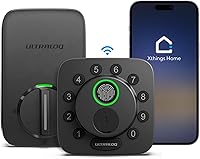
What Is a Smart Deadbolt?
A smart deadbolt is a door deadbolt with electronic controls for entry by code, app, fingerprint, or another supported method. Choose one by checking door fit, connection needs, and backup access.
On this page (9 sections)
- What is a smart deadbolt, and how does it work?
- Does a smart deadbolt replace the door handle?
- How should you choose a smart deadbolt?
- Which smart deadbolt suits your household?
- How do you set up a smart deadbolt correctly?
- What care and common mistakes should you plan for?
- Are smart deadbolts safe?
- Frequently asked questions
- What is a smart deadbolt best for, and which should you choose?
A smart deadbolt is a door deadbolt with electronic entry controls, such as a keypad, fingerprint reader, or app. It adds ways to operate the bolt without using a key every time.
The right choice depends on your door, who needs access, and whether you want remote control. Our guide to how smart locks work explains the wider category.
What is a smart deadbolt, and how does it work?
A smart deadbolt combines a deadbolt mechanism, electronic controls, and a motor. An approved code, fingerprint, or app command tells the motor to move the bolt.
The bolt extends into the door frame to hold the door shut. On models with a physical key, that key provides a mechanical way to operate the lock.
Smart features do not correct a sticking door. If you currently need to lift the handle or push hard to turn the deadbolt, fix the alignment before adding a motor.
What makes a smart deadbolt different from a keypad lock?
A smart deadbolt can add app management and connected features beyond code entry. A basic electronic keypad deadbolt may accept codes without offering remote control, alerts, or smart-home connections.
Compare the actual functions rather than relying on the word “smart.” Guest schedules, activity records, and remote commands are separate features, and their connection requirements can differ.
Does a smart deadbolt replace the door handle?
A separate smart deadbolt usually replaces the deadbolt hardware, leaving the handle or knob in place. You retract the bolt, then use the handle to open the door.
Check whether your entrance has separate hardware or a combined handle set. Our smart deadbolt or handle set guide explains those arrangements, while the smart lock compatibility guide covers fit checks.
Also consider a separate keyed knob below the deadbolt. If someone locks that knob, a working smart deadbolt still will not give them entry without the knob's key.
How should you choose a smart deadbolt?
Choose by door fit, everyday entry, connectivity, and backup access, in that order. Extra app features offer little value if the hardware does not fit or your household finds it awkward.
Start with these checks:
- Door measurements: Confirm thickness, backset, bore-hole size, and clearance against the exact model's instructions.
- Daily entry: Choose codes for shared access, fingerprints for touch entry, or compatible phone features for device-based entry.
- Guest management: Look for separate permanent, scheduled, or one-time codes if visitors need access.
- Power routine: Decide whether you prefer replacement batteries or a rechargeable pack.
- Fallback: Plan how you will enter if your phone is unavailable or the lock loses power.
Measure interior clearance too. The battery housing must clear nearby trim, glass, storm doors, and other hardware.
If you rent, get permission before replacing the deadbolt. Keep the original hardware together so it can be put back later.
Do you need Wi-Fi or a smart-home hub?
Choose remote access only if you will use it, and check what equipment it requires. A local code can be enough for daily entry; remote control helps when you need to admit someone while away.
Built-in Wi-Fi can connect a lock directly to your router. Matter over Thread uses a different setup and requires compatible controllers for the platforms you want to use.
Read our Wi-Fi smart lock guide for connected options and whether smart locks work without Wi-Fi for outage planning. Do not assume remote features will keep working when your home connection fails.
Which smart deadbolt suits your household?
Philips suits shared code access, Aqara suits equipped Apple households, and Tapo suits buyers who prefer rechargeable power. Their differences matter more than the number of entry methods.
Philips Wi-Fi Smart Deadbolt: for families and regular visitors
The Philips combines fingerprint, passcode, app, physical-key, and Alexa or Google Assistant access. Its built-in Wi-Fi needs a 2.4 GHz network, and Philips recommends keeping the router within 65 feet for better remote control.
Choose it if you need separate access for family, cleaners, or guests. It supports up to 100 custom passcodes, plus one-time or scheduled guest codes, alerts, and access history.
Its auto-lock timer runs from 10 to 180 seconds, but it has no door sensor. A timer cannot confirm that someone closed the door, so this is a poor match if door-open awareness is a priority.
Plan for AA alkaline LR6 batteries, which are not included. Check Away Mode before enabling it: Philips describes this mode as disabling every entry method except the master code.
Aqara U400: for compatible Apple homes
The Aqara U400 suits an Apple household that wants approach-based entry or home key tap access. It also offers fingerprints, touchscreen codes, app access, voice control, physical keys, and optional NFC cards sold separately.
UWB approach entry requires a Thread-enabled Apple Home hub. Compatible devices include iPhone 11 or later, excluding iPhone SE and iPhone 16e, with iOS 18.5 or later, or Apple Watch Series 6 or later, excluding SE, with watchOS 11.5 or later.
For Apple home key, Aqara specifies a HomePod mini, HomePod 2nd generation, or Apple TV 4K 2021/2022. Each additional smart-home platform needs its own Thread-enabled Matter controller.
Skip the U400 if you want a direct-to-router setup without controllers. Its removable rechargeable battery has a claimed life of up to 6 months, and its USB-C port supports charging while the lock remains in service.
Tapo DL110: for rechargeable power and guest schedules
The Tapo DL110 suits households that want a rechargeable battery and flexible guest access. It supports fingerprints, keypad codes, Wi-Fi, close-range Bluetooth, assistant control, and backup keys.
Resident profiles and permanent, one-time, or scheduled codes let you separate household access from visits. The fingerprint memory holds up to 100 prints, which can accommodate several household members and more than one finger per person.
Tapo claims up to 1 year between charges in Wi-Fi mode, based on 20 daily entries. Usage, settings, router conditions, and the environment affect that interval, so use the battery indicator rather than a fixed annual reminder.
Skip it if Apple home key or UWB approach entry drives your choice. The U400 provides those options with the required Apple equipment.
How do you set up a smart deadbolt correctly?
Install and configure it with the door open, then check operation before relying on it. Follow the model's instructions for cable routing, handing, calibration, and mounting screws.
First, confirm the existing bolt moves freely into the strike opening. Tighten hardware as directed, keeping cables clear of moving parts and avoiding pinched wires.
For the Philips, route the cable underneath the latch and seat the tailpiece in the latch slot. These details affect whether the mechanism can move correctly.
Add your administrator account, then create separate household credentials. Check each entry method from outside with another person inside or another secure way back in.
Set guest schedules carefully, including their start and end times. Our smart lock installation guide covers the broader process.
What care and common mistakes should you plan for?
Keep the bolt moving freely and the power supply ready. Check battery status regularly, respond to low-power alerts, and use the battery type or charger required by the manufacturer.
Wipe touch surfaces gently according to the care instructions. If fingerprint entry becomes unreliable, clean and dry your finger and the reader before changing settings.
Avoid these common mistakes:
- Sharing the administrator code: Give visitors their own limited access instead.
- Keeping every backup inside: Store a spare key securely where you can reach it.
- Choosing the shortest auto-lock delay: Allow enough time for groceries, children, and slow door closing.
- Trusting a timer as proof of closure: Confirm that the door is shut and the bolt has engaged.
- Ignoring old permissions: Remove guest codes and app access when they are no longer needed.
If you mainly want code entry, compare keypad and keyless locks. For touch entry, compare fingerprint locks.
Are smart deadbolts safe?
A smart deadbolt's security depends on the hardware, door frame, installation, and access settings. A long feature list does not replace a sound strike plate or careful credential management.
Tapo identifies the DL110 as BHMA Grade 2, while Aqara describes the U400 as BHMA-certified without specifying a grade here. Do not assume those descriptions mean the same grade.
Protect the linked account with a unique password and any available extra sign-in protection. Apply supported firmware updates and review shared access periodically.
Our guide to whether smart locks are safe explains the security trade-offs in more detail.
Frequently asked questions
Connection needs and backup entry vary by model. These answers separate the basic deadbolt function from optional connected features.
Does a smart deadbolt need Wi-Fi?
No, Wi-Fi is not required for every entry method. Codes, fingerprints, and physical keys can provide local access on models that support them, while remote app commands need a working connection.
Can a smart deadbolt still use a key?
Yes, all 3 examples here include physical-key access. Keep a spare secure and reachable, and make sure household members know where it is before they need it.
What is a smart deadbolt best for, and which should you choose?
A smart deadbolt is best for controlling access without handing out a key to everyone. Choose Philips for shared codes and direct Wi-Fi, Aqara U400 for compatible Apple entry features, or Tapo DL110 for rechargeable power and guest schedules.
Keep a regular deadbolt if keys already meet your needs and you do not want battery or account upkeep. Before ordering, match your choice to your door measurements and a workable backup plan.
Use our guide to choosing a smart lock for the next checks. If you are still comparing hardware types, start with the complete guide to smart locks and keyless entry.
Frequently asked questions
What is a smart deadbolt?
A smart deadbolt is a deadbolt with electronic controls that move the bolt after an approved entry command. Depending on the model, you can use a code, fingerprint, app, or compatible device.
It still needs a properly fitted door and strike plate to secure the entrance.
Does a smart deadbolt need Wi-Fi?
No, Wi-Fi is not required for every smart deadbolt or every entry method. Codes, fingerprints, and physical keys can provide local access on models that support them.
Remote app control needs a working connection, which may involve Wi-Fi or a compatible smart-home hub.
Is a smart deadbolt different from a smart lock?
A smart deadbolt is one type of smart lock, defined by its deadbolt mechanism. The wider smart-lock category also includes locks built into handles and other hardware.
Choose the format that matches your door, then compare entry methods, connection requirements, power needs, and backup access.
Can a smart deadbolt still use a key?
Yes, some smart deadbolts retain a physical key, including all three examples in this guide. Other designs use different backup methods, so check before buying.
Keep a spare key somewhere secure and reachable from outside your home, rather than leaving every backup behind the locked door.