5 Best Keypad Door Locks (October 2026)
The best keypad door locks include the TEEHO TE001 keypad deadbolt for everyday family access, the Philips Wi-Fi Keypad Deadbolt for scheduled guest visits, and the Yamiry keypad knob lock for replacing a knob.
On this page (9 sections)
- How we chose these keypad door locks
- Compare the best keypad door locks
- The best keypad door locks for different needs
- Which keypad lock features matter most?
- How to choose the right keypad door lock
- How should you set up a keypad door lock?
- How do you keep a keypad lock working well?
- Which keypad lock mistakes should you avoid?
- Which best keypad door lock fits your home?
The TEEHO TE001 keypad deadbolt is the best keypad door lock for households that want everyday code entry without an app. Philips is the stronger choice for scheduled visitors, while Yamiry and eufy offer different ways to combine code access with your door hardware.
Start with the door, then decide who needs access and when. Remote control helps if you manage visitors from work, but it adds little if everyone simply needs a reliable household code.
For a broader overview, start with our guide to smart locks and keyless entry. If remote access is essential, see our Wi-Fi smart lock guide.
Our picks at a glance
-
1
-
2
-
3

How we chose these keypad door locks
We prioritized useful code access and clear buyer fit, then compared remote features, backup entry and hardware requirements. A lock earns its place here by solving a specific access problem, rather than offering the longest feature list.
TEEHO leads because it covers the core job: letting household members and occasional guests enter with a code. Philips adds more control over visitor schedules, while the other choices address knob replacement, fingerprint entry or remote deadbolt control.
We also separated convenience from compatibility. A handle-style lock and a separate deadbolt serve different door layouts, so their features matter only after the hardware fits.
The order reflects those priorities. If your main need is managing access while away, Philips can be a better personal choice than the top-ranked TEEHO.
Compare the best keypad door locks
Compare entry methods, code options and power needs first. Then decide whether you need a separate deadbolt, a knob replacement or a set that includes a handle.
| Product | Best for | Entry | Codes | Power | Our score |
|---|---|---|---|---|---|
| TEEHO TE001 keypad deadbolt | everyday family access | Keypad and 2 backup keys | 20 user codes and one-time code | 4 AA batteries, not included | 8.9 |
| Philips Wi-Fi Keypad Deadbolt | scheduled guest visits | Keypad, fingerprint, app and key | Permanent, one-time, periodic and recurring | Standard 1.5V alkaline batteries, not included | 8.8 |
| Yamiry keypad knob lock | replacing a knob | Keypad knob and 2 keys | 20 user codes and one-time code | Confirm battery requirements before buying | 8.4 |
| eufy C33 | busy side entrances | Fingerprint, passcode and app | Up to 100 passcodes | 8 AA batteries | 7.5 |
| eufy C30 | remote door checks | Keypad, app, voice and physical key | Up to 100 passcodes | 4 AA batteries, not included | 7.2 |
Use the table to eliminate models that don't match your routine. A large code capacity won't help if you need recurring schedules, and fingerprint entry won't replace remote management when you're away from home.
The best keypad door locks for different needs
Choose TEEHO for straightforward household access, Philips for scheduled visitors, Yamiry for knob replacement, C33 for fingerprint entry at a handle, or C30 for a connected deadbolt. Each choice below includes a reason to buy and a reason to move on.
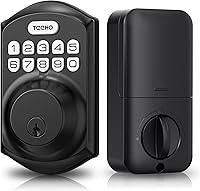
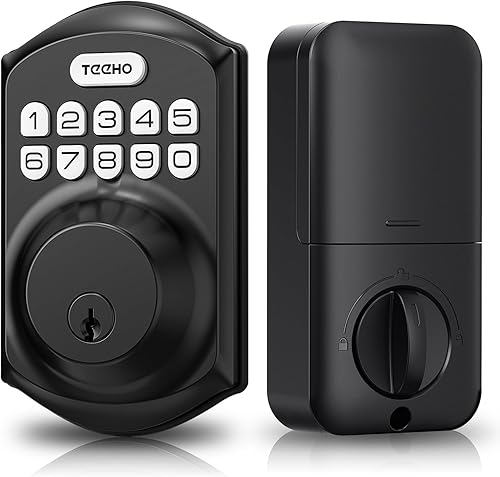
TEEHO TE001 keypad deadbolt
- 20 user codes
- One-time guest code
- Adjustable auto-lock
- 2 backup keys
Choose TEEHO for household codes and occasional guest visits without managing an app. It replaces a deadbolt, so you can keep a suitable existing handle.
Pros
- Separate codes for household members
- Guest code deletes after use
- Auto-lock can be disabled
Cons
- Requires a 2-1/8 in door hole
- No app or Wi-Fi control
TEEHO TE001: best keypad door lock for everyday code entry
The TEEHO TE001 suits a household that wants to stop passing around a shared key. Give regular users separate codes so you can remove one person's access without changing everyone else's routine.
Its one-time guest code is useful for a single visit from a neighbor or maintenance worker. Because that code disappears after use, it avoids leaving a forgotten guest credential active.
For daily departures, you can set auto-lock from 10 to 99 seconds or hold any keypad key for 2 seconds to lock. Auto-lock starts off, so enabling it is a setup choice rather than something to assume.
The main buying check is the door preparation: this model requires a 2-1/8 in bore hole and does not fit a 38 mm hole. Keep a backup key somewhere you can reach without entering the locked home.
Buy TEEHO if local code entry covers your needs and your existing handle can stay. Skip it if you need to change access remotely, review arrival history or schedule repeated visitor access through an app.
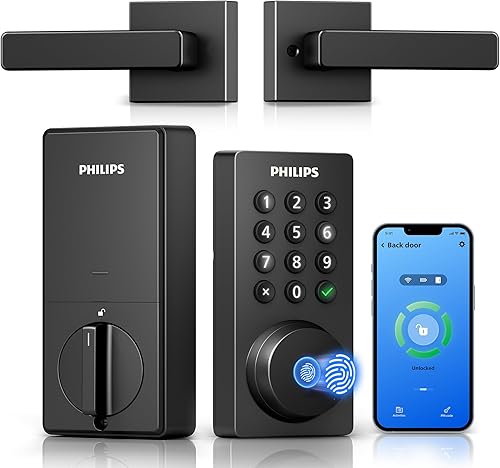
Philips Wi-Fi Keypad Deadbolt
- Built-in 2.4 GHz Wi-Fi
- Permanent, one-time, periodic and recurring PINs
- Fingerprint access
- Matching handle set included
Philips suits homes that need scheduled visitor access and remote code management. The matching handle set also makes sense when you're replacing both pieces of door hardware.
Pros
- Scheduled PIN options
- Remote status and access history
- Matching handle set included
Cons
- Needs a suitable 2.4 GHz Wi-Fi connection
- Auto-lock must be enabled during setup
Philips: choose it for visitors on a schedule
The Philips Wi-Fi Keypad Deadbolt is the most useful option here for a cleaner, caregiver or other visitor who comes on a regular schedule. Its permanent, one-time, periodic and recurring PINs offer more control than a single shared guest code.
The Philips Home Access app lets you manage access, check lock status and review entry history remotely. Fingerprint entry gives household members another way in, while the included matching handle set suits a broader hardware replacement.
Check your network before choosing it. Philips requires 2.4 GHz Wi-Fi and recommends placing the lock within 33 ft of the router, with walls, metal and other obstacles kept to a minimum.
During setup, enable auto-lock if you want it and choose a delay from 0 to 180 seconds. Use standard 1.5V alkaline batteries; Philips advises against rechargeable and high-power lithium batteries.
Buy Philips when scheduled access and a matching handle are both useful. Skip it if you want local keypad entry only, have weak Wi-Fi at the door or would rather keep your current handle hardware.
Yamiry keypad knob lock
- 20 user codes
- One-time guest code
- Adjustable auto-lock
- 2 backup keys
Yamiry suits buyers who want code entry built into a knob rather than a separate keypad deadbolt. Its adjustable timer can also be disabled when repeated passage is needed.
Pros
- Codes can be 4 to 8 digits long
- One-time guest access
- Backlit keypad
Cons
- Knob format does not replace a separate deadbolt
- Confirm door fit and battery requirements
Yamiry: choose it when the knob is the part you need
The Yamiry keypad knob lock makes sense when you want code entry in the knob position. It is a different hardware choice from adding an electronic deadbolt above an existing handle.
You can program 4- to 8-digit codes, assign separate access to regular users and create a one-time guest code. Its backlit keypad helps with evening entry, and physical keys provide another way through the door.
Set auto-lock from 5 to 99 seconds, or disable it when repeated passage is needed. That option can help during a move or a busy afternoon, provided someone remembers to restore the normal locking routine.
Confirm the door measurements and battery requirements before ordering. Plan around keypad and key entry; choose a model with clearly described app features if remote management is a requirement.
Buy Yamiry to replace a suitable knob with code access. Skip it if your goal is to replace a separate deadbolt, and don't treat a knob replacement as a reason to remove another lock your door needs.
eufy C33

- Fingerprint and passcode access
- Built-in Wi-Fi
- App access management and event history
- Integrated handle
The C33 suits a frequently used side or garage entrance where fingerprint entry at the handle would be useful. Built-in Wi-Fi adds remote access management and notifications.
Pros
- Fingerprint reader integrated with handle grip
- Remote app access and event history
- Works with left- and right-hand doors
Cons
- Uses 8 AA batteries
- No Apple HomeKit, IFTTT or Matter compatibility
eufy C33: choose it for a frequently used handle
The eufy C33 suits a side, garage or basement entrance where you reach for a handle throughout the day. Its fingerprint reader works with the handle grip, giving regular users an alternative to typing a code at each arrival.
Built-in Wi-Fi adds app access management, real-time notifications and event history. The C33 stores up to 50 fingerprints and 100 passcodes, which leaves room for separate credentials rather than a household sharing one identity.
Check fit carefully before choosing this format. It supports a 2-1/8 in bore hole and a 2-3/8 or 2-3/4 in backset; confirm door thickness and clearance as well.
The interior unit uses 8 AA batteries, so plan for a full replacement set. Both left- and right-hand doors are supported.
Buy the C33 when fingerprint entry at the handle fits your daily routine. Skip it if you only need a separate keypad deadbolt or require Apple HomeKit, IFTTT or Matter, since the C33 does not support those services.
eufy C30

- Built-in Wi-Fi, no hub required
- Physical keypad buttons
- Physical-key backup
- Customizable auto-lock countdown
Choose the C30 for remote control of a separate deadbolt while keeping a suitable existing handle. Physical buttons and key access give it a familiar daily routine.
Pros
- No hub required for Wi-Fi
- Physical buttons and backup key
- No monthly fee
Cons
- Does not fit a rounded latch hole
- No Apple HomeKit, IFTTT or Matter compatibility
eufy C30: choose it to manage a separate deadbolt remotely
The eufy C30 suits buyers who want a connected deadbolt while keeping a suitable existing handle. Its physical keypad buttons offer a familiar entry method, with app, voice and physical-key access alongside them.
Built-in Wi-Fi works without a separate hub, and there is no monthly fee. Choose it when checking or controlling the lock remotely matters more than having fingerprint entry.
The C30 runs on 4 AA batteries. Eufy claims up to 5 months of battery life, depending on use, so treat that figure as a planning estimate and respond to the low-battery alert.
Door preparation is the main restriction: the C30 does not fit a rounded latch hole. Eufy also directs buyers to use the supplied deadbolt during installation.
Buy it for remote deadbolt control with physical buttons and key backup. Skip it if you want an included handle set, fingerprint entry or Apple HomeKit, IFTTT or Matter support, which this model does not offer.
Which keypad lock features matter most?
Prioritize the right access rules and a workable backup plan over extra ways to open the door. The most useful feature is the one that solves a task your household faces regularly.
How many codes should a keypad door lock support?
Count the people who need individual access, then leave room for visitors. Separate codes make access easier to remove later, especially when a cleaner, sitter or former household member no longer needs entry.
Code capacity and scheduling solve different problems. A lock can hold many codes without giving you the recurring time windows that a regular visitor needs.
A one-time code is best for a single arrival. If a worker must leave to collect tools and return, plan their access before using a code that disappears after the first entry.
Should you choose a Wi-Fi keypad lock?
Choose Wi-Fi when you need remote control, access changes or status checks from outside the home. Local keypad entry is enough when everyone has a standing code and you rarely manage visitors.
Remote features depend on more than the lock itself. Router placement, internet access and app access all affect whether you can manage the door while away.
Read whether smart locks work without Wi-Fi if connection loss is a concern. Keep local entry and remote control as separate parts of your access plan.
Is a keypad deadbolt or knob better?
Choose the format that matches the hardware you need to replace. A deadbolt handles a different job from the knob or lever used to pull the door open.
A separate keypad deadbolt can leave a suitable handle in place. A knob or handle-style unit makes more sense when that part of the door also needs replacing.
Measure the full arrangement, including the space between existing holes and room for the interior battery housing. Our compatibility and setup guide covers more fit questions.
If replacing both parts is your goal, compare the layouts in our keyless entry locks with handles guide. A matching finish alone does not establish that the hardware fits.
How to choose the right keypad door lock
Choose a lock that fits your door and matches your access routine, then check its backup entry and upkeep needs. Work through those decisions before comparing small convenience features.
Measure the door before choosing features
Record door thickness, bore-hole diameter and backset, which is the distance from the door edge to the center of the hole. Compare those measurements with the exact model's requirements.
Also check the interior space around glass, trim and nearby hardware. A battery housing needs room even when the exterior keypad looks small enough.
For handle sets, check all mounting points rather than assuming the existing holes will work. Take photos and measurements before removing the old hardware so you have a clear reference.
Decide who needs access and for how long
Write down your actual users: household members, regular visitors and occasional guests. This separates a simple family-code requirement from a need for schedules and remote changes.
For a cleaner who arrives weekly, recurring access can save repeated code changes. For a neighbor making one visit, a single-use code may be all you need.
If you are still comparing keypad entry with other methods, see our best keyless entry door locks roundup. Fingerprints and apps should solve a daily need rather than add another setup task.
Choose backup entry before you need it
Make sure your backup can be reached from outside the locked home. A key in the kitchen drawer cannot help when the keypad batteries are empty and nobody is inside.
Consider every person who relies on the entrance. Someone without app access still needs a practical way in if their usual entry method is unavailable.
Keep the administrator code private and separate from visitor codes. Use the model's instructions to decide which functions that code controls before sharing access with anyone else.
Match weather exposure to the installation
Check the exact lock's outdoor limits and installation guidance against your entrance. Weather resistance does not make every part suitable for direct water exposure or every type of exterior door.
Pay attention to where rain collects and whether the interior housing will remain indoors. A covered porch and an exposed gate present different conditions.
For a wider checklist, our guide to choosing a smart lock connects door fit with access needs. Resolve any unclear measurement before ordering hardware.
How should you set up a keypad door lock?
Start with a door that closes freely, then follow the model's setup sequence with the door open. Add user access only after the latch or bolt moves correctly.
Fix alignment before adding electronics
Close the door gently and check whether the current bolt enters the strike without lifting, pulling or pushing the door. A keypad lock will not correct a sagging hinge or a poorly placed strike plate.
If you need force to operate the old lock, address that first. Otherwise, you may mistake a door problem for an electronic fault after installation.
Follow the handing and wiring steps
Keep any cable clear of screw paths and moving parts, and tighten mounting screws evenly. Stop if the mechanism begins to bind rather than forcing the screws tighter.
TEEHO calls for a reset before first use so the lock can detect door direction. Philips defaults to right-opening doors and calls for a reset when adapting it to a left-opening door.
Follow the instructions for your exact model rather than borrowing another lock's sequence. Our smart lock installation walkthrough explains the broader process.
Check entry before closing the door
With the door open, confirm that your new code works and the mechanism moves through its full travel. Where a physical key is supported, check that too.
Keep another way into the home available for the first closed-door check. Then confirm the door latches properly and the lock operates without pressure on the handle.
Set auto-lock for real household use
Choose a delay that allows people to bring in groceries, help a child or move through the entrance without rushing. An overly short timer can create repeated lock cycles during ordinary arrivals.
A timer is not proof that the door is shut. Unless your exact lock confirms door position, check the door itself rather than assuming a completed countdown means the entrance is secure.
How do you keep a keypad lock working well?
Keep battery replacement, code removal and door alignment in your regular home routine. These small tasks matter more than repeatedly changing optional app settings.
Replace batteries when the alert appears
Act on a low-battery warning instead of waiting for keypad entry to stop. Keep the correct replacements available, and follow the model's rules for battery chemistry and installation.
Replace batteries as a set when directed, rather than mixing old and new cells. Check the compartment for moisture or damaged contacts during replacement.
Cold weather, frequent use and repeated motor strain can affect battery demands. Use the lock's alerts and behavior to guide maintenance instead of relying only on a claimed lifespan.
Keep codes private and current
Avoid birthdays, street numbers and easy repeated digits. Give regular users their own code where possible, and remove access as soon as it is no longer needed.
If a code is shared beyond its intended users, change it. Anti-peeping features do not make a widely shared code private again.
Clean gently and watch for drag
Follow the care instructions and keep keypad surfaces free of dirt. Avoid spraying cleaner into openings or soaking the keypad and battery housing.
Check door movement again when seasons change or the latch begins to drag. If you suddenly need to pull the door tight to lock it, inspect alignment before repeatedly running the motor.
Which keypad lock mistakes should you avoid?
Avoid buying the wrong hardware format, overlooking backup entry and assuming settings are already active. Those mistakes can make an otherwise suitable lock inconvenient from the first day.
- Buying by appearance alone: Check dimensions and mounting requirements before choosing a finish or keypad shape.
- Sharing one code with everyone: Separate household and visitor access so one change does not disrupt every user.
- Choosing single-use access for repeated visits: Match the code type to how often the person needs to enter.
- Assuming auto-lock is enabled: Confirm the setting and delay during setup, then check the result with the door properly closed.
- Leaving the backup key indoors: Store a supported backup where an authorized person can reach it when needed.
- Expecting app status to explain everything: A locked mechanism and a fully closed door are separate things unless door position is specifically confirmed.
- Ignoring a stiff door: Correct rubbing, sagging or strike misalignment instead of asking the motor to overcome it.
Which best keypad door lock fits your home?
The best keypad door lock is the one that fits your entrance and access rules. Choose TEEHO for everyday local codes, or Philips when a visitor schedule and remote management justify a connected lock.
Pick Yamiry when you're replacing a suitable knob. Choose the eufy C33 for fingerprint entry at a frequently used handle, or the C30 when you want remote control of a separate deadbolt with physical buttons.
Before ordering, confirm the measurements and decide where backup entry will come from. If managing the door from away is your deciding factor, continue with our Wi-Fi smart lock guide.
Our top 3 picks at a glance
-
1
-
2
-
3
Frequently asked questions
What is the best keypad door lock for most homes?
The TEEHO TE001 keypad deadbolt is the best choice here for households that want local code entry without an app. Choose Philips instead when scheduled guest access and remote management matter more, and check the door measurements before buying either model.
Do keypad door locks need Wi-Fi?
No, a keypad lock can accept codes without Wi-Fi, as the TEEHO TE001 does. Wi-Fi is useful for remote app control and status checks, but it is separate from battery power.
Our guide to keypad lock batteries explains how to plan for that maintenance.
Can a keypad door lock work during a power outage?
Battery-powered keypad entry can keep working during a home power outage while the lock's batteries have power. Remote features may become unavailable if the router or internet connection goes down.
Keep a supported backup entry method available, and replace weak batteries before they run out.
What should I check before installing a keypad lock?
Check door thickness, bore hole, backset and hardware clearance before installation. Also make sure the door closes and the existing bolt moves freely without lifting or pushing the door.
Our smart lock installation guide explains the basic checks before you remove your current hardware.