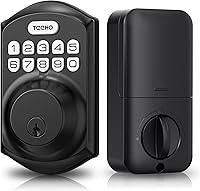
5 Best Keyless Entry Door Lock With Handle (October 2026)
The best keyless entry door locks with handles include the Philips Wi-Fi Keypad Deadbolt for connected households, the Veise KS01B keypad lock for offline family entry, and the Schlage keypad lever lock for knob replacements.
On this page (9 sections)
- How we chose keyless entry door locks with handles
- Compare the best keyless entry door locks with handles
- Which keyless entry door lock with handle fits your routine?
- What should you measure before buying a lock and handle set?
- Which entry methods will your household actually use?
- How should you set up a keyless lock with a handle?
- How do you care for the keypad, handle, and batteries?
- Which mistakes cause the most trouble with keyless handle sets?
- Which best keyless entry door lock with handle should you buy?
The Philips Wi-Fi Keypad Deadbolt is the best keyless entry door lock with handle for households that want remote control and fingerprint entry in a matching set. Choose Veise KS01B for offline family access, or Schlage when you need to replace a knob or lever.
The first decision is the hardware layout. A separate deadbolt with matching handles serves a different job from a keypad built into a lever, even though both let you enter without carrying a key.
If you are comparing those arrangements, read smart deadbolt or handle set: what should you buy?. Our best keyless entry door locks and best keypad door locks guides cover more choices when a matching handle isn't essential.
Our picks at a glance
-
1
-
2
-
3
How we chose keyless entry door locks with handles
We compared door fit, included hardware, entry methods, and access management to identify which household each set suits. A feature earns its place when it solves an entry problem, such as admitting a visitor while you're away.
Offline locks make sense for families who only need codes at the door. Connected sets suit people who need to change access, check status, or operate the lock from elsewhere.
We also separated integrated keypad handles from deadbolt-and-handle sets. The highest-scoring option is still the wrong buy if its mounting pattern doesn't match your door.
Compare the best keyless entry door locks with handles
Choose Philips for connected household access, KS01B for offline codes, and Schlage for a knob or lever replacement. VE06-H suits changing guest access, while KS04 fits rooms that alternate between restricted entry and free passage.
| Product | Best for | Connectivity | Access | Hardware | Our score |
|---|---|---|---|---|---|
| Philips Wi-Fi Keypad Deadbolt | connected households | Built-in 2.4GHz Wi-Fi; Bluetooth | Fingerprint, PIN, app, mechanical key | Deadbolt with matching handle set | 8.8 |
| Veise KS01B keypad lock | offline family entry | Nonconnected | Keypad and mechanical key | Deadbolt with two lever handles | 8.3 |
| Schlage keypad lever lock | knob replacements | Standalone keypad operation | Keypad; interior lever for exit | Keypad lever replacing a knob or lever | 8.0 |
| Veise VE06-H Wi-Fi | frequent guest turnover | Bluetooth; Wi-Fi through separate G2 gateway | App, code, fob, mechanical key, thumb turn | Deadbolt with matching handle set | 8.0 |
| Veise KS04 keypad lock | shared home offices | Nonconnected | Keypad, mechanical key, interior thumb turn | Keypad lock with handle | 7.2 |
Treat connectivity and hardware format as separate decisions. A phone app cannot solve a hole-spacing mismatch, and a matching finish won't provide remote access.
Which keyless entry door lock with handle fits your routine?
The right pick matches both your door and the way people enter. Use the recommendations below to narrow the field before measuring for the final choice.
Philips: best keyless entry door lock with handle for connected homes
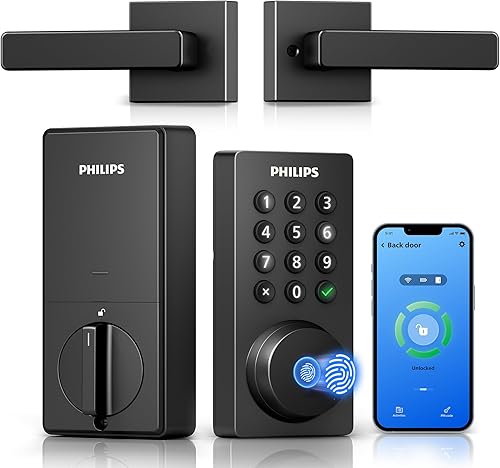
Philips Wi-Fi Keypad Deadbolt
- Built-in 2.4GHz Wi-Fi without a hub
- Fingerprint, PIN, app, and mechanical key access
- Matching handle set included
- Permanent and temporary PIN options
Choose Philips for remote door control and different entry methods for family and visitors. Its built-in Wi-Fi avoids a separate gateway.
Pros
- Remote control without a separate hub
- Fingerprint access alongside codes and keys
- Flexible guest access schedules
Cons
- Needs a suitable 2.4GHz connection near the door
- Auto-lock must be enabled during setup
- Batteries are not included
Choose Philips if household members want different entry methods and you need to manage visitors from away. Fingerprints suit daily entry, while permanent, one-time, periodic, and recurring PINs let you separate family access from visits.
Its built-in 2.4GHz Wi-Fi needs no hub, and the Philips Home Access app handles remote door control, access history, and user management. Alexa and Google Assistant support locking and status checks.
Network placement matters here: Philips calls for the lock to stay within 33 ft of the router, with walls, metal, and interference kept to a minimum. Check coverage at the closed front door before choosing this set.
Auto-lock is adjustable from 0 to 180 seconds, but it starts off by default. Set a delay that gives everyone time to enter, rather than choosing the shortest interval automatically.
Philips gives conflicting inch and metric door-thickness ranges, so resolve compatibility before ordering. Its stated inch range is 1-3/8 to 1-3/4 in, and left-opening doors require the direction reset described in its instructions.
Skip Philips if nobody needs fingerprints or remote control, or if a reliable connection at the door is unlikely. The KS01B removes the network setup while keeping household and guest codes.
Veise KS01B: an offline set for family codes
Veise KS01B keypad lock
- Deadbolt with two lever handles
- 20 permanent user codes plus a master code
- One-time guest passwords
- Passage and silent modes
The KS01B suits families that want individual codes and matching levers without phone-based management. One-time passwords cover occasional visitors.
Pros
- Separate codes for household members
- One-time access without sharing a permanent code
- No app or network setup
Cons
- Cannot manage entry remotely
- Batteries are not included
Choose KS01B when you want a separate keypad deadbolt and two matching lever handles without another app to manage. It provides a master code, 20 permanent user codes, one-time guest passwords, and 2 backup keys.
Individual codes let you remove someone's access without changing the code for everyone else. A one-time password is useful for a single visit, but a regular cleaner or relative needs an ongoing code you manage yourself.
The auto-lock delay runs from 10 to 99 seconds, and holding any exterior key for 2 seconds locks the door. Passage mode suits loading and unloading, while silent mode mutes keypad beeps but keeps battery and security alerts audible.
Random digits can go before or after the real code to help hide it from onlookers. After 10 failed attempts, the keypad stops accepting entries for 3 minutes, so teach children the correct sequence before relying on it.
The KS01B fits left- and right-handed doors from 1-3/8 to 2 in thick. It uses 4 AA/LR6 alkaline batteries, which aren't included.
Skip it if you need to let someone in from work or check access records on your phone. Its appeal is local code entry, so it won't replace a connected lock's management features.
Schlage: keypad entry in place of a knob or lever
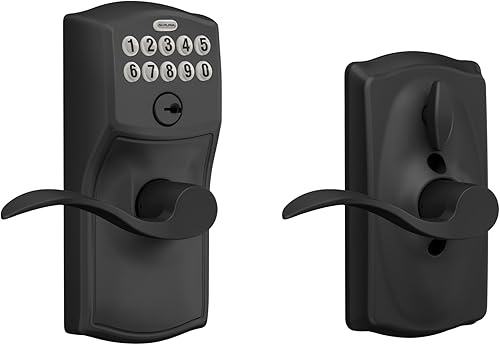
Schlage keypad lever lock
- Integrated keypad lever
- Up to 19 user codes
- Interior Flex-Lock mode switch
- Included 9V battery
Schlage fits a different job from the separate deadbolt sets: adding keypad entry where a knob or lever already sits. Its interior switch controls whether the outside stays open or automatically re-locks.
Pros
- Direct knob or lever replacement format
- Physical switch for changing entry mode
- No hardwiring required
Cons
- Does not replace a separate deadbolt
- Not a choice for remote phone control
Choose Schlage when the job is replacing an existing knob or lever, rather than buying a separate deadbolt and handle set. If your door already has a deadbolt above the handle, plan how you'll use both locks.
The keypad supports up to 19 codes and comes with 2 pre-programmed codes for initial setup. Its silicone-coated numbers illuminate when pressed, helping you find the buttons after dark.
The interior Flex-Lock switch changes between keeping the outside open and automatic re-locking. This physical switch suits a door that needs free entry during part of the day and code-controlled entry afterward.
Turning the interior lever lets you exit. Show everyone how the mode switch works so a change made for deliveries or visitors doesn't leave the entrance open longer than intended.
Schlage includes a 9V battery and a low-battery indicator, and says typical battery life can reach 2 years. Schlage also specifies a Grade 2/AAA rating for this model.
Skip it if you want a matching deadbolt-and-handle package or remote phone control. Also remember that adding keypad access to the lever won't remove the need for a key if you keep a separate keyed deadbolt engaged.
Veise VE06-H: scheduled access and fobs for changing users
Veise VE06-H Wi-Fi

- App, code, fob, key, and interior thumb turn
- 250+ user codes with scheduling options
- Remote control requires a separate G2 gateway
- Three correctly spaced door holes required
The VE06-H suits entries with changing users who need scheduled codes or fobs. Allow for the separate gateway if management from away matters.
Pros
- Fobs offer an alternative to codes and phones
- Multiple guest code schedules
- App and web management options
Cons
- Remote Wi-Fi features require the separate G2 gateway
- Three-hole layout needs careful measurement
Choose VE06-H when you manage changing visitors and want fobs as well as codes. Its included 2 fobs offer entry without a phone or a memorized PIN.
The lock supports 250+ user codes, including permanent, one-time, scheduled, and recurring access. That range suits guest stays or regular service visits better than giving every visitor the household's main code.
Nearby app access uses Bluetooth. Remote Wi-Fi control, real-time notifications, and Alexa or Google Home integration require the separate Veise G2 gateway, despite Wi-Fi appearing in this pick's display name.
Code changes and changes to valid times also need you within range or connected through that gateway. Decide how you'll handle an early arrival or extended visit before relying on remote code management.
Fit needs extra attention: VE06-H requires 3 correctly spaced pre-drilled holes and doors from 1-3/8 to 2 in thick. Compare the full mounting diagram with your door, including the lower handle attachment.
Pair it in the app before changing the master password through the keypad. Skip this set if you want fewer setup parts or don't need its larger access-management toolkit; Philips is the more direct route to built-in Wi-Fi.
Veise KS04: code-controlled rooms with open-access periods
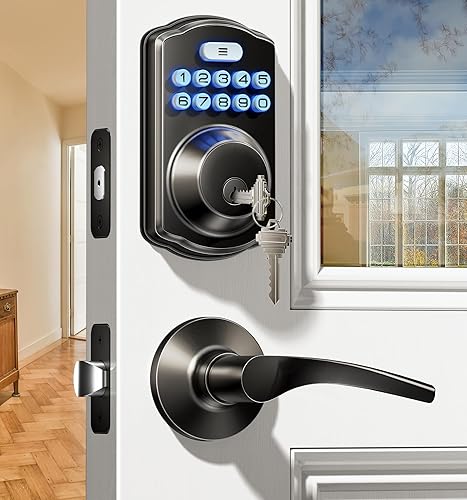
Veise KS04 keypad lock

- Integrated keypad lock with handle
- User codes and one-time codes
- Passage mode for continuous access
- Silent mode and backlit keypad
The KS04 suits a shared office or room where you alternate between code-controlled entry and free passage. Its satin nickel finish also offers an alternative to the black sets here.
Pros
- Passage mode for busy access periods
- Quiet keypad operation
- One-time codes for temporary visitors
Cons
- No app or remote management
- Batteries are not included
Choose KS04 for a shared home office or similar door where you want code entry at some times and free passage at others. Its integrated handle format and satin nickel finish distinguish it from the separate black deadbolt sets here.
The keypad provides user codes and one-time codes, with an interior thumb turn and 2 backup keys. It stays nonconnected, so access changes happen at the lock rather than through remote phone management.
To use passage mode, disable auto-lock and set the interior thumb turn as directed. This works for a room shared during the day, provided someone takes responsibility for restoring restricted entry afterward.
Silent mode quiets keypad operation, and the backlight helps with late arrivals. Auto-lock offers a 10 to 99 second delay, while holding any exterior key for 2 seconds locks the door.
KS04 fits left- and right-handed doors from 1-3/8 to 2 in thick with a 2-1/8 in bore. Its 4 AA/LR6 alkaline batteries aren't included.
Skip it if you need remote oversight or a separate deadbolt-and-handle package. Passage mode is useful, but it isn't unique to this pick; choose KS04 for its overall format and finish.
What should you measure before buying a lock and handle set?
Measure thickness, backset, bore size, and mounting-hole spacing before choosing the electronics. Take photos of both sides of the door and compare your measurements with the exact model's installation diagram.
Check the holes beneath the old hardware
The bore is the large hole through the door, while the backset is the distance from the door edge to its center. Separate deadbolt-and-handle arrangements also need the correct spacing between their mounting points.
Long exterior handles can have a lower attachment point that a lever doesn't need. Check whether the new hardware reuses that hole and covers the old finish marks, rather than assuming a complete set fits every prepared door.
Don't assume the supplied handle replaces every existing part. Compare the latch, strike, interior trim, and exterior mounting pattern before removing anything.
Check clearance and door movement
Make sure the interior housing clears nearby trim and that the handle can move without hitting a wall, storm door, or screen door. Confirm the opening direction using the manufacturer's diagram rather than guessing from the words left and right.
Close the door and operate the current lock without lifting, pulling, or pushing the door into place. A new motorized lock won't correct a sagging hinge or a misaligned strike.
A tight bolt can add strain and make automatic operation unreliable. Correct the door alignment first, then use how to install a smart lock yourself to plan the replacement.
Which entry methods will your household actually use?
Choose the simplest access mix that covers daily entry and occasional visitors. Extra entry methods help only when someone will use them and maintain the access settings.
Codes, fingerprints, and fobs solve different problems
Codes let a visitor enter without receiving a physical item. Give each regular user a separate code so you can remove one person's access without disrupting everyone else.
Fingerprints reduce code entry for daily users, but keep another authorized method ready if a finger isn't read. Fobs avoid memorized numbers, though they still need to be carried and accounted for like keys.
For children or older relatives, consider reach, button size, and the ability to read the keypad at night. Explain the entry sequence before making the new lock the only familiar way in.
Match guest access to the visit
Use one-time access for a single entry and scheduled access for a defined visit. Recurring access suits a regular time slot, while permanent codes belong with people who need ongoing entry.
Avoid sharing the master code with guests or service workers. Keep it for administration, and remove user access when a visit, job, or tenancy ends.
Decide what must work while you're away
Remote status checks and remote door control are different from local keypad entry. Ask whether you need to admit someone from elsewhere, change access times, or simply stop carrying a key.
A connected set adds app-account and network upkeep. If all access decisions happen at home, a standalone keypad can meet the need with fewer setup steps.
Our guide to whether smart locks work without Wi-Fi explains which functions depend on a connection. For a closer look at network access and account protection, read are smart locks safe?.
How should you set up a keyless lock with a handle?
Start with smooth mechanical operation, then add codes, app settings, and automatic locking. Keep an alternate entrance available until the setup is complete.
- Check the supplied instructions against your door. Confirm the latch position, opening direction, and mounting holes before attaching the exterior assembly.
- Route cables carefully. Keep wires clear of screw paths and moving parts, and tighten the hardware evenly without forcing the housings together.
- Check operation with the door open. Confirm that the interior control and each entry method work before closing the door.
- Check operation with the door closed. The latch or bolt should move without you pressing against the door or lifting the handle.
- Replace initial credentials. Set a private master code, create household access, and secure the app account if the model uses one.
- Set automatic locking last. Choose a delay, check its behavior, and show every household member how passage or privacy modes change entry.
Don't leave backup keys inside the only door they open. Keep an accessible spare with a trusted person or in another secure location that doesn't depend on the lock.
For app-based locks, check access using the connection you plan to rely on. A nearby Bluetooth connection doesn't prove that remote control works when you're away.
How do you care for the keypad, handle, and batteries?
Use gentle cleaning, prompt battery replacement, and regular alignment checks to keep entry dependable. Follow the model's care instructions instead of spraying cleaners into the keypad, keyhole, or interior housing.
Wipe the handle and keypad with a soft cloth, and avoid flooding the electronics. If someone has dirty or damp hands, clean and dry the contact area before trying fingerprint entry again.
Respond to the first low-battery alert rather than waiting for the lock to stop operating. Keep the correct replacement batteries ready, and change the set together according to the instructions.
Philips specifies standard 1.5V alkaline batteries and excludes rechargeable and high-power lithium batteries. Philips claims up to 6 months of battery life; actual replacement timing depends on use, so the alert matters more than the calendar.
Don't treat a longer battery-life claim as a reason to skip checks. Our guide to whether keypad door locks need batteries explains the power needs behind electronic entry.
Recheck alignment if the door begins to drag, requires pressure to latch, or changes with the seasons. Handle loose trim promptly using the manufacturer's tightening guidance, without overtightening mounting screws.
Which mistakes cause the most trouble with keyless handle sets?
The biggest mistakes are buying the wrong hardware format and confusing lock status with a closed door. Prevent those first, then review the access settings that affect everyday use.
- Assuming every handle set uses the same holes. Match the mounting diagram, including any lower handle attachment, before choosing.
- Leaving a separate deadbolt out of the plan. A keypad lever doesn't make the whole door keyless if another engaged lock still needs a key.
- Choosing an auto-lock delay that's too short. Allow time for children, bags, and slower entry, then check how the household uses it.
- Treating a timer as a door sensor. An extended bolt doesn't prove the door is shut or secured to the frame.
- Leaving passage mode active. Assign someone to restore controlled entry after a party, move, or workday.
- Giving everyone the same code. Separate access makes removing a former user's permission much easier.
- Ignoring the door frame. The lock, strike, hinges, and surrounding wood all contribute to the entrance; new electronics can't repair damaged mounting points.
Which best keyless entry door lock with handle should you buy?
Choose the Philips Wi-Fi Keypad Deadbolt if your priority is remote management and fingerprint entry without a separate gateway. Choose Veise KS01B if family codes and matching levers cover your needs.
Pick Schlage for a knob or lever replacement, especially when a physical switch for entry mode suits the routine. Keep any separate deadbolt in your access plan.
Choose Veise VE06-H Wi-Fi for changing guest schedules and fobs, with the G2 gateway included in your plan for remote features. Choose Veise KS04 for an integrated satin nickel keypad handle on a door that alternates between restricted and open access.
The best keyless entry door lock with handle is the one that fits your existing door and supports the way people enter each day. If none matches your hardware layout, use our keyless entry door lock guide to compare other formats before committing to door changes.
Our top 3 picks at a glance
-
1
-
2
-
3
Frequently asked questions
What is the best keyless entry door lock with handle?
The Philips Wi-Fi Keypad Deadbolt is the best choice here for households wanting remote control, fingerprints, and a matching handle set. Veise KS01B is a better fit for offline family entry, while Schlage suits knob or lever replacements.
Start with your door layout, then choose the access methods you need.
Do keyless entry locks come with the handle?
Some include matching handles, while others combine the keypad and lever in one assembly. Philips, Veise KS01B, and VE06-H include separate handle hardware; Schlage and KS04 use an integrated handle format.
Match the arrangement to your existing holes and check which interior and exterior parts you need.
Can a keyless door lock work without Wi-Fi?
Yes, standalone keypad locks work without a home network. Connected locks can also offer local entry methods that do not depend on remote app access.
Our guide to whether smart locks work without Wi-Fi explains the distinction, so you can plan for internet outages without confusing them with dead batteries.
What should I measure before buying a door lock with handle?
Measure door thickness, backset, bore diameter, and spacing between existing holes. Also check clearance around trim and the handle's mounting points.
Match those measurements to the exact model's installation diagram; a compatible thickness alone does not confirm that a complete handle set will cover or reuse your existing holes.
Does auto-lock mean the door is closed?
No, a timer-based auto-lock setting does not by itself confirm that the door is shut. A bolt can extend while the door is open unless the system has a separate way to detect closure.
Check the door physically during setup and do not treat a locked status as proof of closure.